14
SEL-735 Quick-Start Guide Date Code 20131015
Security and Passwords
VI. Security and Passwords
A. Security
The SEL-735 supports four access levels to prevent unauthorized entry. Table 3 describes the default
passwords and the capabilities of each access level. The user must enter the ACC Access Level before
entering the EAC or 2AC Access Levels.
D. Test Mode
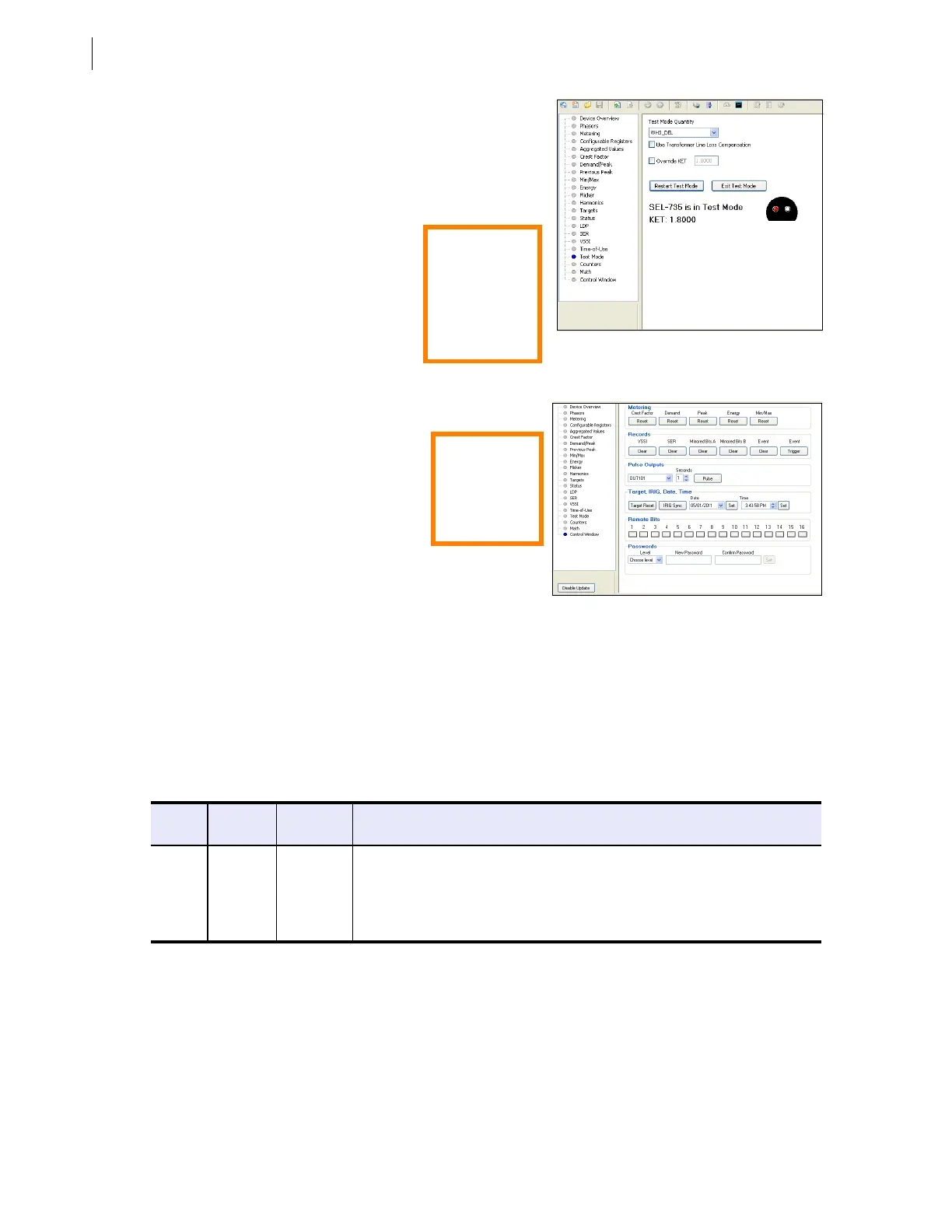
The ACSELERATOR QuickSet HMI allows simple test mode
interaction and eliminates the need to navigate through the
front panel to enable test mode. While in test mode, the
SEL-735 stops collecting LDP and Demand data and places
an asterisk next to records in the LDP report.
To place the meter into test mode, select
a Test Mode Quantity from the drop
down box and click Enter Test Mode.
The test mode window depicts an optical
port that pulses a red test pulse in
conjunction with the actual front optical
port. Click Exit Test Mode at the end of
an accuracy test to restore normal meter
operation.
Figure 24 Test Mode
E. Control Window
The control window provides an interface
to set the date and time, reset data, and test
output contacts. For example, to set the
time, click Set next to the Time edit box to
update the time in the meter.
ACSELERATOR QuickSet prompts for a
2AC password before it will control the
meter or reset data. See Section VI. Security and
Passwords for additional information.
Figure 25 Control Window
Table 3 Default Passwords and Access Levels
Access
Level
Terminal
Prompt
Default
Password
Capability
0AC = NA Entry access level
ACC => OTTER View configuration settings and meter data
EAC E=> BLONDEL Reset demands and perform all ACC commands
2AC =>> TAIL Change configuration settings, reset all data, and perform all EAC and 2AC commands
Quick Tip:
The QuickSet
HMI supports
all rear-panel
communications
ports when in
test mode.
Quick Tip:
To rese t t h e
Peak Demand,
click the Reset
button under
Peak.


 To Next Page