8
SEL-735 Quick-Start Guide Date Code 20131015
ACSELERATOR QuickSet SEL-5030 Software
E. Commonly Used Configuration Settings
This section outlines commonly used meter configuration settings, including: Meter and Terminal Identifier,
Current and Potential Transformer Ratios, Demand Metering, KYZ Pulse, Daylight Savings Time, Load
Profile, Front-Panel Display, and Communications.
1. General Settings
The General settings include the Meter Identifier (MID), Terminal Identifier (TID), and Current and
Potential Transformer Ratios (CTR and PTR).
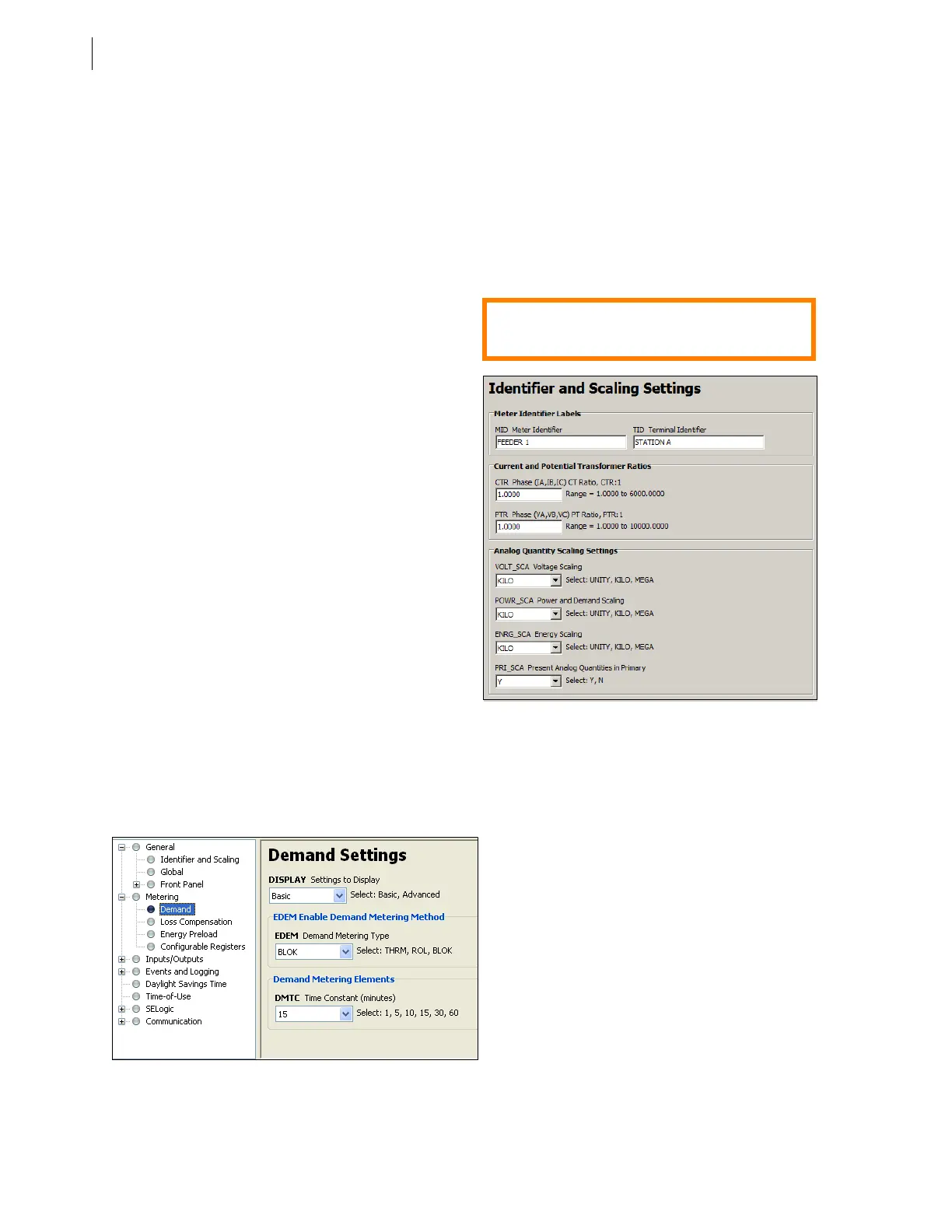
To access General settings, expand General > Identifier and Scaling from the
ACSELERATOR QuickSet
settings editor tree.
a. MID and TID Settings
Meter reports include the MID and
TID for easy meter identification.
These configuration settings help
uniquely identify each meter within
asystem.
Figure 11 MID, TID, CTR, and PTR Settings
b. Current and Potential Transformer
Ratios
You can configure the meter to scale
the following reports to report in
primary units:
–Meter Reports (MET)
–Human Machine Interface (HMI)
–Load Profile (LDP)
–Display Points (DP)
–Distributed Network Protocol (DNP)
–Modbus
®
–CTR and PTR settings
–Front-Panel LCD
SEL
OGIC
®
control equations are secondary
quantities and are unaffected by CTR and PTR values.
To set the CT and PT ratios, choose General > Identifier and Scaling from the
ACSELERATOR
QuickSet settings editor tree. Note that the CTR and PTR values are net ratios. For example, a 1200:5 CT
ratio equates to a CTR setting of 240.
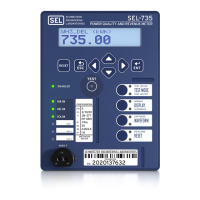
Figure 12 Demand Metering
2. Demand Metering
The SEL-735 supports Thermal, Rolling, and
Block demand types with intervals of 1, 5, 10, 15,
30, and 60 minutes.
To configure demand metering, choose Metering
> Demand from the
ACSELERATOR QuickSet
settings editor tree.
Quick Tip:
The MID setting must match the MV-90
®
Master File
Device ID setting.


 To Next Page