9
Date Code 20131015 SEL-735 Quick-Start Guide
ACSELERATOR QuickSet SEL-5030 Software
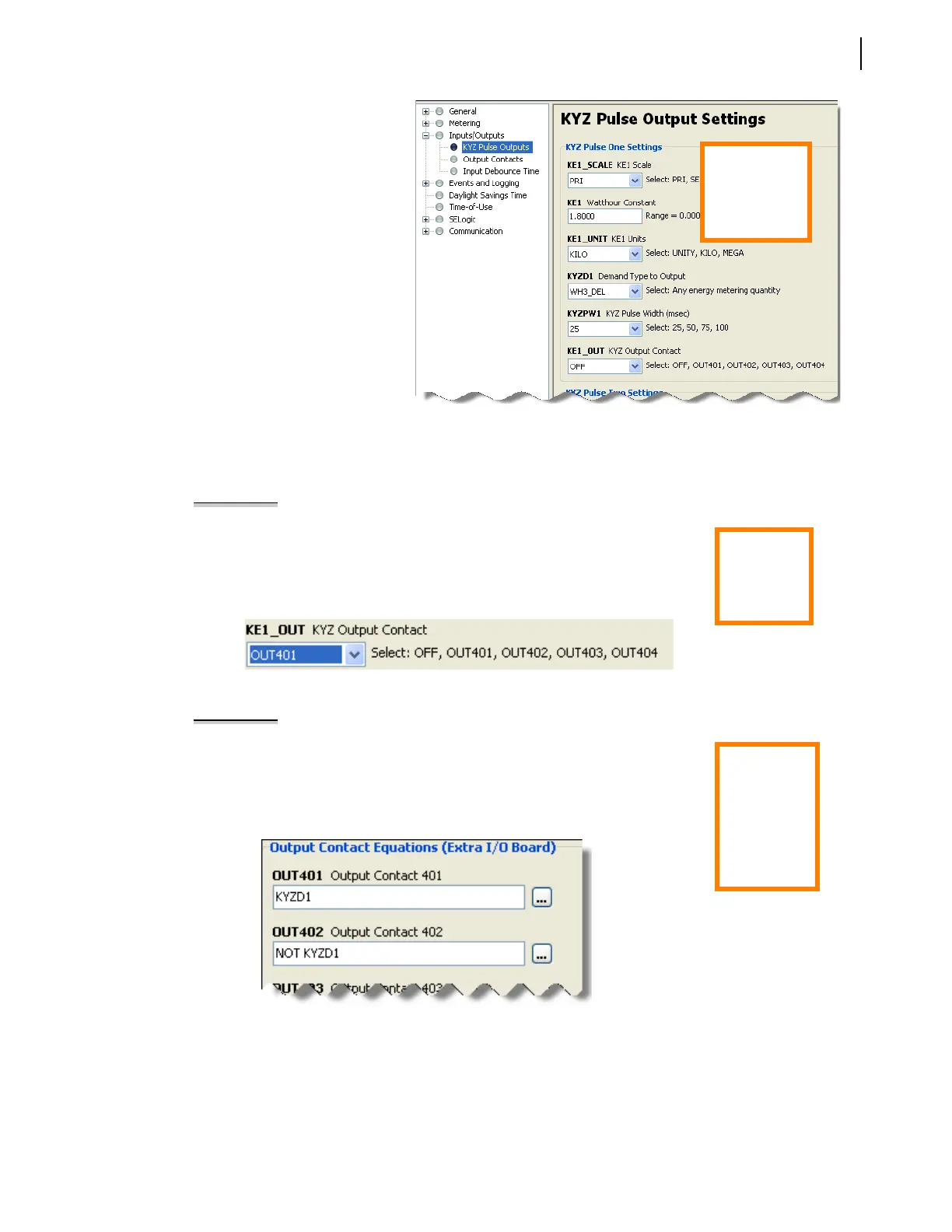
3. KYZ Pulse Settings
The KYZ Pulse Settings define the
KYZ pulse weight. Figure 13
depicts the KYZ settings that
configure 1.8 kWh/pulse.
4. Map KYZ Pulse Settings
Before the KYZ outputs will
operate, the user must configure
the meter to map the KYZ pulses
to a form A KY output contact as
shown in Example 1 or a form C
KYZ output contact as shown in
Example 2. The SEL-735 supports
four Form A outputs or two
Form C outputs. Please verify that
the meter contains solid-state
output contacts prior to
configuring KYZ outputs.
Figure 13 KYZ Pulse Settings
Electro-mechanical contact outputs are only rated for 10,000 closures. With default KYZ configuration
settings and 5 A and 120 V applied, 10,000 closures occur in just 30 hours.
EXAMPLE 1 Map a Form A KY Pulse Setting to OUT401
Step 1: Select Inputs/Outputs > KYZ Pulse Outputs from the
ACSELERATOR QuickSet
settings editor tree.
Step 2: Set KE1_OUT to OUT401.
ACSELERATOR QuickSet automatically maps the
KYZ pulses to OUT401.
Step 3: If necessary, repeat steps 1 and 2 to add an additional KY output.
Figure 14 Output Contact 401 Equation
EXAMPLE 2 Map a Form C KYZ Pulse Setting to OUT401/OUT402
Step 1: Select Inputs/Outputs > Output Contacts from the
ACSELERATOR QuickSet
settings editor tree.
Step 2: Type KYZD1 in the OUT 401 Output Contact 401 equation box.
Step 3: Type NOT KYZD1 in the OUT 402 Output Contact 402 equation box.
Step 4. If necessary, repeat steps 1–3 to add an additional KYZ output.
Figure 15 Output Contact 401/402 Equations
Quick Tip:
The KE1 Units
setting KILO is
equivalent to
kilowatt-hours.
Quick Tip:
KYZ pulses
require solid-
state output
contacts.
Quick Tip:
If the number
of KYZ outputs
is half the
expected
value, divide
the KE1 setting
by two.


 To Next Page