10
SEL-735 Quick-Start Guide Date Code 20131015
ACSELERATOR QuickSet SEL-5030 Software
5. Date and Time Configuration Settings
a. Set the Date and Time
The SEL-735 internal time clock is accurate to 5 seconds per month at
room temperature and accurate to 30 seconds per month at temperature
ranges from –40°C to +85°C. Use one of the methods listed below to
improve time-clock drift.
–Configure MV-90 to set the clock during every read.
–Connect an SEL communications processor to the SEL-735.
–Set the time periodically using the DNP or Modbus protocol.
–Set the time with
ACSELERATOR QuickSet.
–Connect an IRIG-B time-code input to the SEL-735.
b. Daylight-Saving Time (DST)
By default, the meter ships with the 2007 United States DST calendar.
The meter begins DST on the second Sunday in March at 2:00 a.m. and
ends DST on the first Sunday in November at 2:00 a.m.
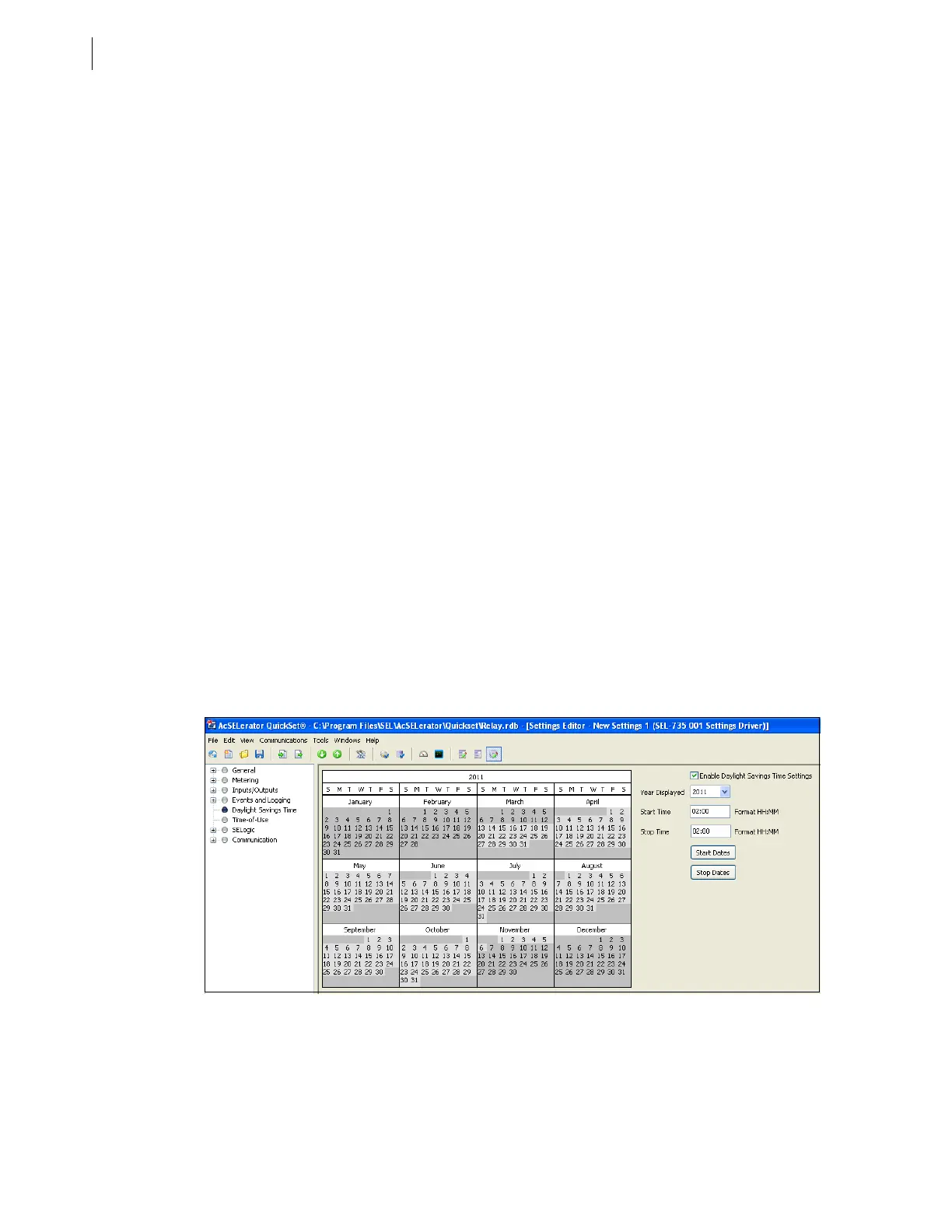
To enable DST, choose Daylight Savings Time from the
ACSELERATOR QuickSet settings editor tree and select Enable
Daylight Savings Time Settings. Enter or accept the default Start
Time and Stop Time, then click Start Dates and Stop Dates to select
the present DST schedule.
If the meter is connected to an external time source, disable the DST
setting in the SEL-735 to avoid time-source conflicts.
c. Time Configuration Settings With MV-90
If using the Auto Timeset option as an MV-90 Master File setting:
–Disable the Enable Daylight Savings option in the SEL-735.
–Do not connect an external time source. This keeps the meter clock
synchronized with the PC clock and MV-90.
Figure 16 Daylight-Saving Time Settings


 To Next Page