7
Date Code 20131015 SEL-735 Quick-Start Guide
ACSELERATOR QuickSet SEL-5030 Software
2. Read Configuration Settings From the Meter Into ACSELERATOR QuickSet
Before editing configuration settings, ACSELERATOR QuickSet must read them from the SEL-735.
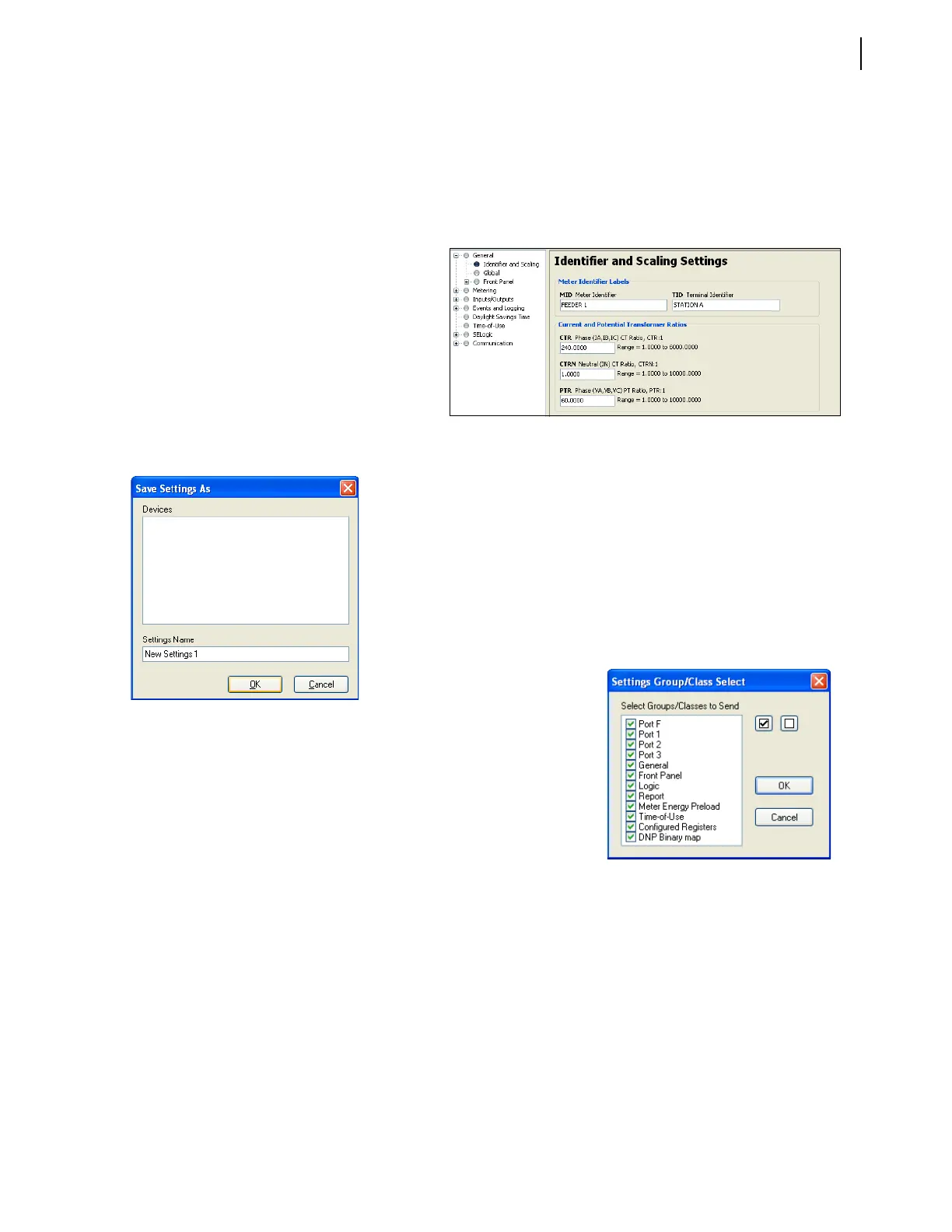
Click File > Read as shown in Figure 8 to read meter configuration settings.
3. Modify Configuration Settings
A settings tree view appears when ACSELERATOR QuickSet successfully reads meter configuration
settings from the SEL-735.
Click the plus sign (+) to expand a
setting group, or click a group name
to see all associated configuration
settings.
ACSELERATOR QuickSet
automatically hides unavailable
configuration settings and flags
invalid configuration settings at the
bottom of the screen.
Right-click on any setting for the
previous or default value.
Figure 8 Meter Configuration Settings
Figure 9 Save Settings
4. Save Configuration Settings to the PC Hard Drive
Select File > Save to save changes made within ACSELERATOR
QuickSet to the PC hard drive. Replace New Settings 1 in the
Settings Name text box with a unique name. Click OK to save the
configuration settings to the
ACSELERATOR QuickSet settings
database on the PC hard drive.
5. Send Configuration Settings to the Meter to Update All
Modified Configuration Settings
The File > Send command
sends any changes made
within
ACSELERATOR
QuickSet to the meter.
ACSELERATOR QuickSet
automatically selects
modified configuration
settings groups and warns if
these settings will overwrite
existing data or change active
communications parameters.
Figure 10 Settings Group/Class Select


 To Next Page