5
P
Setting
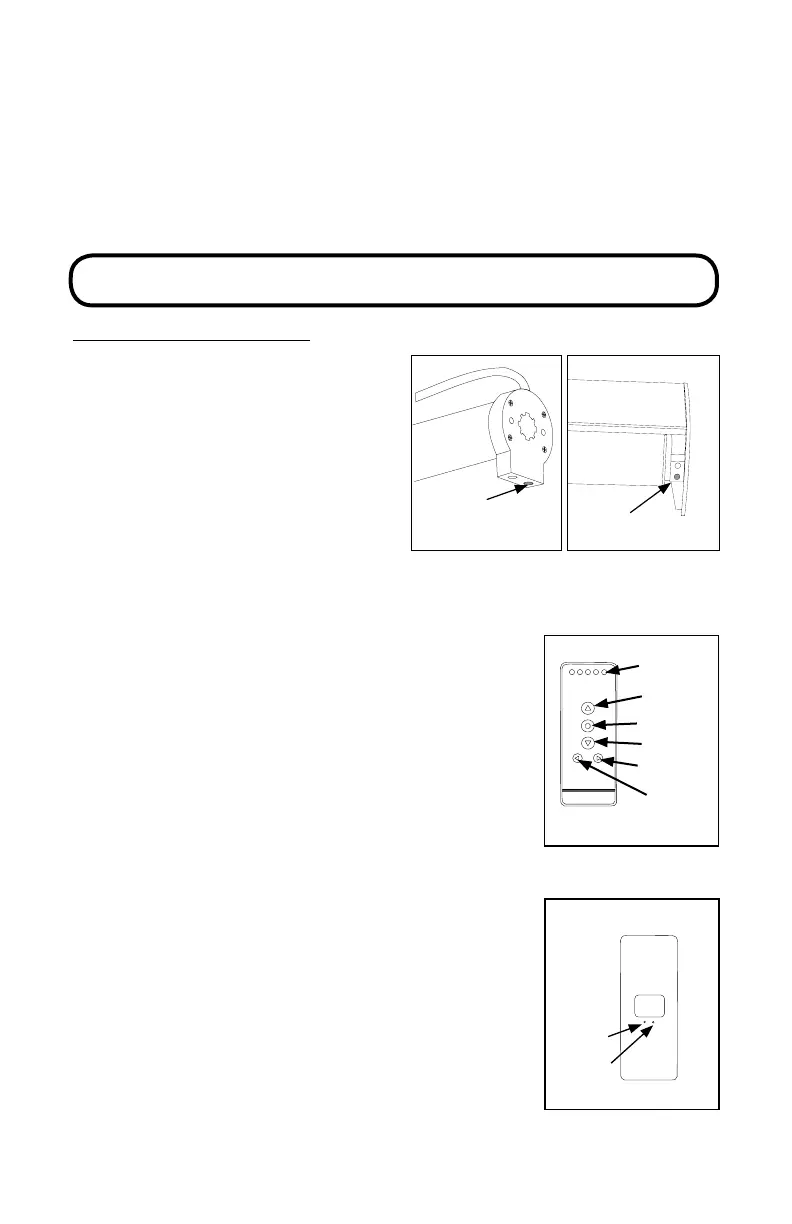
(red button)
Setting
(red button)
STEP 3: LINK REMOTE
5 CHANNEL REMOTE
is remote control has 5 channels.
Before linking the remote, determine
which shade(s) you want on which
channel. All shades linked to a remote
will also automatically be programmed
to the “ALL” channel.
It is recommended to only link one
shade per channel unless it is absolutely
necessary to group shades other than
the “all” channel. is simplies
adjusting limits and setting favorites.
Remove plastic lm from the front of the remote.
If battery is not already installed in the remote
follow the instructions on page 22.
1. Select the channel that you want to program
using the CHANNEL selector buttons.
2. Press the SETTING button on the motor until
the shade jogs once.
3. Press and hold the CONFIRM button until the
shade(s) jogs once. e shade is now linked to the
remote.
4. Repeat steps 1-3 to program the rest of the
shades/channels.
STOP!
is booklet has instructions for 3 remote styles.
Determine which remote you have before proceeding.
TEAR OUT CENTER SPREAD FOR ILLUSTRATIONS OF
EACH REMOTE FOR EASY REFERENCE.
1
2
3
4
5
Channel
Display
Up
Stop/Favorite
Down
Channel +
Channel -
5 Channel Remote (front)
C
L
Conrm
Limit
5 Channel Remote (back)



 To Next Page