“Dynamic”
Electronic control for towel heaters
Electronic
Via Pacinotti, 24 - 35030 Rubano (PD) Italy- Tel 049.8976761, Fax 049.8976085 - www.selmo.it
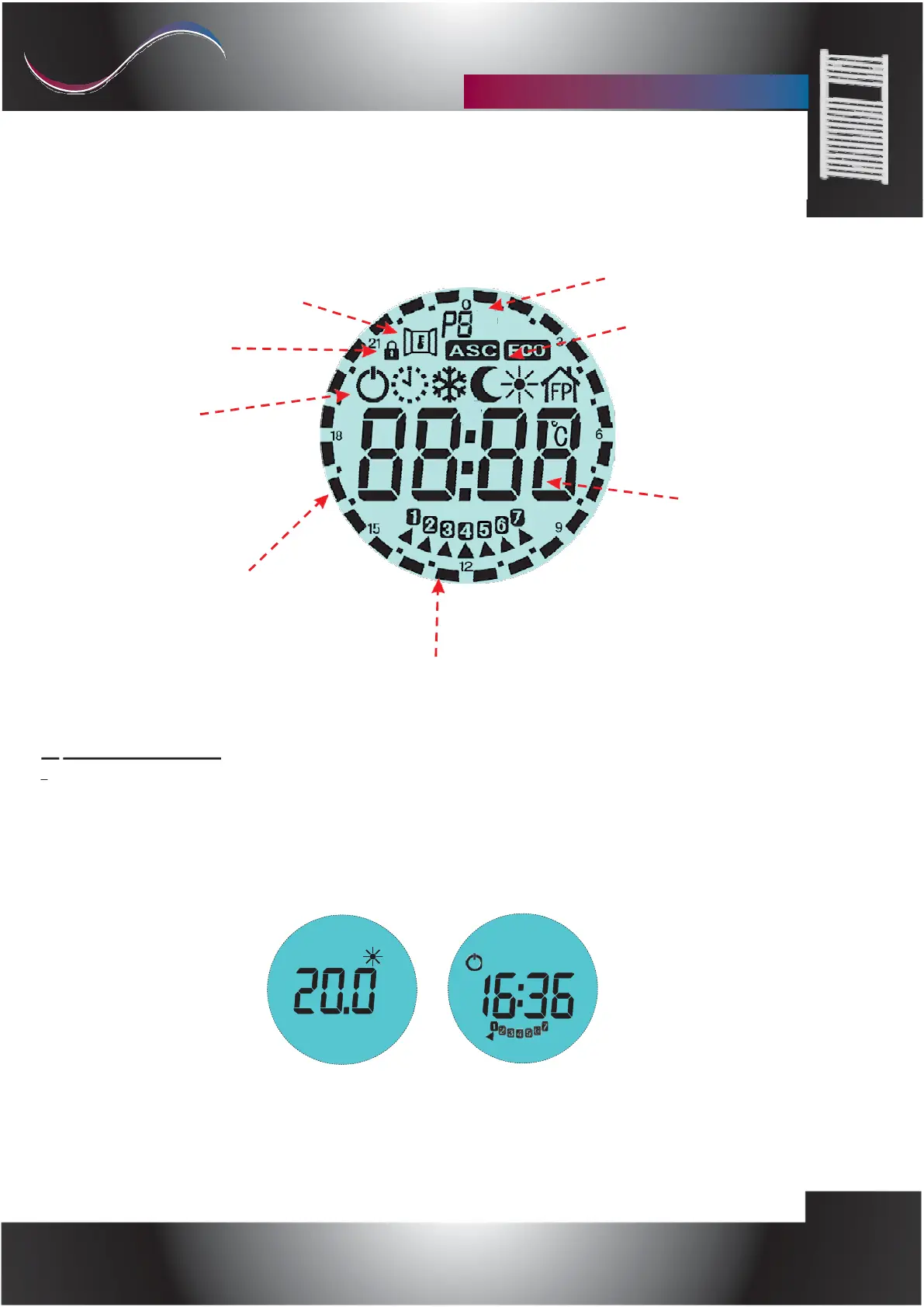
Function:
"Open window detection".
"keys lock" icon.
Current Chrono program
ASC & ECO functions indicator
Function mode icons:
6- Fil-Pilote
5-Comfort;
4-Night;
3-Antifreeze;
2-Crono;
1-Stand-By
Clock / selected temperature
Comfort/Night bar
"Chrono" mode.
Current Day
1.
ON / STAND-BY
Press the [On / Stand-by] key to turn on the unit or activate the "Stand-by" mode.
When it is active, the set mode and temperature are displayed. During "Stand-by" the display shows
the symbol On / Off, the current time and the day of the week.
NOTE: When the device enters "Stand-by" mode, 2 sounds of 0.5 seconds are emitted.
When the device is switched on, it emits two sounds lasting one second.
Mod. Comfort
Mod. Stand-by



 To Next Page