12
Connecting your Vend Station using the Copier Type System
SEM Inc. has developed an exclusive and intuitive way to connect your Vend
Station to your copier. When ordering your Vend Station, you MUST specify
for which copier it is intended for. If you change your copier after the Vend
Station has been installed and if this change requires an harness change,
you will need to purchase a new harness.
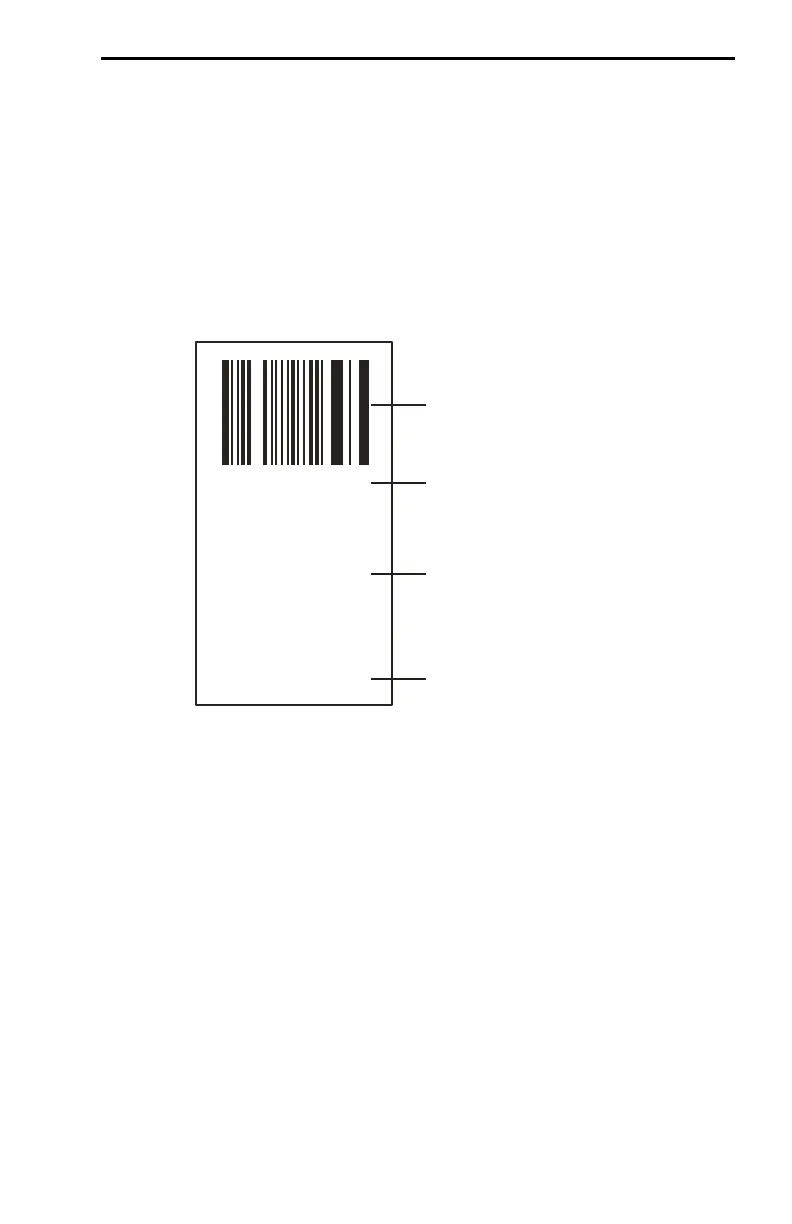
Each harness comes with its own label onto which will be indicated the part
number, the description of the copier it goes to and the type number you
have to program into the Vend Station in the section “Copiers Parameter 3 of
6” on page 27.
This Copier Type System refers only to the programming of the Vend Sta-
tion. It does not designate a specific brand or model of copier. For example,
many black & white copiers, offering only one price, will be designated as
Type One. However, the connector and pin-out will differ from one copier to
the other.
If you did not specify the exact copier model when ordering or if you are
moving this Vend Station to another copier, please be aware that the Black
and Green wires on the harness are for the loop giving permission (enable)
to make a copy while the Red and White wires are for the debit pulse com-
ing from the copier and going to the Vend Station.
Note that a second price line is available. You catch this debit pulse using
the Orange and Blue wires. Copier type will then be Type 2.
BAR code
SEM’s Part #
Make & Model
of device
Harness
Minolta
MS6000/7000
Microfiche
TYPE 11
* A07170 *
Type # to
program into
Vend Station


 To Next Page