42
Parts description
In the next pages, you will find the parts catalogue for your Vend Station.
Please use the appropriate number when ordering parts from us in order to
facilitate the identification of parts. Most parts are generally in stock and can
be shipped on the next business day.
Installing/Removing Coin Changer
Description Part #
Square/Slot machine screw 8-32 x 3/8” (3 pieces) B00520
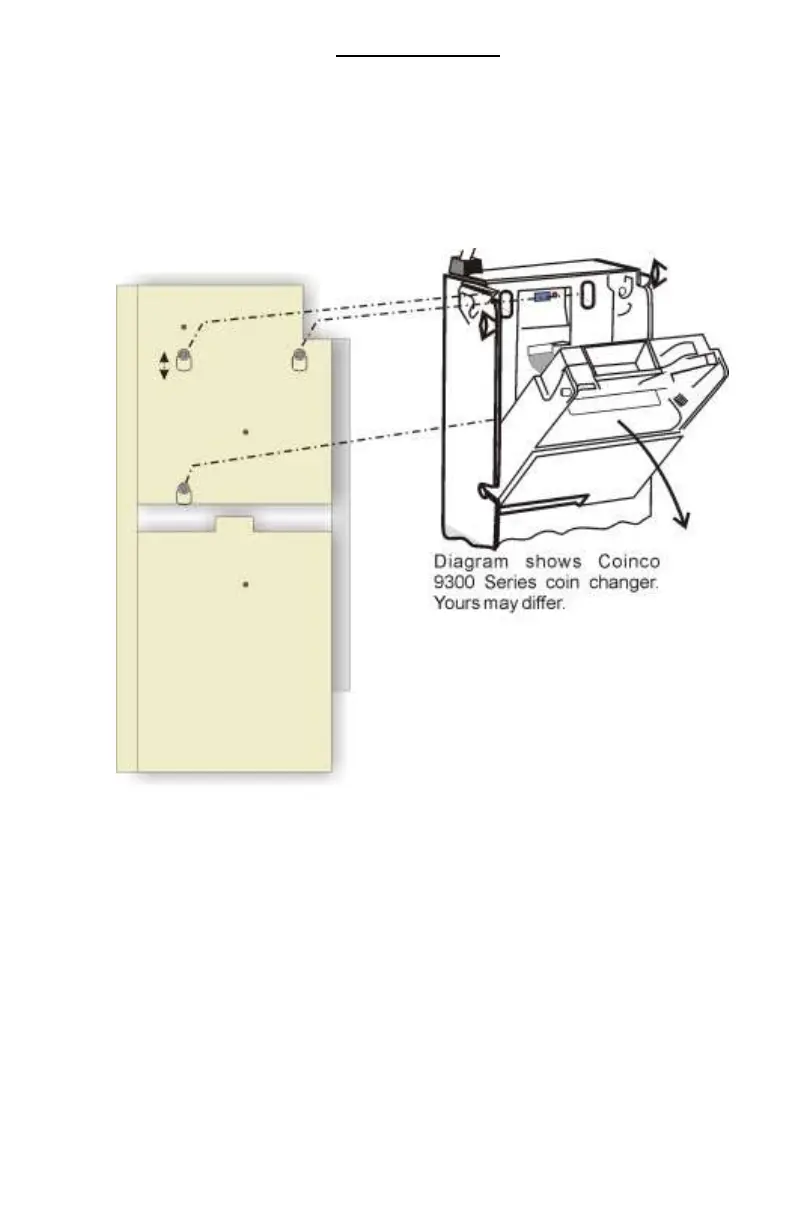
The coin changer, no matter the make or model and the quantity of tube, is
always installed the same way. It is held in place by three Robertson/Slot
machine screws. To remove, simply loosen the screws a bit and lift the coin
changer out of its position.
Shipping bracket may still be in place preventing the coin changer to move
while in shipping. You can remove the shipping bracket by unscrewing the
wing nut. We suggest keeping it in place when changer is in place.


 To Next Page