7
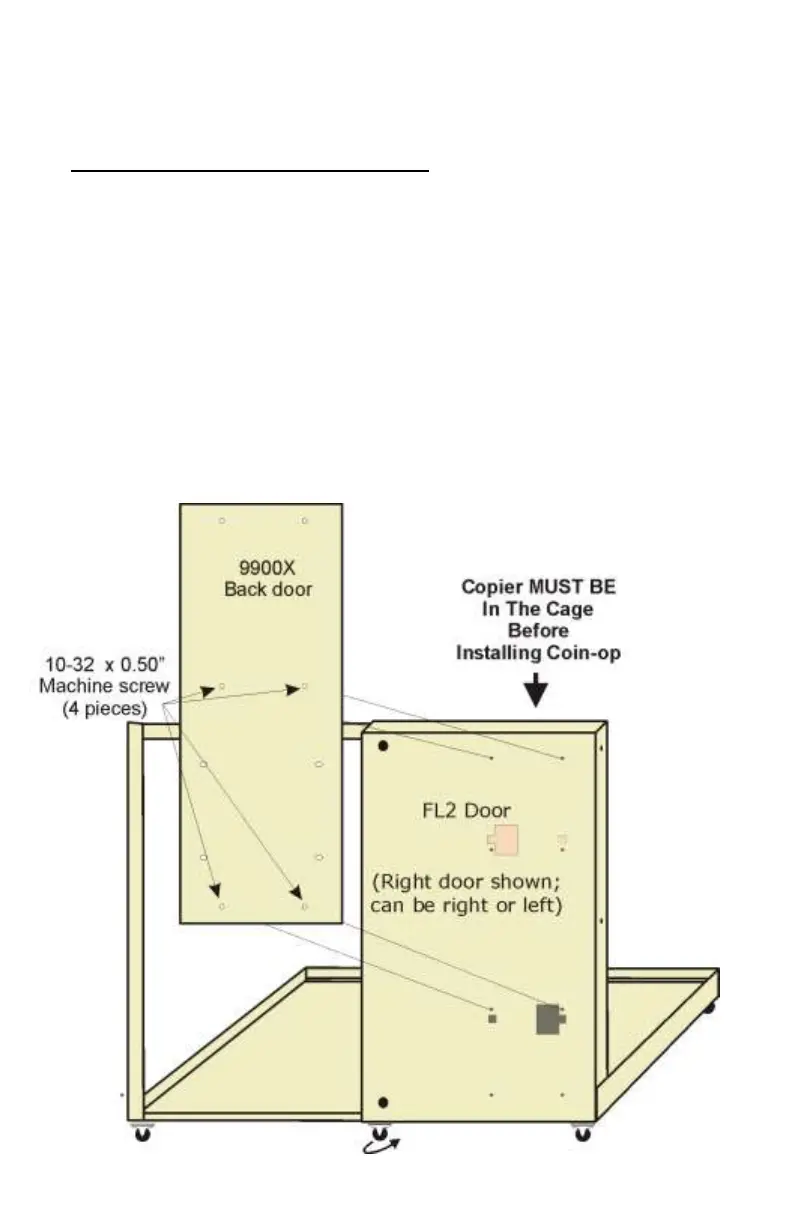
To install it on an FL2 Protective Cage:
1. Make sure small swivel wheel is under the FL2 door. Do not install the
Vend Station if wheel is missing. Installing the Vend Station on a door
without the wheel will damage the FL2 frame and door when you open it.
2. Install the copier in the FL2 cage before installing Vend Station on door.
Failure to comply will result in the entire cage to tumble forward as the
Vend Station is heavier than the FL2 cage floor.
3. Remove bottom plates on FL2 door to pass power transformer and cop-
ier harness.
4. Make sure no sharp metal parts can damage the harnesses.
5. Open the back door of the Vend Station.
6. Locate the holes.
7. Place back door flat on the FL2 door (you may ask for help to hold the
Vend Station)
8. Screw in all four 10-32 x ½” machine screws.
9. Tighten them all.
10. Open the FL2 door to see if it operates correctly.
11. Pass the cable so that they do not interfere with anything.


 To Next Page