OUTSTAR S Bluetooth
®
Helmet | 44
11. TROUBLESHOOTING
Please visit sena.com for more troubleshooting information.
• Customer Support: sena.com
11.1 Fault Reset
When the Bluetooth system is not working properly, you can easily reset
the unit:
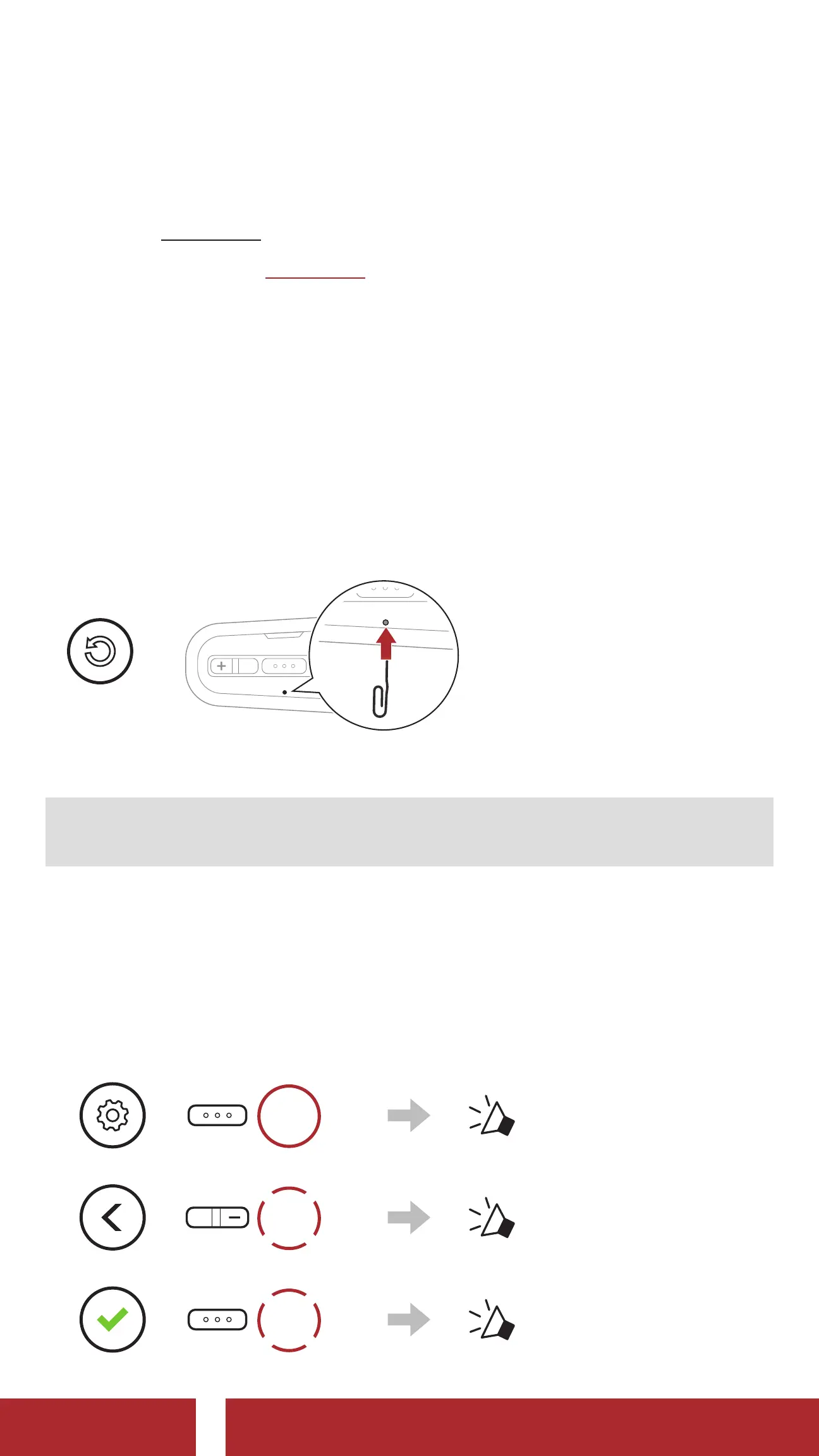
1. Locate the Pinhole Fault Reset Button below the Center Button.
2. Gently insert a paper clip into the hole and press the Pinhole Fault
Reset Button with light pressure.
=
FAULT
RESET
3. The Bluetooth system will shut down.
Note: Fault Reset will not restore the Bluetooth system to factory
default settings.
11.2 Factory Reset
To erase all of your settings and start fresh, the Bluetooth system can be
restored to factory default settings using the Factory Reset feature.
1.
=
15s
HOLD
“ Configuration menu”
2.
=
2x
TAP
“ Factory Reset”
3.
=
1x
TAP
“ Headset reset,
good-bye”
CHAPTER



 To Next Page