9
MENU
04
SMARTPHONE USAGE
Phone Pairing
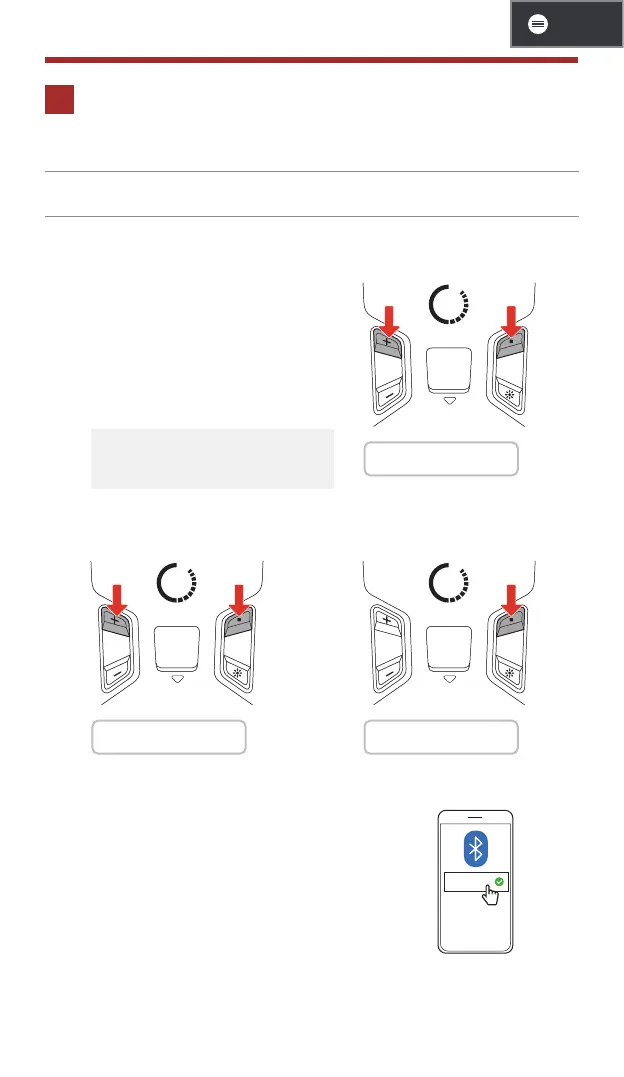
1. There are three ways to enter the phone pairing mode.
• The first time you turn on the
Bluetooth system:
- The Bluetooth system will
automatically enter the phone
pairing mode when you initially
turn it on or reboot it after
executing a factory reset.
• To cancel phone pairing,
tap any button.
1s
1 "Phone pairing"
• Starting with your Bluetooth
system powered off:
• Starting with your Bluetooth
system powered on:
5s
1 "Phone pairing"
5s
1 "Phone pairing"
2. Select S1 in the list of Bluetooth devices
detected.
S1



 To Next Page