EN 11
EN
Revision 04/2019Copyright © 2019, Fast ČR, a. s.
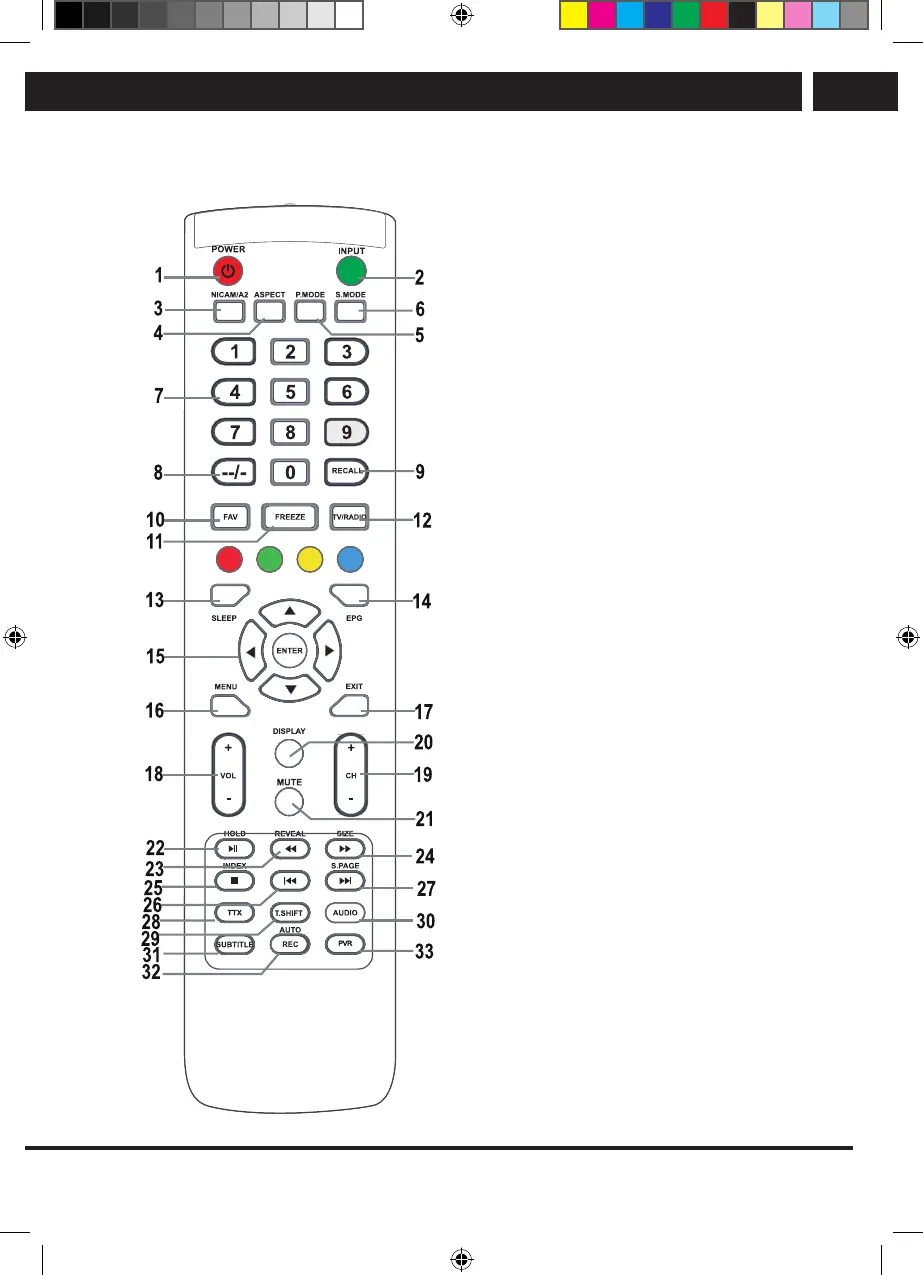
Remote control
4. Remote control
1. POWER 1 button
Turns the television on/from the
stand-by mode.
2. INPUT button
Press to select the desired input.
3. NICAM button
NICAM/A2 input or output.
4. ASPECT button
Page aspect ratio selection, e.g. 16:9,
Zoom, Auto, 4:3.
5. PMODE button
Press repeatedly to select a picture
mode.
6. SMODE mode
Press repeatedly to select a sound mode.
7. Numerical buttons 0–9
Press 0–9 buttons directly to select a TV
channel while watching the TV. Enter the
page number in the teletext mode, etc.
8. --/- button
It is used to enter channel numbers with
various digit counts, e.g. 1 – 11 – 111.
9. RECALL button
Button to switch the previously watched
channel.
10. FAV button
Press to enter/exit the favourites menu in
the TV mode.
11. FREEZE button
Freeze picture
12. TV/RADIO button
Switch between the television and radio
modes
13. SLEEP button
Set the automatic shut off time for the
television.
14. EPG button
Press to show/hide the electronic
program guide.
Sencor UM SLE 22F61TCS EN CZ SK HU PL.indb 11 29.04.2019 18:03:51



 To Next Page