- 10 _EN- SL320005700 Ed.00 - 04-2011
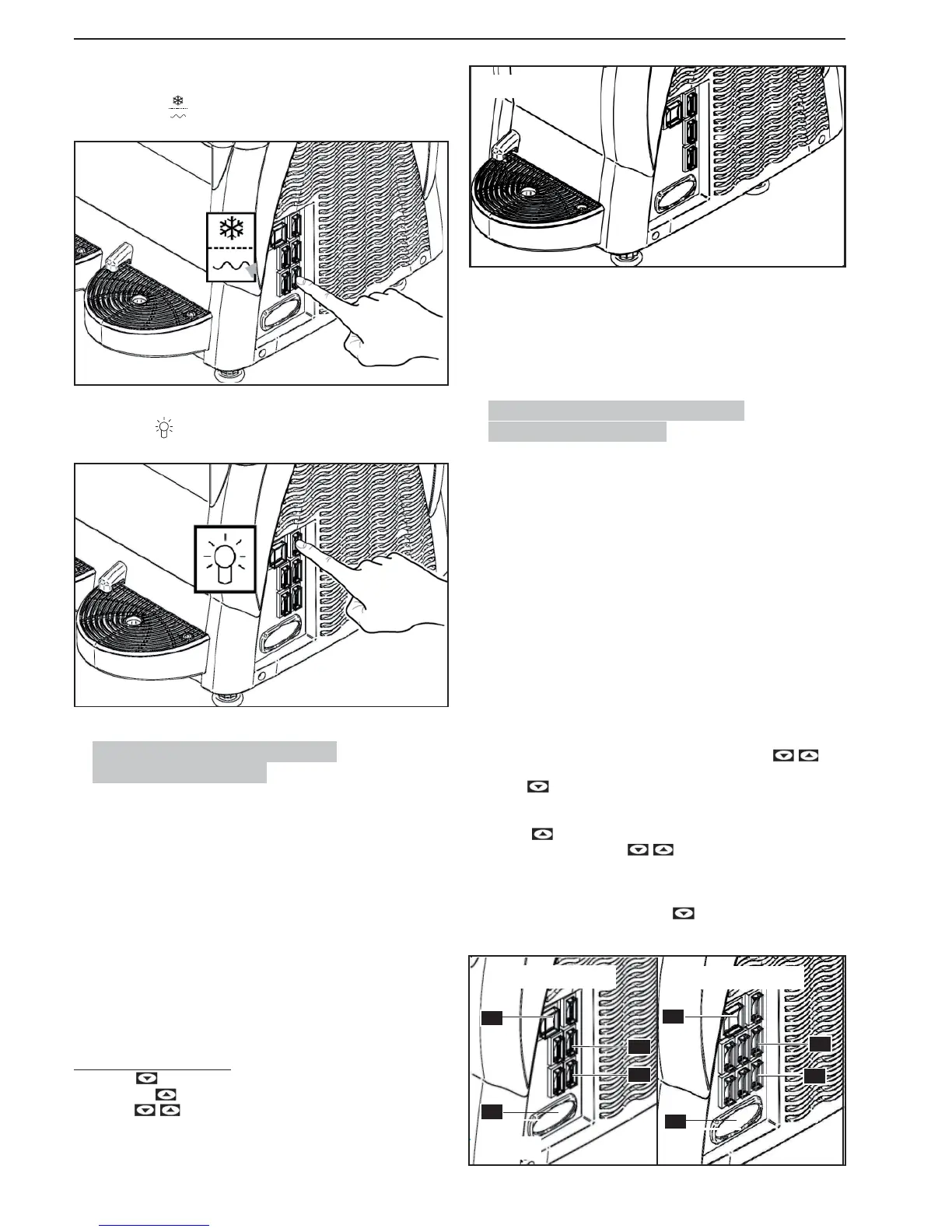
To dispense COLD DRINKS:
Changeover switch : in position “II” refrigeration system on (cooling mode).
Press the switch
to turn on the machine lid light.
6.3. Starting the Granita maker 1
(Electronic thermostat)
The temperature display serves to view the temperature of the product inside
the tank and to regulate it when the machine is operating in “cold drinks fridge”
mode.
Switch (A) in position “I“: power is being supplied to the machine.
Switch (C) in position “I“: the mixer is operating.
To make SLUSH DRINKS (GRANITA):
Switch (D) in position “I“: Refrigerator system operating (slush drinks - granita).
To make COLD DRINKS:
Switch (D) in position “II“: Refrigerator system operating (cold drinks).
To disable the FRIDGE (mixing only):
Switch (D) in position “0“: Refrigerator system off (mixing only).
Setting the temperature set-point
- Press the . key; the display will read PrG.
- Press the key . the display will show the temperature set-point value.
-
Using the keys it is possible to change the set-point value from 0°C
- 10° C.
A
E
C
D
3 seconds after the last key is pressed, the setting is stored to memory and the
display will show the temperature of the product in the tank.
ALARMS
In case of probe failure, the display will read A1.
Programming and adjustment outputs will be disabled.
6.4. Starting the Granita Maker 2/3
(Electron ic thermostat)
For the sake of simplicity, we will show how to enable the right-hand tank; for
the other tanks, it is suffi cient to carry out the same sequence of operations on
the switches for the tank concerned.
Switch (A) in position “I“: Machine powered.
Switch (C) in position “I“: Mixers operating.
To make SLUSH DRINKS (GRANITA):
Deviators (D) in position “I“: Refrigerator system operating (slush drinks - granita).
To make COLD DRINKS:
Deviators (D) in position “II“: Refrigerator system operating (cold drinks).
To disable the FRIDGE (mixing only):
Deviators (D) in position “0“:Refrigerator system off (mixing only).
Setting the temperature set-point
- When the electronic thermostat is switched on, press the keys
together and the display will read “t1”.
- With the key it is possible to scroll through the set points “t1”; “t2” (Ma-
chine with 2 tanks) and, “t1”; “t2”; “t3” (Machine with 3 tanks).
- When the display shows the set point to be changed (“t1”or “t2” or “t3”),
press the key to view the set point value.
- It is then possible to use the keys to set the set-point value from
0°C - 10°C.
- The setting is stored to memory three seconds after the last key has been
pressed. The display returns to show “t1”or “t2” or “t3” according to the set
point that has been changed. Press the
key until the display shows the
temperature of the product in the tank.
ALARMAS
Fig.13
Fig.14
Fig.15
2 TANKS
3 TANKS
A
E
D
C
E
A
C
D
Fig.16


 To Next Page