10
Anti-Theft System
This unit is equipped with a detachable panel. Removing this panel makes the radio totally
inoperable.
Troubleshooting
I f yo u s u s p e c t s o m e t h i n g i s w r o n g ,
immediately switch power off. Do not use the
unit in abnormal condition, for example without
sound, or with smoke or foul smell can cause
re orelectric shock,Immediatelystopusing
it and call the store where you purchased it.
Never try to repair the unit yourself because it
is dangerous to do so.
General
No power or no sound
Car's engine switch is not on. Turn your
car's key to ACC or ON.
Cable is not correctly connected. Check
connection.
Fuse is burnt. Replace fuse.
Check volume or mute on / off.
If the above solutions cannot help, press
the RESET button.
Disc
Disc is inside but no sound.
Disc is upside down.
Place disc in the correct direction, and the
label side up.
Disc is dirty or damaged.
Clean disc or change another disc.
Disc sound skips, tone quality is low.
Disc is dirty or damaged.
Clean CD or change another CD.
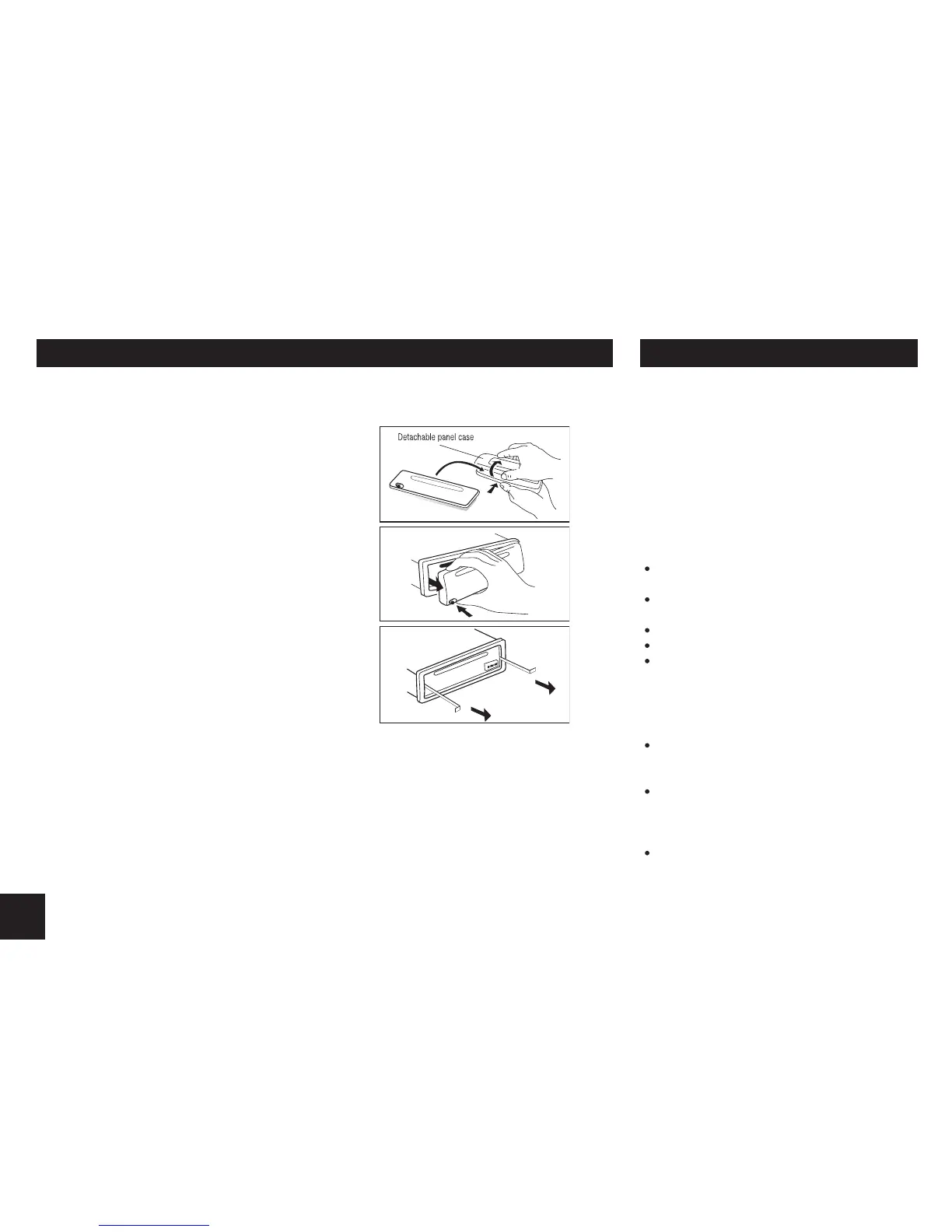
Remove the detachable Panel
1. Switch off the power of the unit.
2. Remove the detachable panel.
3. Gently press the button of the case and open the
cover. Place the panel into the case and take it
with you when you leave the car.
Install detachable panel
1. Fix right part of face plate in the right part of panel
slot of the unit.
2. Press down the left side of the face plate until if
clicks into the panel slot of the unit.
Remove the unit
1. Switch off the power of the unit.
1. Remove the panel and the trim plate.
2. Insert both L-Keys into the hole on the front of the
set until they lock.
3. Pull out the unit.


 To Next Page