9
Installation Guide
Installation Procedures
First complete the electrical connections, and then check them for
correctness.
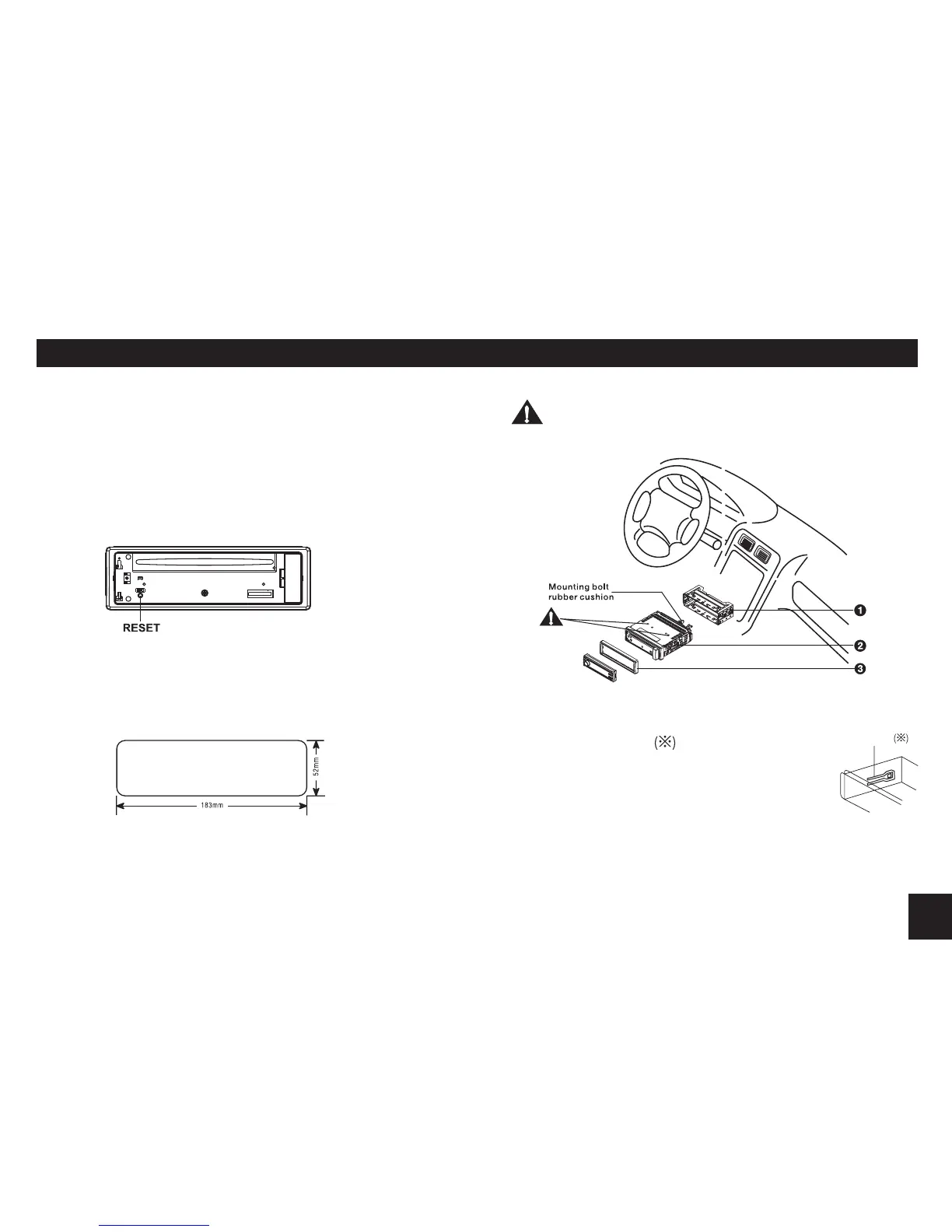
Reset
Press the RESET button with a pointed object to reset the unit to
the original status.
Note: Press the RESET button will erase the clock setting and
stored stations.
Installation Opening
This unit can be installed in any dashboard having an opening as
shown below. The dashboard should be 4.75mm - 5.56mm thick
in order to be able to support the unit.
Important:
Remove these two screws before installation. Otherwise, the
player will not work.
1. Insert mounting collar into the dashboard, and bend the mounting
tabs out with a screwdriver.
Make sure that lock lever isushwiththemounting
collar. (Not projecting outward)
2. Secure the rear of the unit.
Afterxingmounting bolt andpowerconnector,xthe
rear of the unit to the car body by rubber cushion.
3. Insert trim plate.
Lock lever


 To Next Page