3
Panel Controls
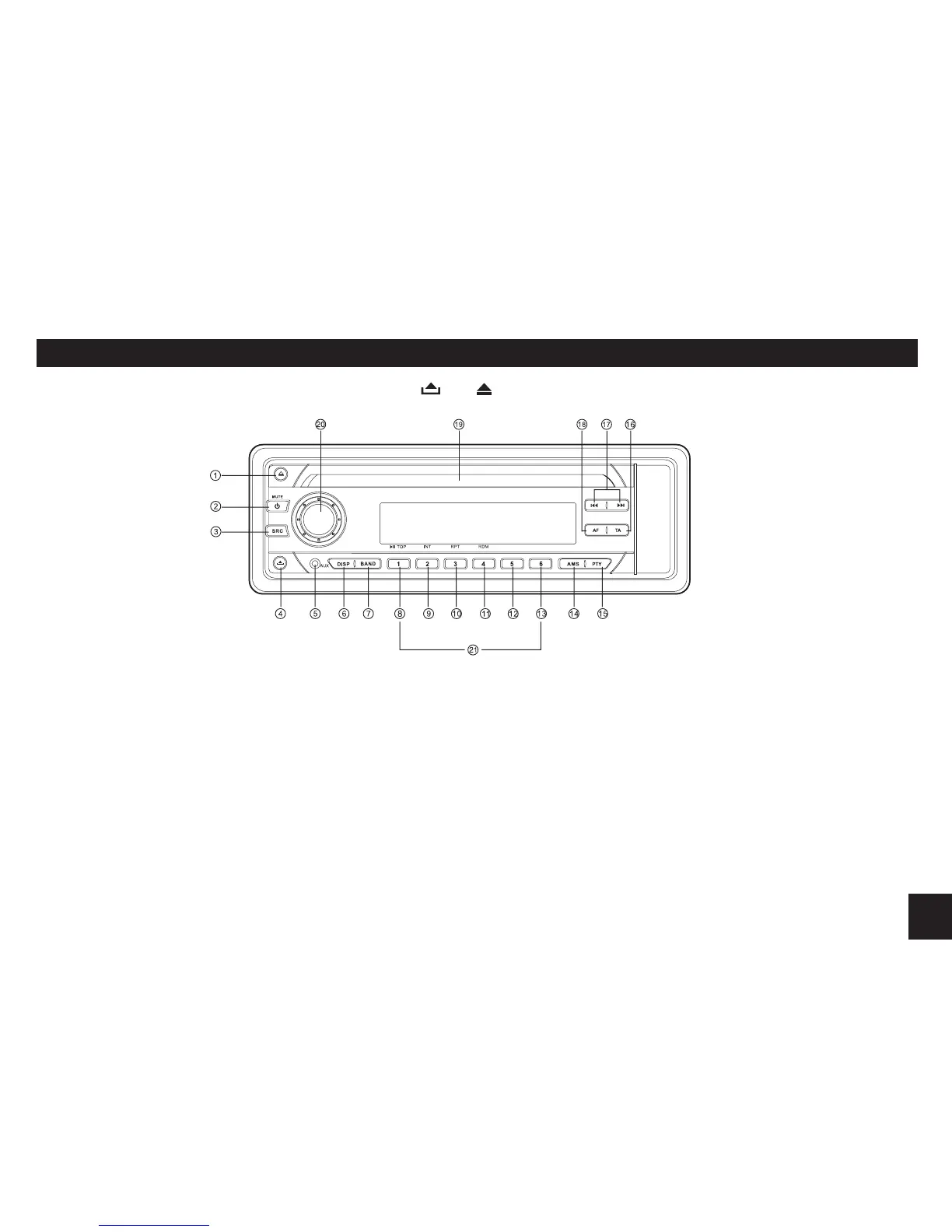
Power on : Press any button on the panel except and to turn on the unit.
1. - Disc eject
2. - Power on
- Mute
- When on, hold it to power off.
3. Press the button to select a
mode from:
- Radio
- Disc play (when disc inserted)
- Aux-in
4. - Panel release
5. - Aux-in jack
6. - Time display/adjust
7. - Band switch:
FM1 - FM2 - FM3 - AM1 - AM2
8. - Button 1: Play/Pause
Top play (press more than 2 sec.)
9. - Button 2: Intro play (10 sec.)
10. - Button 3: Track repeat play
11. - Button 4: Track random play
12. - Button 5: MP3 track -10 down
13. - Button 6: MP3 track +10 up
14. - AMS
Radio preset scan/Radio auto
preset
- SEARCH
MP3track/le/charactersearch
15. - Program type
16. - T r a f f i c an n o u n c e m e n t s
identication
17. - Radio tune
- Track seek
18. - Alternative frequency
- REG on/off
19. - Disc slot
20. - Rotate the knob to adjust
volume level.
- Push to select VOL/BAS/
TRE/BAL/FAD, rotate the
knob to adjust level.
- Press more than 2 seconds
to enter menu mode.
21. - Radio preset button 1~6,
press to tune in a preset
station.
- H o l d f o r m o r e t h a n 2
seconds to store station.


 To Next Page