Putting the AMBEO Soundbar | Max into operation
AMBEO Soundbar | Max | 33
Error messages during room calibration
Canceling the calibration
To cancel the calibration:
Press the volume buttons – (volume down) and + (volume up) for
4
seconds.
Repeating the calibration
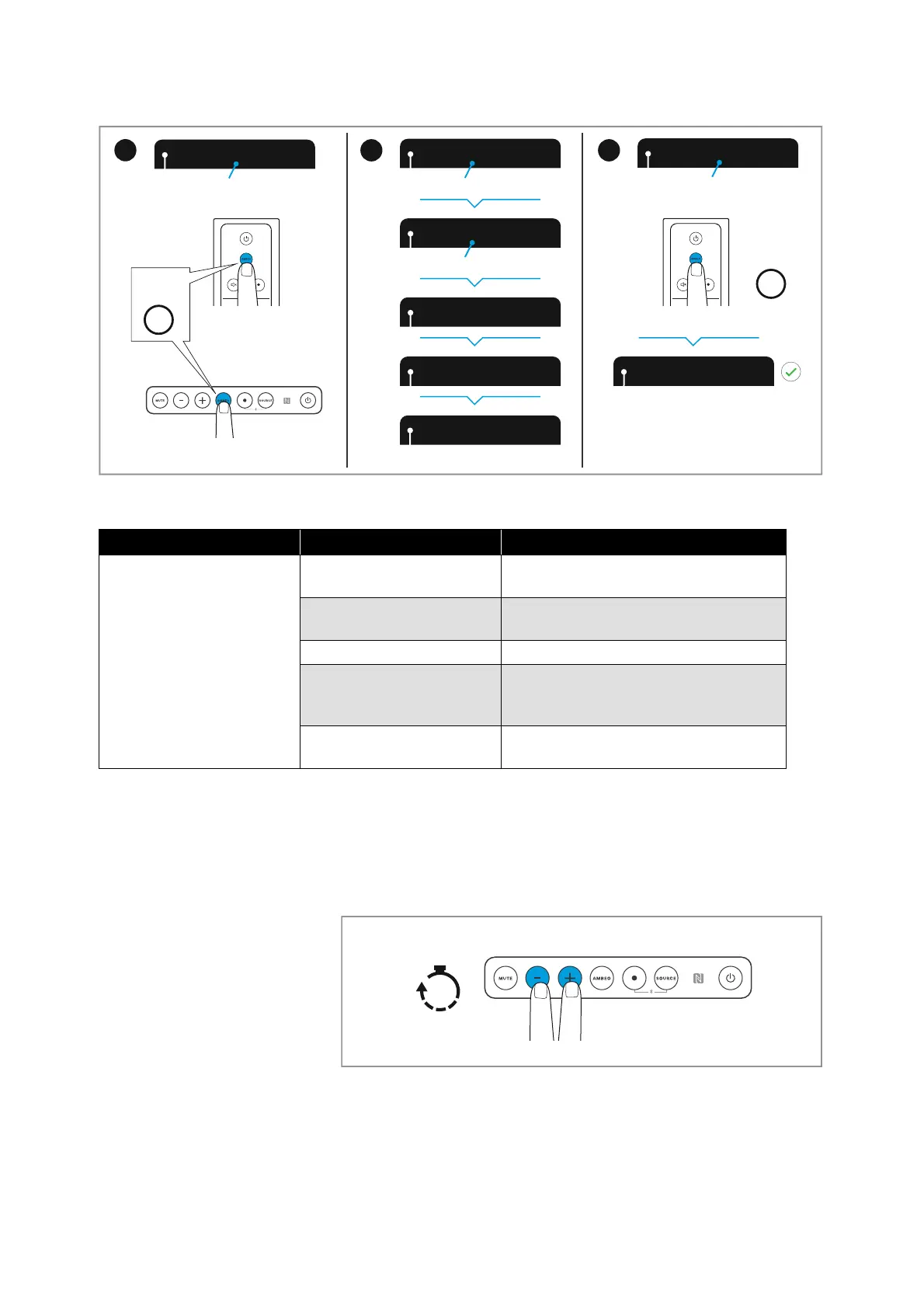
If you want to repeat the calibration, you have the following options:
•Press the AMBEO button on the Soundbar for 4 seconds.
•Press the AMBEO button on the remote control for 4 seconds.
• Use the Smart Control app.
Press AMBE
Please step
Calibration s
Calibration
Processing
Done!
Press AMBE
1x
1x
Press
AMBEO
Press AMBEO to finalize
Please step to the side
Calibration starts in 10 / 9 / ..
Press AMBEO to start callibration
Press
AMBEO
4
OR
5
6
Message on the display Possible error Possible solution
Calibration failed. Please
push AMBEO to cancel.
Subwoofer volume is too
low
Increase the volume of the subwoofer
and restart the calibration
Microphone is not
connected
Connect the microphone
Ambient noise is too high Reduce ambient noise
Not enough sound-
reflecting surfaces in the
room
Change the position of the
microphone in the room
General error An error has occurred, restart the
calibration



 To Next Page