Putting the AMBEO Soundbar | Max into operation
32 | AMBEO Soundbar | Max
Calibrating the Soundbar
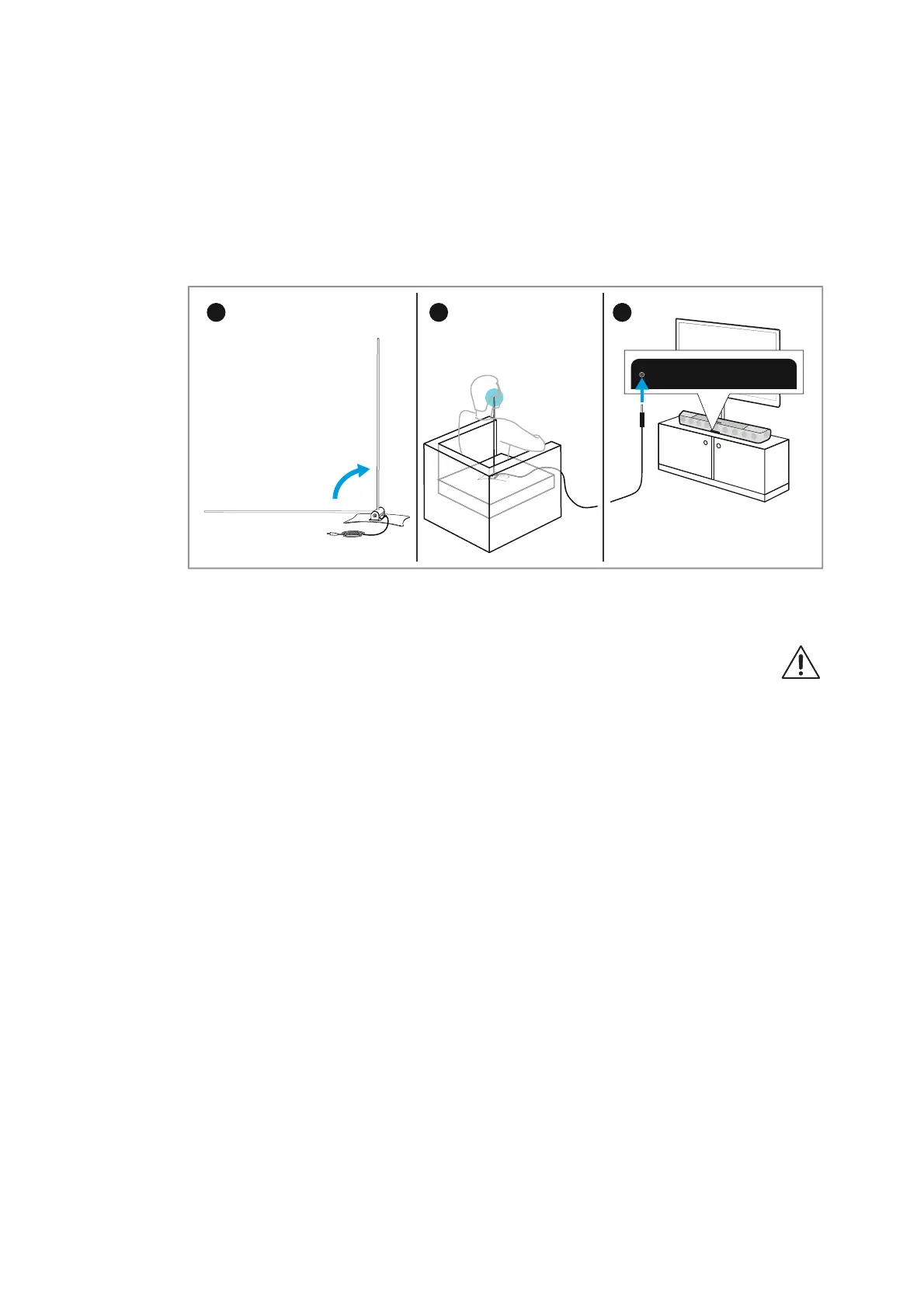
▷ Straighten up the microphone in the microphone holder.
▷ Place the microphone with the microphone holder on the seat in
front of the Soundbar. The microphone head should be located
approximately at ear height during normal use.
▷ Connect the jack plug of the microphone cable to the microphone
input
on the Soundbar.
▷ Press the AMBEO button on the top of the Soundbar or the
AMBEO button on the remote control.
The display shows “Please step to the side”.
Please note that the test tones are played at a high vol-
ume during calibration.
▷ Avoid disturbing noises (open windows, household
appliances, etc.) and do not stay between the Soundbar and the
microphone as this can falsify the calibration.
The display shows a countdown for the start of the calibration
“Calibration starts in 10 / 9 / ...”.
The calibration process takes several minutes.
The display shows “Done!” and “Press AMBEO to finalize”.
▷ Press the AMBEO button on the top of the Soundbar or the
AMBEO button on the remote control.
The display shows “Welcome”. The AMBEO demo sound is played
(approx. 10 seconds).
▷ Disconnect the jack plug of the microphone cable from the micro-
phone input on the Soundbar.



 To Next Page