Putting the RS 175 into operation
RS 175 | 13
Connection option A: Optical (digital)
To achieve the best possible listening experience, we recomm
ended that
you connect your RS 175 headphone system to your home cinema or hi-fi
system using the supplied optical digital cable.
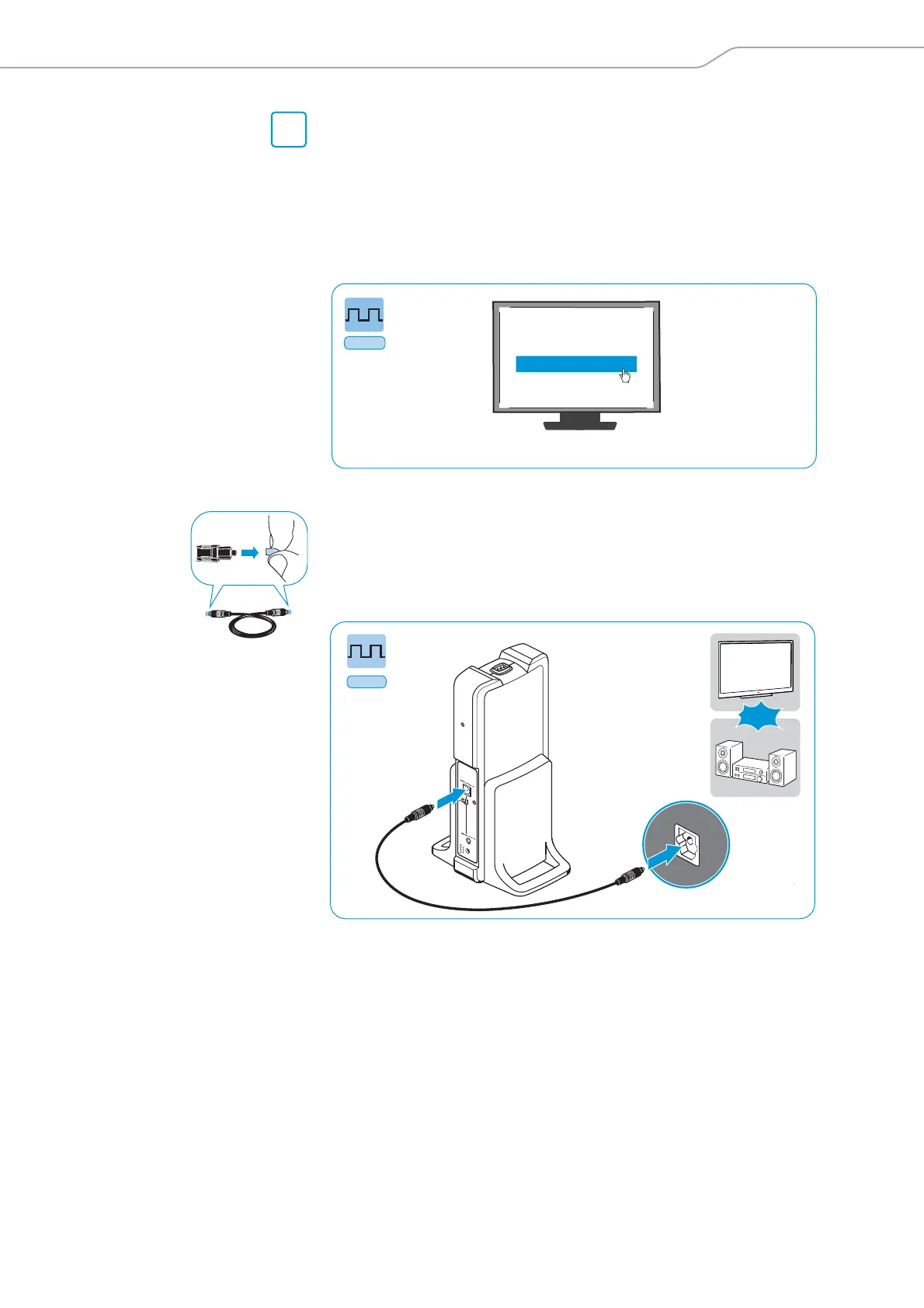
Your wireless headphone system allows digital audio streaming using only
PCM audio output from devices connected through the optical digital input
DIGITAL OPTICAL IN. Refer to the sound menu or the instruction manual of
your devi
ce
to change from another audio stream (e.g. Bitstream) to PCM.
왘 Switch your audio source off before
connecting the transmitter.
왘 Pull off the clear protective caps from both plug
s before connecting the
cable.
왘 Connect one end of the optical digital cable to the DIGITAL OPTICAL IN
input of the transmitter and the other end to the optical output of your
au
di
o source.
A
Digital
Digital sound output
PCM
Bitstream
Sound menu
*Sound menu may vary












 To Next Page