Putting the VMX 200 into operation
VMX 200 | 9
Putting the VMX 200 into operation
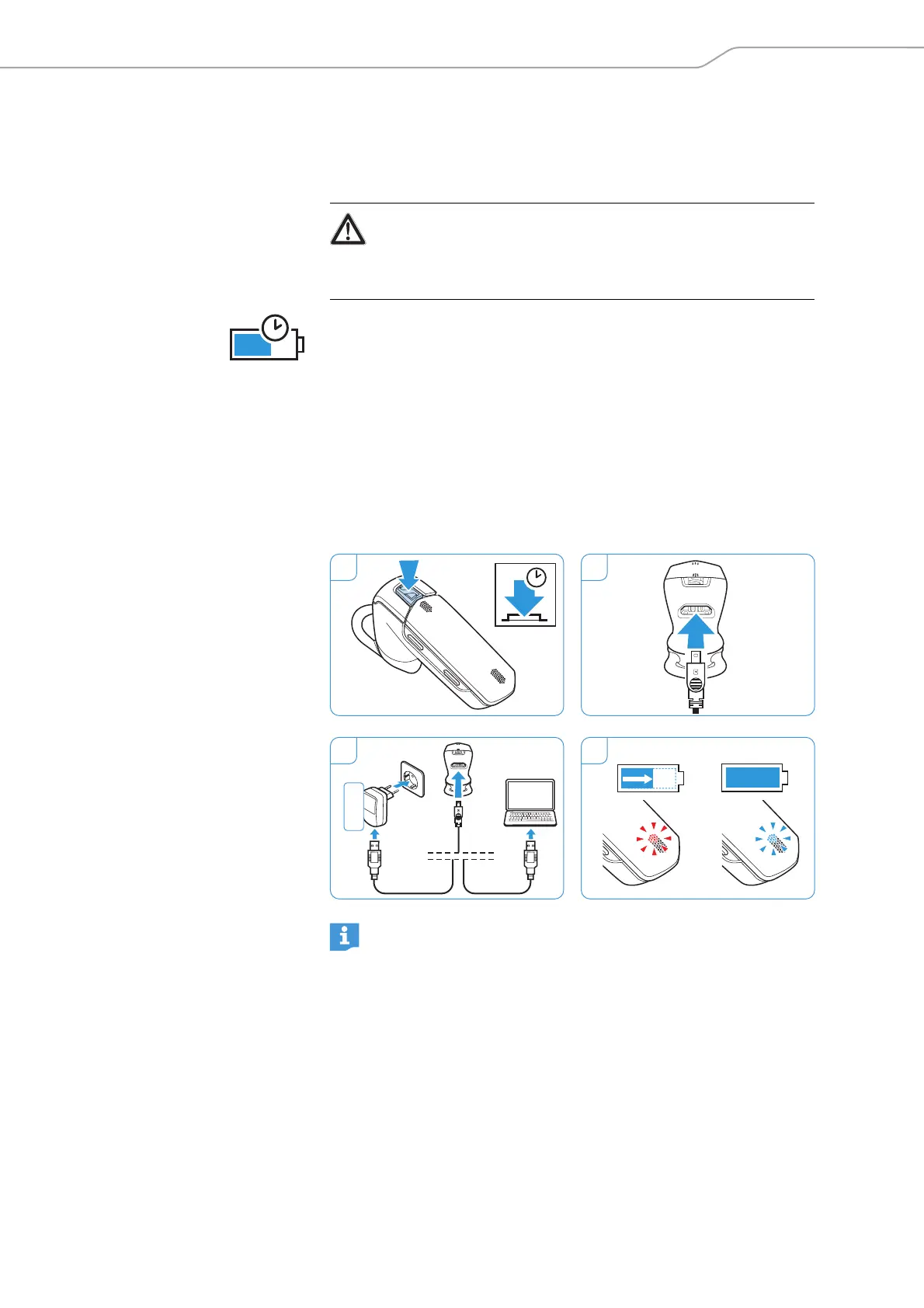
Charging the headset battery
Before using the headset for the first time, charge the rechargeable
battery for at least 2.5 hours. Later, 2 hours will suffice to fully charge the
battery. A fully charged battery provides a talk time of approx 6 hours.
1 Take off the headset and switch it off (see page 14).
2 Connect the smaller plug of the charging cable to the USB socket of the
VMX 200.
3 Connect the USB plug of the charging cable to the USB socket of the
power supply unit or your computer.
4 The battery is being charged and all active connections are interrupted.
The LED lights up red. When charging is complete, the LED flashes blue
once every 5 seconds.
WARNING
Danger of injury!
Wearing the headset when charging can cause burns and injuries.
왘 Do not wear the headset when charging.
2 h
When the battery level drops below 10 minutes of talk time, the LED
flashes red and you hear a low battery warning every 20 seconds.
The headset automatically switches off after the battery has
dropped below the minimum level.
1 2
3 4
3 s
EU
UK
US
AU
100 %



 To Next Page