Need help?
Do you have a question about the Sensi 1F87U-42WF and is the answer not in the manual?
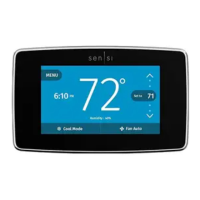
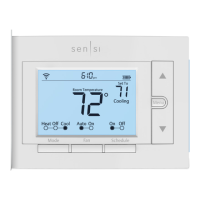
Indicates Wi-Fi connection status on the thermostat.
Illuminates the thermostat display for 10 seconds.
Shows the current time on the thermostat interface.
Indicates if the thermostat keypad is locked, preventing changes.
Displays battery level; low levels require battery replacement.
Adjusts temperature set points or configuration settings upwards.
Shows the target temperature the thermostat aims to maintain.
Accesses thermostat configuration menus for settings.
Adjusts temperature set points or configuration settings downwards.
Shows the ambient temperature of the room.
Toggles the programmed thermostat schedule On or Off.
Switches the fan mode between Auto and On.
Selects the system operation mode (Heat, Cool, Off, Aux).
Describes changing heating, cooling, and off modes on the thermostat.
Explains how to use the fan for circulation or continuous operation.
Details how to set a fixed temperature, overriding schedules.
Explains overriding schedule temporarily until the next set point.
Describes setting fan run time for air circulation.
Instructions for disabling the thermostat's Wi-Fi radio.
Steps to manually set the thermostat's time when not connected to Wi-Fi.
Instructions for creating a basic 7-day schedule with 4 set points.
Provides example time and temperature set points for schedules.
Connects the thermostat to a Wi-Fi network.
Sets display preference to Fahrenheit or Celsius.
Configures settings for cooling or heat pump systems.
Configures settings for gas or electric heat systems.
Sets the reversing valve position for heat pump systems.
Controls the fan's run time for air circulation.
Adjusts humidification set points and accessory settings.
Adjusts dehumidification set points and accessory settings.
Turns the thermostat's Wi-Fi radio On or Off.
Defines terminal labels and their corresponding wire functions.
Discusses matching wire colors to thermostat terminals.
Code necessary for connecting the thermostat to Wi-Fi.
Identifies whether the unit is a professional or DIY model.
The code used to add the Sensi Thermostat to Apple HomeKit.
Information on clipping the RC/RH jumper wire if needed.
Details on battery usage for backup and maintaining Wi-Fi.
Indicates when the thermostat was manufactured.
A unique number that identifies the thermostat.
 General
| Model | 1F87U-42WF |
|---|---|
| Category | Thermostat |
| Connectivity | Wi-Fi |
| Programmable | Yes |
| Temperature Range | 45°F to 99°F (7°C to 37°C) |
| Humidity Control | No |
| Display | Backlit |
| Power Source | Battery |
| Operating Temperature Range | 32°F to 104°F (0°C to 40°C) |
| Temperature Accuracy | ±1°F (±0.5°C) |
| Remote Control | Yes, via app |
| Scheduling | 7-day programmable |
| Energy Saving Features | Geofencing, flexible scheduling |
| Warranty | 3 years |
| Operating Humidity Range | 5% to 90% non-condensing |
| Weight | 0.5 lbs |

 To Next Page