EasyManua.ls Logo

Sensi ST75W - User Manual

Sensi ST75W
20 pages
Print Icon
To Next Page IconTo Next Page
Loading...
1
PRO Installation
Touch Wi-Fi
Thermostat
Question and Answer IconNeed help?

Do you have a question about the Sensi ST75W and is the answer not in the manual?

Summary

Sensi Partnership & Support

Sensi Partner Program

Information on the Sensi partner program and registration.

Customer Support Resources

Provides website, phone number, and email for support.

Installation & Compatibility

Ease of Installation

States the thermostat installs like a standard thermostat.

Mobile Device Compatibility

Lists compatible mobile operating systems (iOS, Android, Amazon Fire).

Smart Home Platform Compatibility

Lists compatible smart home platforms (Wink, Amazon Alexa, Apple HomeKit).

HVAC and Router Compatibility

HVAC System Compatibility

Details compatibility with various HVAC system types.

Router Compatibility

Lists compatible router types for Wi-Fi connection.

Included Items & Wi-Fi Setup Needs

Whats in the Box

Lists the items included with the Sensi thermostat.

Wi-Fi Connection Requirements

Outlines necessary items for Wi-Fi connection setup.

Installation Steps & Wiring

Installation Overview

Provides initial installation instructions and references.

Terminal Definitions

Explains old and Sensi thermostat terminal mappings and cross-references.

Wiring Diagrams

Single;Multi-Stage Non-Heat Pump System

Illustrates wiring for non-heat pump systems with two transformers.

Wiring Diagrams: Heat Pump

Single;Multi-Stage Heat Pump System

Illustrates wiring for single and multi-stage heat pump systems.

Thermostat Configuration

Configuration Menu Reference

Details menu items, defaults, and options for thermostat configuration.

HVAC Equipment Configuration

Specifies settings for HVAC equipment type and setup.

Fan Mode Options

Allows adjustment of circulating fan run time.

System Testing Procedures

Fan Operation Test

Tests fan operation by setting it to 'On' and 'Auto'.

Circulating Fan Test

Tests circulating fan by enabling and setting run time.

Heating System Testing

Heating System Test

Tests heating system by adjusting temperature settings.

Auxiliary Heat Test

Tests auxiliary heat operation for heat pumps.

Auxiliary System Testing

Auxiliary Heat Operation Test

Tests auxiliary-only heat for heat pumps with auxiliary.

Cooling System Testing

Cooling System Operation Test

Tests cooling system by adjusting temperature settings.

Troubleshooting Common Issues

No Heat;Cool;Fan Problems

Lists common causes and corrective actions for no heat, cool, or fan.

No Heat Diagnosis

Details diagnostic steps and solutions for no heat issues.

Troubleshooting Specific Conditions

No Cool Diagnosis

Details diagnostic steps and solutions for no cool issues.

Constant System Operation

Addresses issues with heat, cool, or fan running constantly.

Display and Temperature Discrepancies

Explains how to adjust thermostat display vs. thermometer readings.

Blank Display Resolution

Provides solutions for a blank thermostat display.

Troubleshooting Advanced Problems

HVAC Cycle Rate Adjustment

Explains factors affecting HVAC cycle rate and adjustment.

Call for Service Error Handling

Addresses 'Call for Service' alerts and related issues.

Random Fan Operation Prevention

Explains how to prevent random fan operation.

Connecting Sensi to Wi-Fi

Sensi App Download & Account Creation

Guides downloading the app and creating a Sensi account.

Thermostat Wi-Fi Connection Process

Details the steps to connect the thermostat to Wi-Fi.

Contractor Information Entry

Option to enter contractor phone number in settings.

Important Warnings and Cautions

Installer Warnings

General warnings for installers regarding instructions and safety.

Transformer Phase Warning

Warns about out-of-phase transformers in two-transformer systems.

Voltage Requirements Warning

Warns about using circuits exceeding specified voltage.

Electrical Safety Cautions

Cautions to disconnect power to prevent shock or damage.

California Proposition 65 Warning

Warning about chemicals known to cause cancer and birth defects.

Alerts and Notices

Explains E5 alert, mercury notice, and contact support.

Customer Information

Sensi Welcome Guide

Recommends leaving the welcome guide for the customer.

Overview

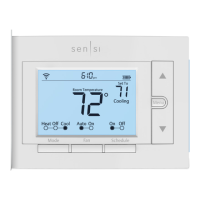
This document is an installation guide for the Sensi Touch Wi-Fi Thermostat, designed for professional installers. It provides comprehensive information for installing, configuring, and troubleshooting the thermostat, as well as details on its compatibility with various HVAC systems and smart home platforms.

Function Description:

The Sensi Touch Wi-Fi Thermostat is a professional-grade smart thermostat that allows users to control their home comfort from anywhere via a connected device. It is designed for easy installation, similar to a standard thermostat, and offers the flexibility for Wi-Fi connection during installation or later by the homeowner using the Sensi app. The thermostat integrates with various smart home platforms, enhancing its versatility and user convenience. It supports both conventional heating and cooling systems, as well as heat pump systems, and offers features like scheduling, fan mode options, and remote access. The Sensi partner program allows contractors to stay connected with their customers for service needs, with contact information saved in the Sensi app.

Important Technical Specifications:

Mobile Device Compatibility:

  • Operating System: iOS, Android, Amazon Fire
  • Compatibility: Yes for all listed operating systems

Smart Home Platform Compatibility:

  • Operating System: Wink, Amazon Alexa, Apple HomeKit
  • Compatibility: Yes for all listed platforms

HVAC System Compatibility:

  • Conventional heating and cooling (Gas furnace, Air conditioner, Electric furnace, Boiler): Yes, requires a common wire (c-wire).
  • Heat only (Gas furnace, Electric furnace, Boiler): Yes, requires a common wire (c-wire).
  • Cool only (Air conditioner): Yes, requires a common wire (c-wire).
  • Heat pump: Yes, requires a common wire (c-wire).
  • Communicating proprietary systems: No, needs standard HVAC wiring.
  • Line voltage: No, requires low voltage (20-30VAC).
  • Millivolt systems: No, requires 20-30VAC.

Router Compatibility:

  • Single-band router with 2.4 GHz band: Yes*
  • Dual-band router with 2.4 & 5.0 GHz bands: Yes*
  • Single-band router with 5.0 GHz band: Yes Note: Sensi thermostats require an 802.11n 2.4 GHz Wi-Fi network and are compatible with most residential Wi-Fi networks. Some known incompatible routers exist; users are advised to check support.sensicomfort.com for a list.

Items Needed for Wi-Fi Connection:

  • Homeowner's compatible iOS or Android device.
  • Device with the Sensi app installed and registered.
  • Customer's Wi-Fi network name (SSID) and password.
  • A Wi-Fi network with 802.11n 2.4GHz band.

Terminal Definitions and Wiring:

The manual provides detailed cross-references for old thermostat terminals to Sensi thermostat terminals, along with wiring diagrams for single-stage/multi-stage systems (no heat pump) with two transformers and heat pump systems. Key terminals include RH (Power for heating, 24V), RC (Power for cooling, 24V), C (Common wire, 24V), Y/Y1 (1st stage cool/1st outdoor stage heat), Y2 (2nd stage cool/2nd outdoor stage heat and cool), W/W1/W/E/Aux/E/E (1st indoor stage heat/1st stage axillary/emergency heat), W2 (2nd indoor stage heat/2nd stage axillary/emergency heat), G (Indoor blower (fan)), O/B (Changeover (reversing valve) connection for heat pump or zone panel systems), and L ("L" terminal connection/no function). Special instructions are provided for two transformer systems and heat pump systems with separate W2 and E wires.

Configuration Menu Items:

  • Screen Brightness: Adjusts resting state brightness (Off option available).
  • Backglow: Off / On.
  • Home Screen Content: Indoor Humidity, Time of Day, °F / °C.
  • Schedule: 5 / 2 Day Schedule.
  • Wi-Fi: Connect to Wi-Fi.
  • Time Setup: Set date and time.
  • About Thermostat: Model Number/Reset.
  • Advanced Setup: HVAC Equipment | Fan Mode Options.
    • HVAC Equipment: Outdoor Setup (AC1/AC2/HP1/HP2/ACO), Indoor Setup (GA1/GA2/EL1/EL2/Fan), Reversing Valve Position (O/B/3).
    • Fan Mode Options: Circulating Fan (Off - 100% in 5% increments).

Usage Features:

  • Easy Installation: Designed to install like a standard thermostat.
  • Wi-Fi Connectivity: Allows control via the Sensi app from anywhere.
  • Flexible Wi-Fi Setup: Can be connected during installation or later by the homeowner.
  • System Testing: Includes steps for testing fan operation, heating system, auxiliary system (for heat pumps), and cooling system.
  • Circulating Fan: Allows setting a percentage of time the fan runs in a day, accounting for heating, cooling, and continuous fan operation.
  • Contractor Information: The Sensi app allows installers to register their phone number so customers can easily contact them for service.
  • Display Options: Adjustable screen brightness and backglow, customizable home screen content (humidity, time, temperature units).

Maintenance Features:

  • Troubleshooting Guide: Comprehensive section detailing symptoms, possible causes, and corrective actions for common issues such as no heat/cool/fan, constant running, display/thermometer disagreement, blank display, fast/slow cycling, and "Call for Service" alerts.
  • Support Contact: Provides a phone number (1.888.605.7131) and email (support@sensicomfort.com) for customer support, available seven days a week.
  • Online Resources: Directs users to sensicomfort.com/support for articles, downloads, and videos.
  • Mercury Notice: Informs users that the product does not contain mercury and provides guidance on proper disposal of older mercury-containing thermostats via thermostat-recycle.org.
  • Safety Warnings: Includes warnings regarding out-of-phase transformers, voltage requirements, electrical shock prevention, and California Proposition 65 warning.
  • E5 Alert: Specific guidance for "Call For Service" with E4 or E5 display, advising immediate contact with support.

Sensi ST75W Specifications

General IconGeneral
BrandSensi
ModelST75W
CategoryThermostat
LanguageEnglish

Related product manuals