Need help?
Do you have a question about the Sensi 1F95U-42WF Series and is the answer not in the manual?
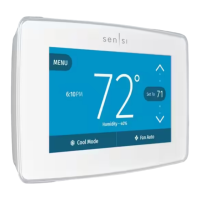
Access thermostat configurations.
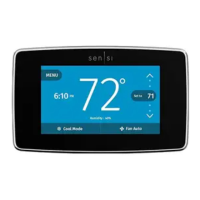
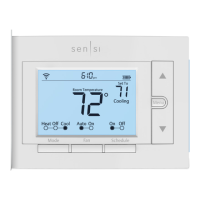
The room temperature at the thermostat.
Adjusts the temperature set point or thermostat configuration.
Current set temperature the thermostat will maintain.
Adjusts the temperature set point or thermostat configuration.
Switches fan mode from Auto or On.
Displays current humidity.
Switches system mode between Heat, Cool, Off, Aux or Auto.
Displays current time.
Press the mode button to switch between available system mode settings.
Switch fan mode to "On" to circulate indoor blower or "Auto" to control as needed.
Turn Schedule "Off" and adjust set point to hold temperature.
Temporarily change temperature; thermostat displays when next scheduled set point occurs.
Access settings and options about your thermostat in the menu.
Option to display room temperature even when the Sensi Touch screen goes to sleep.
Light to help see wiring/terminals during installation or light the area near thermostat.
Toggle what you want to see on the display: time, humidity, or F/C units.
Connect to Wi-Fi via the Sensi app or turn Wi-Fi on/off on the thermostat.
Instructions to turn Wi-Fi off on the thermostat and manually set time/schedule.
Program schedule based on time/temperature set points from app or unit.
Set the date and time manually if Wi-Fi is turned off.
View thermostat information: model number, MAC ID, firmware, support contact, factory reset.
Check HVAC settings, Circulating Fan, and humidification settings.
Set feature to circulate air using indoor blower fan (10%-100% increments).
Step-by-step instructions to set the Circulating Fan feature on the thermostat.
Customize thermostat for your system by changing settings; download app for instructions.
Definitions for terminal labels and their functions in wiring diagrams.
Explains wire color might not match terminal letters, advises taking photos.
Visual guide to the thermostat base, showing terminals and switches.
 General
| Type | Smart Thermostat |
|---|---|
| Wi-Fi Connectivity | Yes |
| Voice Control | Amazon Alexa, Google Assistant |
| Stages | 2 Heat / 2 Cool |
| Temperature Range | 45°F to 99°F (7°C to 37°C) |
| Remote Access | Yes |
| Geofencing | Yes |
| Product Type | Thermostat |
| Compatibility | Most HVAC systems |
| Mobile App | Yes (iOS and Android) |
| Power Source | Battery or C-wire |
| Programmability | 7-day scheduling |
| Smart Home Compatibility | Amazon Alexa, Google Assistant, Apple HomeKit |
| Operating Humidity Range | 5% - 90% RH, non-condensing |
| Operating Temperature Range | 32°F to 104°F |
| Warranty | 3-year |


 To Next Page