EasyManua.ls Logo

Sensi TOUCH 2 1F96U-42WF Series - User Manual

Sensi TOUCH 2 1F96U-42WF Series
13 pages
Print Icon
To Next Page IconTo Next Page
Loading...
SENSI
TM
TOUCH 2 SMART THERMOSTAT
Manual Operation
© 2022 Emerson Electric Co. All rights reserved
R-5580
Models: 1F96U-42WF series, ST76 series
Version: June 2022
Question and Answer IconNeed help?

Do you have a question about the Sensi TOUCH 2 1F96U-42WF Series and is the answer not in the manual?

Summary

Buttons and Icons Overview

Menu Access

Access thermostat settings and add sensors.

Sensor Participation

See how many sensors the thermostat is controlling to.

Temperature Adjustment Buttons

Adjusts the temperature set point up and down.

Current Set Temperature

Current set temperature the thermostat will maintain.

Humidity Display

Displays current humidity.

Fan and System Modes

Switches system mode and fan mode.

Time Display

Displays current time.

Mode Selection

Switching System Mode

Switch between Heat, Cool, Off, Aux, or Auto system modes.

Fan Mode Control

Control indoor air circulation via fan settings like Auto or On.

Holding One Temperature

Temporarily hold a specific temperature setting.

Menu Settings - Remote Sensors

Remote Sensors

Pair and view information about remote sensors.

Menu Settings - Display and Sleep

Display Options

Toggle what content appears on the thermostat display.

Home Screen Content

Customize display units, time, and humidity visibility.

Sleep Mode

Configure display settings when the touchscreen is inactive.

Menu Settings - Schedule, About, Wi-Fi

Schedule Management

Toggle the thermostat's schedule feature on or off.

About Thermostat

View model, MAC ID, firmware, and support information.

Wi-Fi Connectivity

Connect to Wi-Fi, view network details, and signal strength.

Menu Settings - Advanced Setup

Advanced Setup

Adjust HVAC settings and humidification.

HVAC Equipment Configuration

Customize thermostat settings for your specific HVAC system.

Date and Time Settings

Manually set or automatically sync date and time.

Contractor Information

Display contractor contact details on the thermostat.

Installation and Wiring

Terminal Outputs and Wiring Diagrams

Definitions of thermostat wiring terminals.

Wire Color to Terminal Correspondence

Guidance on wire color and terminal matching.

Thermostat Back Panel Installation

Dipswitch for Accessory Terminals

Configure power source for accessory terminals.

RH;RC Jumper Configuration

Clip jumper for two-transformer systems with separate RH/RC wires.

Troubleshooting Common Issues

Touchscreen Control Issues

Resolve touchscreen control issues, including keypad lockout.

Setpoint Adjustment Limits

Understand setpoint limits and temperature range restrictions.

Heating;Cooling Exceeding Setpoint

Diagnose and fix issues with heating/cooling exceeding setpoints.

Troubleshooting - Setpoint and Display

Unexpected Setpoint Changes

Troubleshoot unexpected setpoint changes due to schedules or automations.

Blank Touchscreen Diagnosis

Identify reasons for a blank thermostat screen, often power-related.

Troubleshooting - Heating;Cooling

Heating;Cooling System Not Turning On

Resolve issues with the heating or cooling system not engaging.

Overview

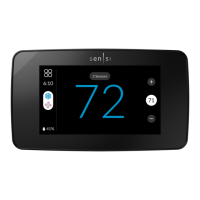
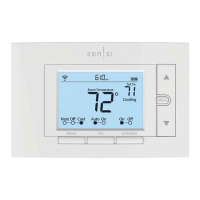
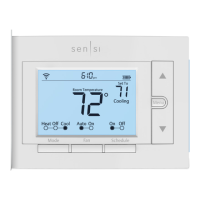
The Sensi Touch 2 Smart Thermostat (Models: 1F96U-42WF series, ST76 series) is a Wi-Fi enabled device designed to provide comfortable and efficient control over your home's heating, ventilation, and air conditioning (HVAC) system. It can be operated either through the Sensi mobile application or directly from the wall unit's touchscreen interface. While basic operation is available on the device, advanced features such as thermostat settings, scheduling, and email alerts are exclusively accessible via the Sensi app.

Function Description:

The Sensi Touch 2 thermostat allows users to manage their home's temperature, humidity, and fan settings. It supports various system modes including Heat, Cool, Off, Aux, and Auto, enabling flexible climate control. The Auto mode intelligently switches between heating and cooling based on two user-defined temperature setpoints, maintaining a comfortable range. For homes with heat pumps and auxiliary heat, the thermostat automatically manages the use of both systems in Heat Mode, or can be set to Aux for exclusive use of the backup heating. The fan can be set to Auto, On (for continuous operation), or Circulate Fan mode, which runs the blower for a set amount of continuous minutes each hour without engaging the HVAC system. The thermostat also supports remote sensors, allowing it to average temperatures across multiple locations for more accurate climate control.

Important Technical Specifications:

The thermostat operates on a 24V power supply. Key wiring terminals include RH* (Power for heating, 24V), RC* (Power for cooling, 24V), C** (Common wire, 24V), G (Indoor blower/fan), Y (First outdoor stage cooling/first heat and cool on heat pump systems), Y2/* (Second outdoor stage cooling/second heat and cool on two-stage heat pump systems), W/E (First indoor stage heat/first stage auxiliary/emergency heat on heat pump systems), W2/* (Second indoor stage heat/second stage auxiliary/emergency heat on heat pump systems/Dehumidifier), O/B (Changeover connection for heat pump or zone panel systems), ACC- (Used to control a whole home humidifier with two wires), and ACC+ (Used to control a whole home humidifier using a single wire). The device features a built-in Wi-Fi radio for connectivity and supports remote sensors for enhanced temperature monitoring. It has a temperature setpoint range of 45°F to 99°F.

Usage Features:

The touchscreen interface provides intuitive control.

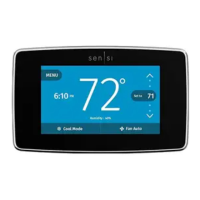
  • Menu Access: A dedicated menu button allows access to thermostat settings and sensor management.
  • Sensor Participation: Displays the number of sensors actively controlling the thermostat.
  • Plus/Minus Buttons: Used to adjust the temperature setpoint up or down.
  • Current Set Temperature: Shows the target temperature the thermostat will maintain.
  • Current Temperature: Displays the room temperature at the thermostat, or an average if remote sensors are connected.
  • Humidity Display: Shows the current humidity level.
  • Fan and System Modes: Buttons to switch between Heat, Cool, Off, Aux, Auto system modes, and Auto, On, or Circulate fan modes.
  • Time Display: Shows the current time.
  • Schedule Management: Users can toggle schedules On/Off directly from the thermostat, though creating and editing schedules requires the Sensi app. When a schedule is active, temporary holds can be set using the Plus/Minus buttons, which will maintain the new temperature until the next scheduled set point, with a minimum hold time of two hours.
  • Display Options: Customizable display settings include showing indoor humidity and time, and adjusting screen brightness for Sleep Mode. Users can also choose to display the setpoint in Sleep Mode.
  • Temperature Units: The thermostat can display temperatures in Fahrenheit or Celsius.
  • Wi-Fi Connectivity: Allows users to turn Wi-Fi on or off and view network information like name and signal strength.
  • Advanced Setup: Provides access to HVAC equipment settings, date and time adjustments, and humidification/dehumidification settings.
  • Contractor Information: If installed by a Sensi Partner Program professional, their contact information can be displayed on the thermostat.

Maintenance Features:

  • Factory Reset: A "Factory Reset" button in the "About Thermostat" menu allows users to clear all settings except HVAC Equipment settings and Temperature Limits, which can be useful for troubleshooting or reconfiguring the device.
  • Troubleshooting Guidance: The manual provides comprehensive troubleshooting steps for common issues such as inability to control the thermostat at the touchscreen (due to Keypad Lockout or Temperature Limits), heating/cooling past the setpoint (checking fan mode, circulating fan, humidity control, cycle rate, or system mode), and a blank touchscreen (checking power, wiring, and HVAC system status).
  • Wiring Diagrams and Definitions: Detailed explanations of terminal labels and wiring diagrams are provided to assist with installation and verification of correct wiring. This includes information on the RH/RC jumper for two-transformer systems and dipswitch settings for accessory power.
  • Support Resources: The manual directs users to sensi.emerson.com/en-us/support for additional information on configuring the thermostat and troubleshooting.

Sensi TOUCH 2 1F96U-42WF Series Specifications

General IconGeneral
BrandSensi
ModelTOUCH 2 1F96U-42WF Series
CategoryThermostat
LanguageEnglish

Related product manuals