

EasyManua.ls Logo

Sentinel Hub - User Manual

Sentinel Hub
8 pages
Print Icon
To Next Page IconTo Next Page
Loading...
REQUIREMENTS
Sentinel Boat Monitor device
Sentinel HUB
Sentinel Marine solutions app (Android or iOS)
Installation Guide
Sentinel HUB
v1.1
Question and Answer IconNeed help?

Do you have a question about the Sentinel Hub and is the answer not in the manual?

Summary

Mounting the Sentinel Hub

Wiring and Connections

Digital Inputs and Relay Outputs

Explains the function of digital inputs for sensing and relay outputs for switching.

Power Supply and Measurement

Details external power options, voltage measurement, and current sensing via shunt resistors.

Engine RPM and Hour Meter Input

Describes how to connect the engine RPM input for speed and operating hour tracking.

Wired Temperature Probe Connection

Guides on connecting an optional wired temperature probe for environmental monitoring.

Sentinel Hub Use Case Example

Pairing and Configuration Guide

System Operation and Monitoring

Sentinel Hub Technical Specifications

Overview

The Sentinel HUB is a versatile marine monitoring device designed to integrate with the Sentinel Boat Monitor system and the Sentinel Marine solutions app (available on Android and iOS). It serves as a central hub for collecting and transmitting various environmental and operational data, enhancing the monitoring capabilities of a marine vessel.

Function Description:

The Sentinel HUB acts as an extension to the Sentinel Boat Monitor, providing additional sensor inputs and relay outputs. Its primary functions include:
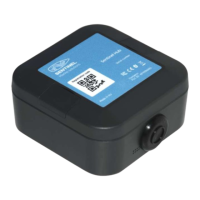
  • Environmental Monitoring: Equipped with built-in temperature, humidity, and pressure sensors, the HUB provides real-time environmental data. For more accurate readings, it should be placed in a shaded area, away from heat sources and protected from water splashes. An optional wired temperature probe can also be connected for measuring temperatures in ducts or on different surfaces.
  • Voltage and Current Measurement: The HUB can measure analog voltages from 0 V to 60 V via its Vbat input. Current measurement is achieved by monitoring the dropout voltage across an external shunt resistor, supporting bi-directional current flow. The system is pre-configured for 500A/50mV shunts, but custom shunt values can be configured by contacting support.
  • Engine RPM Input and Hours Counter: It features a dedicated digital input for engine speed (RPM) measurement, typically connected to an alternator's "W" terminal. This input also functions as an engine hours counter, tracking the cumulative operating time of the engine.
  • General Purpose Digital Inputs: The HUB includes two general-purpose digital inputs that detect the presence of a voltage (5V threshold) between the input and GND terminal, indicating a logical "on" or "off" state. These can be used for various applications, such as monitoring magnetic switches (e.g., door sensors).
  • Relay Outputs: Two "latching" relay outputs (SW1 and SW2) are available, which connect their terminals together when activated. These outputs maintain their state even if power is removed, making them suitable for switching loads. Each output can handle a maximum switching current of 2 A. For higher power loads, an external DC power relay of sufficient capacity should be used.
  • Wireless Communication: The HUB communicates with the Sentinel Boat Monitor and the Sentinel Marine solutions app using Bluetooth Low Energy (BLE).
  • Powering Options: The device can be powered by a single CR2032 battery and/or an external voltage supply up to 60 V. The CR2032 battery can serve as a backup power source when external voltage is disconnected.

Important Technical Specifications:

  • Absolute Maximum Voltage (IN 1, IN 2, RPM IN, +Vbat): 60V
  • Vbat Measurement Voltage Range: 0 - 60V
  • Shunt Input Common Mode Voltage: 0 - 30V maximum
  • Shunt Input Differential Voltage Range: -80mV to +80mV
  • Digital Output Type: Relay contact
  • Output Switch Current: 2 A maximum
  • RPM IN Maximum Input Frequency: 20 kHz
  • IN 1, IN 2, IN 3 Threshold Voltage: 5V
  • Internal Environmental Sensor Accuracy:
    • Temperature: ± 1°C
    • Humidity: ± 3% RH
    • Pressure: ± 1 hPa at 0-65°C
  • Temperature Probe (Optional) Accuracy: ± 0.5°C
  • Temperature Range: -20°C to 105°C
  • Power Supply: 1 x CR2032 battery and/or external analog voltage
  • Operating Temperature: -25°C to 60°C
  • Operating Humidity: 0 - 100%
  • Wireless Operating Range: Up to 30 m indoor (depends on wall materials/thicknesses), Up to 50 m outdoor
  • Wireless Communication Protocol: Bluetooth low energy (BLE)
  • Dimensions: 65 mm x 65 mm x 28 mm
  • Battery Life (CR2032, only battery operation): More than two years

Usage Features:

  • Mounting: The HUB has two mounting holes located under hinged covers. It is recommended to mount the device on a wooden or plastic panel to avoid interference with Bluetooth reception. Large conductive surfaces between the HUB and the Boat Monitor should also be avoided.
  • Wiring: When connecting any input line, a 1 A fuse should be installed on the positive (+) power cable as close as possible to the battery terminal for protection.
  • Pairing and Configuration: The Sentinel HUB is paired and configured using the Sentinel Marine solutions app. This involves tapping the "+" sign in the app, scanning the QR code on the HUB, selecting the nearby device, and ensuring the HUB and Boat Monitor are close to each other before pressing "Continue."
  • App Integration: Once paired, new sensors (Temperature, Humidity, Air Pressure, Current, Battery Voltage, etc.) will appear in the "Sensors" tab of the app. Users can customize which sensors are shown using the "Edit" button. The "Switches" tab allows users to toggle Hub outputs ON or OFF and rename them.
  • Engine Pulse Code: The default engine pulse code for RPM input is 10.7. If your alternator has a different pulse ratio, contact support for adjustment.

Maintenance Features:

  • Battery Replacement: The device uses a CR2032 battery, which can be replaced when needed, especially if external power is not consistently available or desired.
  • Shunt Value Configuration: If a shunt resistor with a value different from the pre-configured 500A/50mV is installed for current measurement, users should report the new shunt value to support@sentinelmarine.net for proper configuration.
  • Subscription Management: The addition of new sensors from the Sentinel HUB may require a change in the Boat Monitor subscription. For more information, users should contact support@sentinelmarine.net.
  • Firmware Updates: While not explicitly detailed, Sentinel devices typically receive firmware updates to improve functionality and address issues, which would be managed through the app or support.

Sentinel Hub Specifications

General IconGeneral
BrandSentinel
ModelHub
CategorySwitch
LanguageEnglish