8 Original Instructions Sentry Equipment Corp
Outputs
 NOTE
If others provide control, it should follow the minimum requirements of the operating logic outlined in this section
Controller outputs vary by the sampler controlled. Refer to the chart below or the electrical wiring diagram (EWD) to
determine output usage.
Sampler R1 R2 R3 R4 R5 R6
A, MG-Air Unused
Sample
Sol
IC Full IC Motor Alarm
Sampler
Running
B1
Direction
Relay
IC Full Motor " " "
GE IC Full Unused Motor " " "
ISOLOK Air Eject Sol
Sample
Sol
IC Full " " "
Iso-Park Sol 2 Sol 1 IC Full " " "
MG Elec IC Full Unused Motor " " "
PR Purge Sol
Sample
Sol
IC Full " " "
R Solenoid IC Full Motor " " "
RB, D2 Solenoid IC Full Motor " " "
RX Purge Sol
Sample
Sol
IC Full " " "
RPG Extend Sol Rotate Sol IC Full " " "
SA/A, GA Solenoid Unused IC Full " " "
SA/E IC Full Unused Motor " " "
Operation
Quick Start
The rst time power is applied, the controller defaults to Quick Start. Quick Start leads the operator through the
controller set-up procedure step-by-step.
To access Quick Start on subsequent power-ups, press the Service key and select Quick Start.
Using the Controller Keys
System Keys
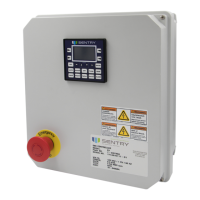
1. Soft Keys: The arrow keys on either side of the display correspond to keys programmed on the screen. The rim
surrounding the soft key shown on the display will be lled when the option is selected.
2. ESC: Returns to previous screen; ends editing session without accepting new value.
3. Arrow Keys: The up, down, right and left arrow keys located directly below the display are used to navigate menu
selections and change editable values.
4. ENTER: Accepts new values; selects menu options; enters editing mode.
5. Numbers: In editing mode, all of the function keys can be used to enter numbers, which are shown in gray on the
upper right hand corners of the keys


 To Next Page