Sentry SBC Controller Original Instructions 9
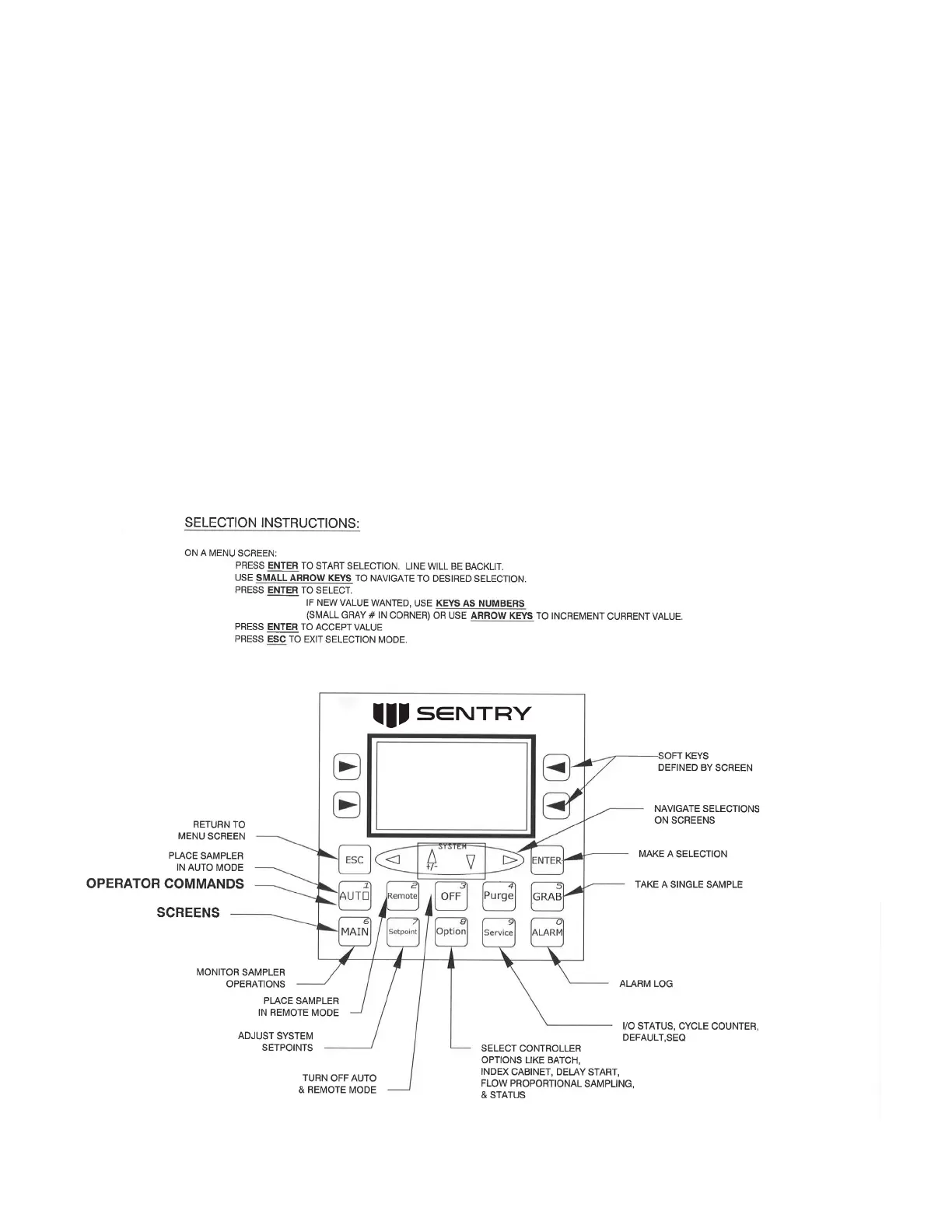
Command Keys
1. AUTO: Places the controller in AUTO mode. This mode allows local operation of the controller.
2. Remote: Allows remote operation of the controller. Sampling starts when a contact from an external source is
closed. Continuous sampling occurs for as long as the contact is closed. Momentarily closing this contact will start
a single sample.
3. OFF: Takes the sampler out of REMOTE or AUTO mode; will reset the Batch counter.
4. Purge: If sampler has a purge/air eject option, this key manually operates the solenoid to purge the unit.
5. GRAB: Allows the operator to immediately collect a sample. Sampler must be in the Cycle/Retracted portion of the
sampling cycle or in the OFF state.
Menu Keys
1. MAIN: Main operating screen displays sampler position, current timer value, current mode, and Batch and IC count.
2. Setpoint: Lists all program setpoints.
3. Option: Menu of the available program options and routing to pertinent screens.
4. Service: Menu of service-related options such as I/O Status, Quick Start, Operation Sequence, Default settings, and
Cycle Counter.
5. Alarm: System alarm log.


 To Next Page