EasyManua.ls Logo

SEON DS2 - User Manual

SEON DS2
8 pages
Print Icon
To Next Page IconTo Next Page
Loading...
DS2 Two-Camera Vehicle Event Recording System
DS2 Quick Installation and Setup Guide
Part #700-1078 R5
Quick Installation and Setup Guide
Before you Begin…
This process involves mounting cameras and running cables through the vehicle interior. It is helpful to have
some familiarity with installing automotive accessories.
Warning: It is your responsibility to avoid damaging safety or electrical systems.
DS2 may interfere with on-board collision avoidance systems utilizing forward facing cameras.
Consult your vehicle's Owner's Manual or your dealer if you’re unsure whether your vehicle
uses this technology. To confirm if DS2 is compatible with your vehicle, please consult
https://community.seon.com/ds2-unsupported-vehicle-list/ or contact the Seon service team.
Impairing or interfering with the operation of an airbag is a critical safety concern. If you are not
confident in your ability to perform the procedures in this Guide, please consider contacting
Seon Support to schedule a professional installation.
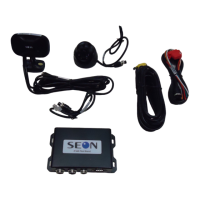
Check that you received all system components:

Other manuals for SEON DS2

Question and Answer IconNeed help?

Do you have a question about the SEON DS2 and is the answer not in the manual?

Summary

Quick Installation and Setup Guide

Introduction and Safety Precautions

Covers initial setup, vehicle familiarity, and critical safety warnings regarding vehicle systems and airbags.

Step 1: Determine Installation Locations

Cable Lengths and Routing

Specifies cable lengths required for connecting cameras and the control unit within the vehicle.

Component Mounting Locations

Guidance on optimal placement for the Control Unit and Camera 1 on the windshield.

Step 2: Insert SD Card into Camera 1

Step 3: Mount Camera 1 on Windshield

Step 4: Mount Camera 2

Step 5: Install Control Unit and Power

Alarm;Event Trigger Button Installation

Details on optional installation of the Alarm/Event Trigger Button with wiring connections.

Step 6: Run and Connect Camera Cables

Cable Connection Procedure

Specifies how to connect the CAM and OBD cables between cameras and control unit.

Step 7: Verify System Operation

Contact Technical Support

SEON DS2 Specifications

General IconGeneral
BrandSEON
ModelDS2
CategoryRecording Equipment
LanguageEnglish