Laptop
Configuration
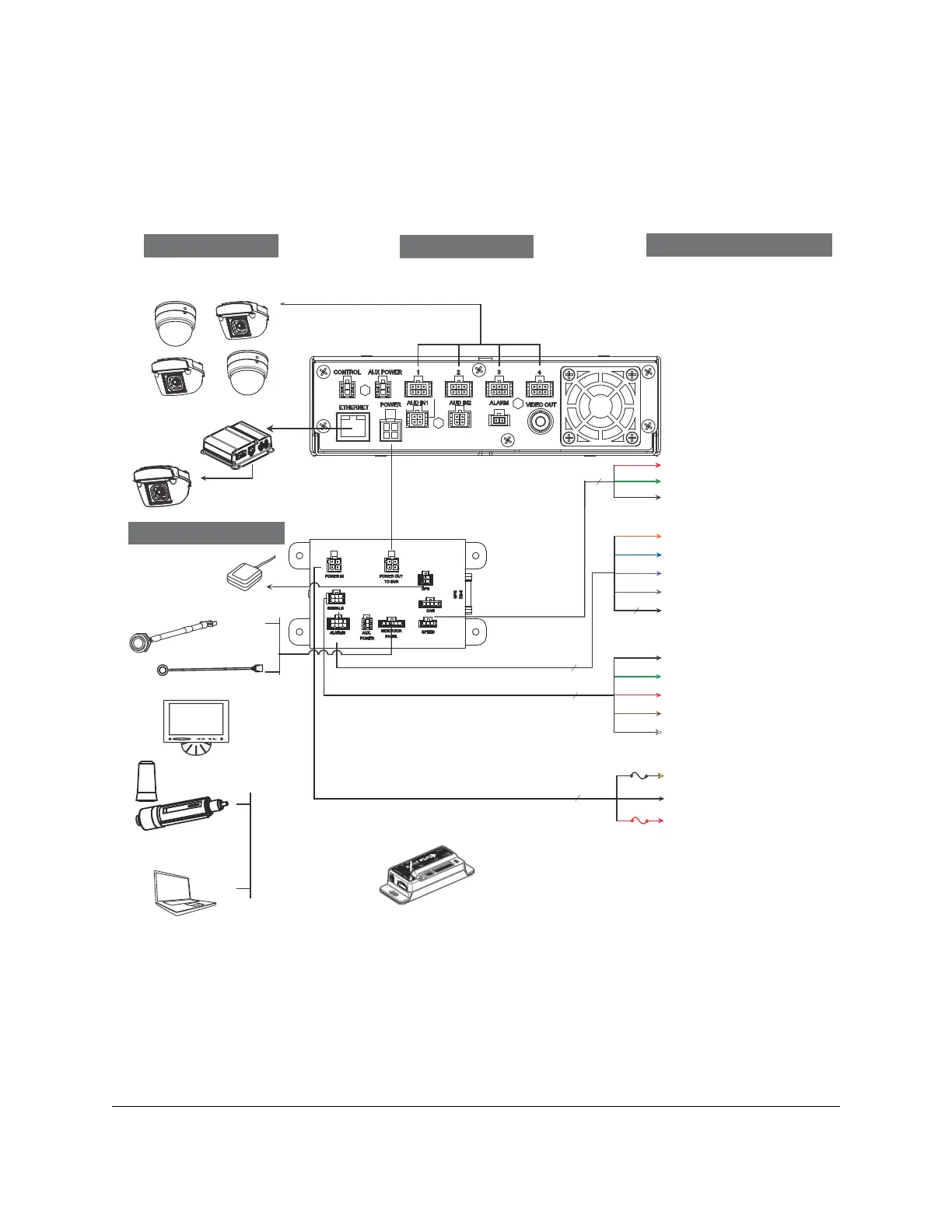
Explorer® MX-HD
Typical Plus System Setup
Vehicle Electrical Interface
Peripherals
Seon System
Smart-Link
Supports Four
Analog Cameras
GPS Receiver
*1
3 wires
Red - Not used
Green - Speed sensor high
Black - Speed sensor low
SPEED
5 wires
XELR-8 Inertia Sensor
Portable Video Monitor
*2
Left Turn (black)
Stop (green)
Brake Signal (red)
Warning (brown)
Right Turn (white)
SIGNALS
Alarm 1 (orange)
Alarm 2 (blue)
Alarm 3 (violet)
Alarm 4 (gray)
Alarm 1-4 Ground (black)
4 wires
ALARMS
MX-HD DVR Rear Panel
3 wires
Vehicle + 12V (red)
5A
Vehicle Switched + 12V (yellow)
Battery Negative (black)
POWER
1A
Optional Accessories
*1 For ease of installation and better speed tracking, Seon recommends using a GPS receiver.
*2 The portable video monitor can be used from the front or back panel DVR connectors.
8 wires
Smart-Reach Lite
(Wi-fi)
CHW HD Camera
Power over Ethernet
Switch
Diagnostic Indicator/
Alarm Button
RGY Illuminator
To DVR
ETHERNET
Input
To DVR
VIDEO OUT
To DVR
CONTROL Input
or
*3 The Diagnostic Indicator/Alarm Button and RGY Illuminator Display are not interchangeable, a different Smart-Link unit is required to use either one.
*3
*3



 To Next Page