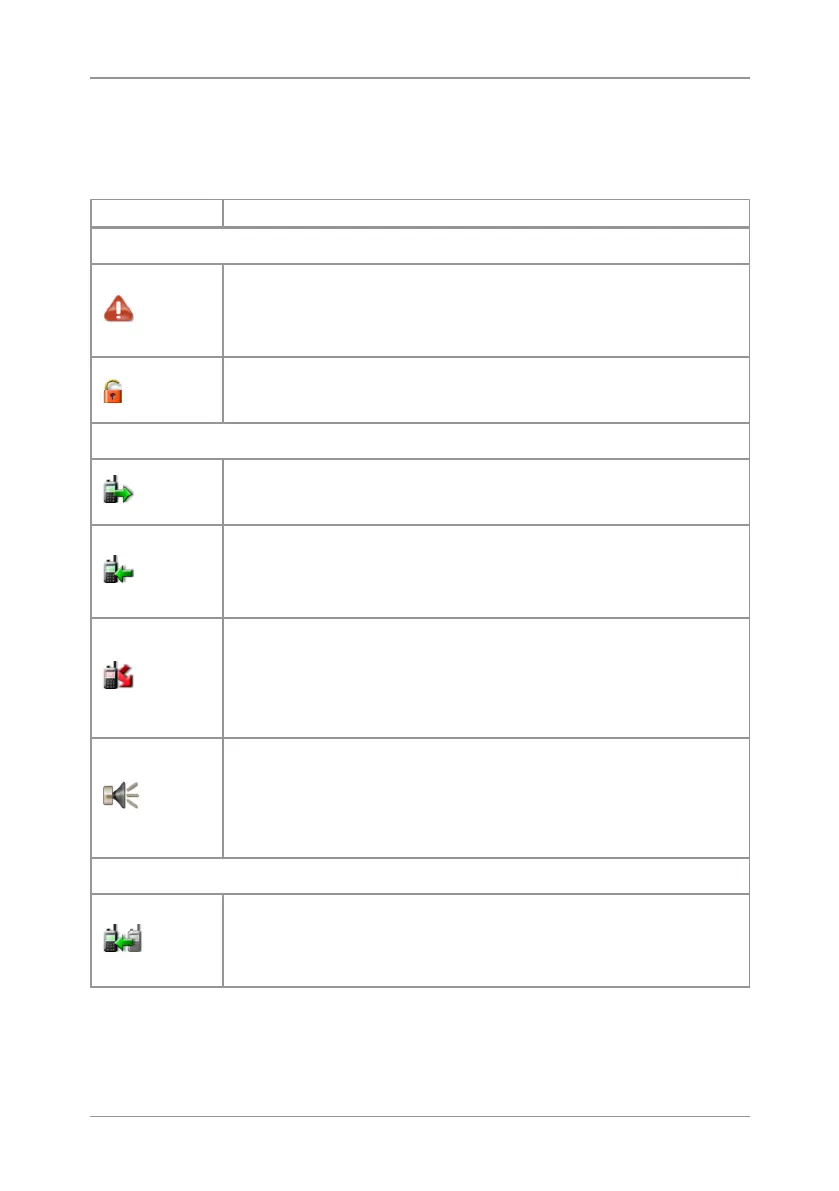
Status icons
Icons appear on the status line (at the top of the display) when the radio
is engaged in certain activities or when certain functions are active.
Icon Description
Security and Emergency
Emergency
Appears when emergency operation mode is active on
your radio and an Alarm call is in progress.
Air Interface Encryption disabled
Calls will not be encrypted.
Trunked Mode Operation (TMO)
Outgoing TMOcall in progress
You are in a call that you initiated.
Incoming TMO call in progress
You are in a call that was initiated by another person or
your dispatcher on the TMO network.
Missed incoming TMO call
You have missed an incoming TMO call. The blue
LEDflashes.
A notification alerting you to the missed
call appears in the Shortcut Bar.
Broadcast Call
A high-priority group call (
point-to-multi-point
) initiated
by your Dispatcher to all network radio users. You
cannot reply to the caller.
Direct Mode Operation (DMO)
Incoming DMO call
You are in a DMO call that was initiated by another
radio user.
12
SC20 series – 07/2017


 To Next Page
 Loading...