Need help?
Do you have a question about the Sepura SC2024W and is the answer not in the manual?
Describes default operation and features, with notes on customization.
How to check the battery charge level before operation.
Details on recharging the radio's rechargeable battery.
Instructions for charging a new battery for the first time.
Guidance on using Sepura approved battery chargers.
Explains how to charge the radio and the meaning of LED indicators.
Instructions on how to attach the battery to the radio.
Step-by-step guide on how to safely detach the battery from the radio.
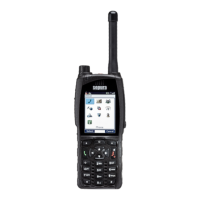
Detailed description of the functions of various keys, buttons, and the Navi-knob.
Explains context-sensitive key labels and their actions on the Home screen.
How to assign and activate special features using soft keys.
Details the indications provided by the blue LED, including missed events and Bluetooth status.
Explains the operational states indicated by the tri-colour LED.
Describes the status line at the top of the screen and its icons.
Explains context key labels at the bottom of the screen and their dynamic functions.
Icons related to emergency operation and air interface encryption status.
Icons indicating call status and missed calls within the TMO network.
Icons related to call status in Direct Mode Operation.
Icons indicating higher or lower transmission power levels in DMO.
Icons for signal strength, coverage, battery status, charging, and keypad lock.
Icon indicating transmit inhibit status and inability to transmit.
Managing personal contacts, searching, and initiating calls.
Reading, creating, saving, and sending text (SDS) and status messages.
Searching talkgroups, enabling scanning, and setting speech call preferences.
Managing GPS location and position settings.
Using custom applications like Man-down and Lone Worker.
Managing network connections and operating modes (TMO/DMO).
Managing Bluetooth, personalization settings, and Connector Protector.
Selecting custom profiles to match circumstances or environment.
Accessing help information and lists of soft keys.
Step-by-step instructions to turn the radio on.
Procedures for correctly powering down the radio.
How to lock and unlock the radio's keypad to prevent accidental use.
How to change the radio's volume using the Navi-knob.
Steps to switch between TMO and DMO modes via the menu.
Step-by-step guide to selecting a talkgroup using navigation keys and the Navi-knob.
Steps to select a folder from a list via the menu.
Steps to select a folder and talkgroup from the Talkgroup Selection box.
How to select a talkgroup from within a selected folder.
Description of the hands-free calling feature for assistance.
How to search for contacts by name or number and filter within folders.
Detailed steps for searching contacts in the phone book.
Steps to filter contacts displayed within a specific folder.
Instructions for editing the name of an existing contact.
Steps to modify phone numbers associated with a contact.
Procedures for removing a contact from the phone book.
Explanation of group calls and how they operate in half-duplex mode.
Steps to initiate and conduct a group call.
How to identify and respond to an incoming group call.
Instructions for making half-duplex individual calls by selecting contacts or dialling.
Steps to initiate an individual call by directly dialling a number.
How to answer or reject an incoming half-duplex individual call.
How to initiate a phone call by dialling a number.
How to answer or reject an incoming phone call.
How to change text styles and enter numbers and special characters.
Steps to switch between different character sets during text entry.
How to select characters from the Character Selection Box.
Procedure for deleting a character to the left of the cursor.
Methods for inserting punctuation and symbols.
How to enable the Connector Protector for protection in harsh environments.
Selecting custom profiles to match circumstances or environment.
Methods to activate or deactivate the Man Down feature.
How to configure Man Down sensor settings.
How to view, manage, and save incoming messages.
Steps to compose and send a new text message.
How to be alerted to and read incoming messages.
How to reply to an incoming text message.
Options for sending messages to different destinations.
How to send pre-defined status messages.
How to flip the display orientation for easier reading in certain positions.
How to adjust the display and keypad backlight settings.
How to adjust display brightness for day or night conditions.
Steps to adjust Day/Night mode, backlight enable, and level.
Steps to select and change the radio's display language.
Quick way to return to the Home screen.
Shortcut to lock and unlock the keypad.
How to change the currently selected talkgroup.
Quick method to send a status message.
Shortcuts for changing character sets, deleting, and inserting characters.
Using Select/Send and Cancel/Home keys for functions.
How to perform fast scrolling through lists.
Alternative method for initiating and ending calls.
How to access the call history.
 General
| Frequency Range | 380-430 MHz |
|---|---|
| GPS | Yes |
| Bluetooth | Yes |
| Man Down | Yes |
| Ingress Protection | IP67 |

 To Next Page