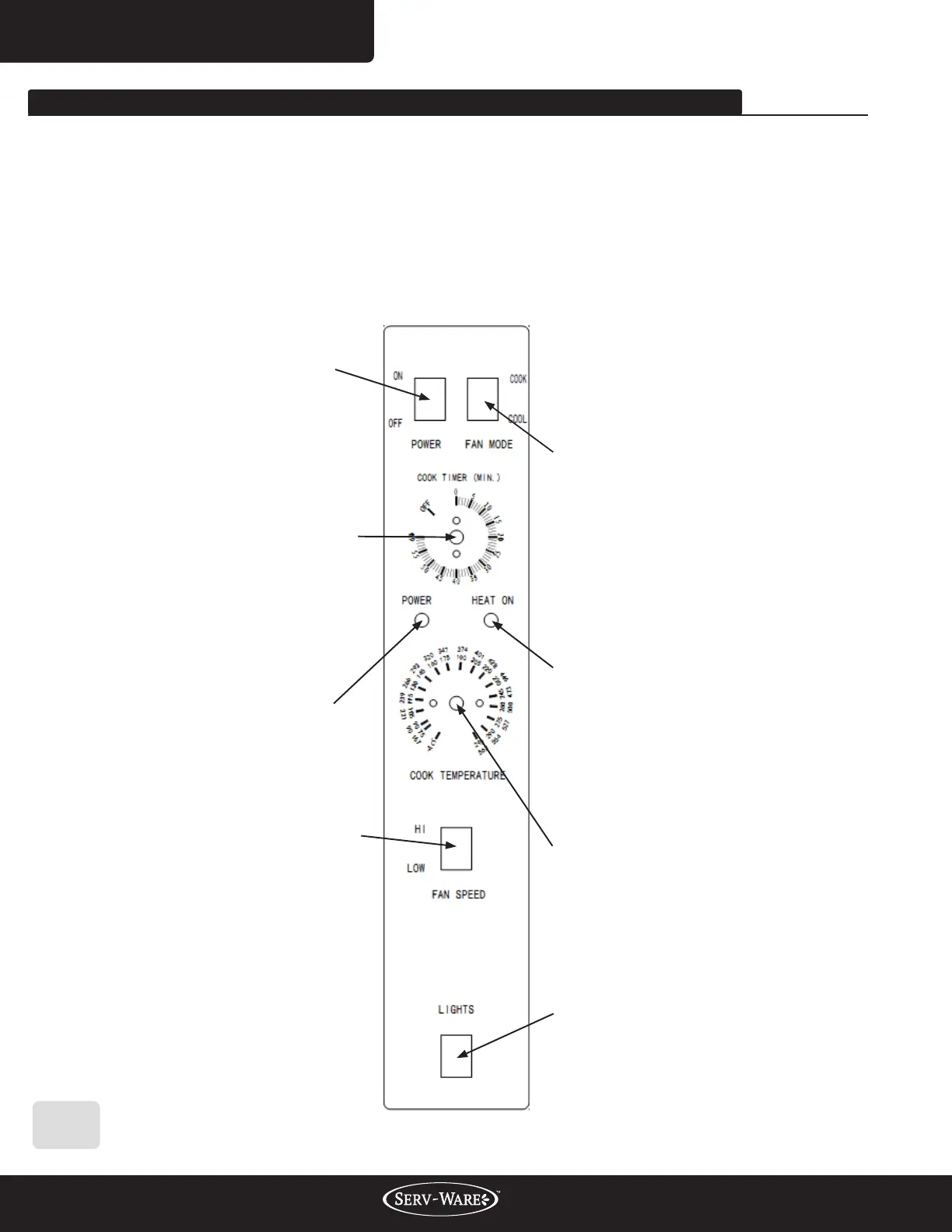
HEAT-ON Indicator:
The HEAT-ON indicator will light
when the burners are on and will
remain on while the oven preheats.
Power Light:
Switch ON, and the light turns on.
Switch OFF, and the light turns o.
Cook Timer:
Turn knob to set a time duration. An
alarm will sound when the timer runs
out. Turn the knob to OFF to cancel
the alarm. The timer is a reminder to
the user; the timer does not control
the oven.
Power Switch:
Switch ON to use the oven, switch
OFF when do not use.
Fan Mode:
In COOK mode, the fan runs
continuously except when the doors
are open. The fan does not cycle
with the operation of the burners.
In COOL mode, the fan runs
continuously even if the doors are
open. To rapidly cool the oven after
cooking is completed, open the doors
and switch the fan mode to COOL.
HI / LOW Fan Speed:
Use to select fan speed (HI or LOW).
The appropriate speed is determined
by the type of food being cooked.
Oven Interior Light Switch:
Press to turn on the light.
The light is controlled independently.
Cook Temperature Control:
Turn the knob to desired temperature.
When the set point is reached, the
HEAT ON indicator will be o. When
the burners maintain in the set
temperature, the indicator will cycle
on or o.
www.servware.com
800•768•5953
Service, Installation & Care Manual
13
WORKING INSTRUCTIONS AND OPERATION FLOW
Operating the Controls:
A convection oven is a dierent type of oven that oers many features and advantages to the
food service operation. The additional capabilities and features of the oven require some learning.
However, the operation of the oven is not dicult to understand or control once you have some
practice. See the controls in the following feature:



 To Next Page