27
Connecting battery and motor
· No connectors included. Please use a
matching part for the red and black battery
cable.
· Please check the correct polarity:
Red=positive, black=negative. Wrong
polarity will ruin the M24 immediately!
· Use suitable connectors for both yellow
cables or solder the cables to the motor.
The M24 type plate is also used as a heat sink. The module might heat up and need some cooling.
Don’t cover it with foam!
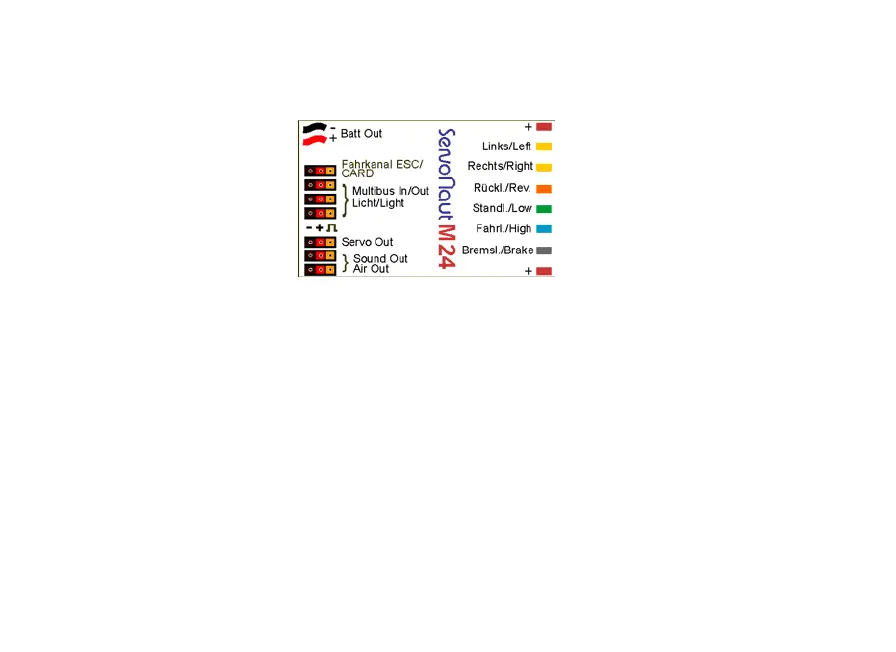
Blue plug to receiver
White plug to receiver
driving light
braking light
common plus
Battery minus / plus
common plus
left indicator
right indicator
reversing light
parking light
Screw terminals light
Multibus sound module (option)
Multibus light set (option)
Servo fifth wheel coupling
Sound module
to AIR4
· Only use motors that are designed for the
chosen operating voltage.
· Use capacitors to suppress motor interfer-
ence.
· Do not connect a diode to the motor (do not
use a hot-carrier-diode).


 To Next Page