DIGITAL WEIGHING INDICATOR
SI 4010
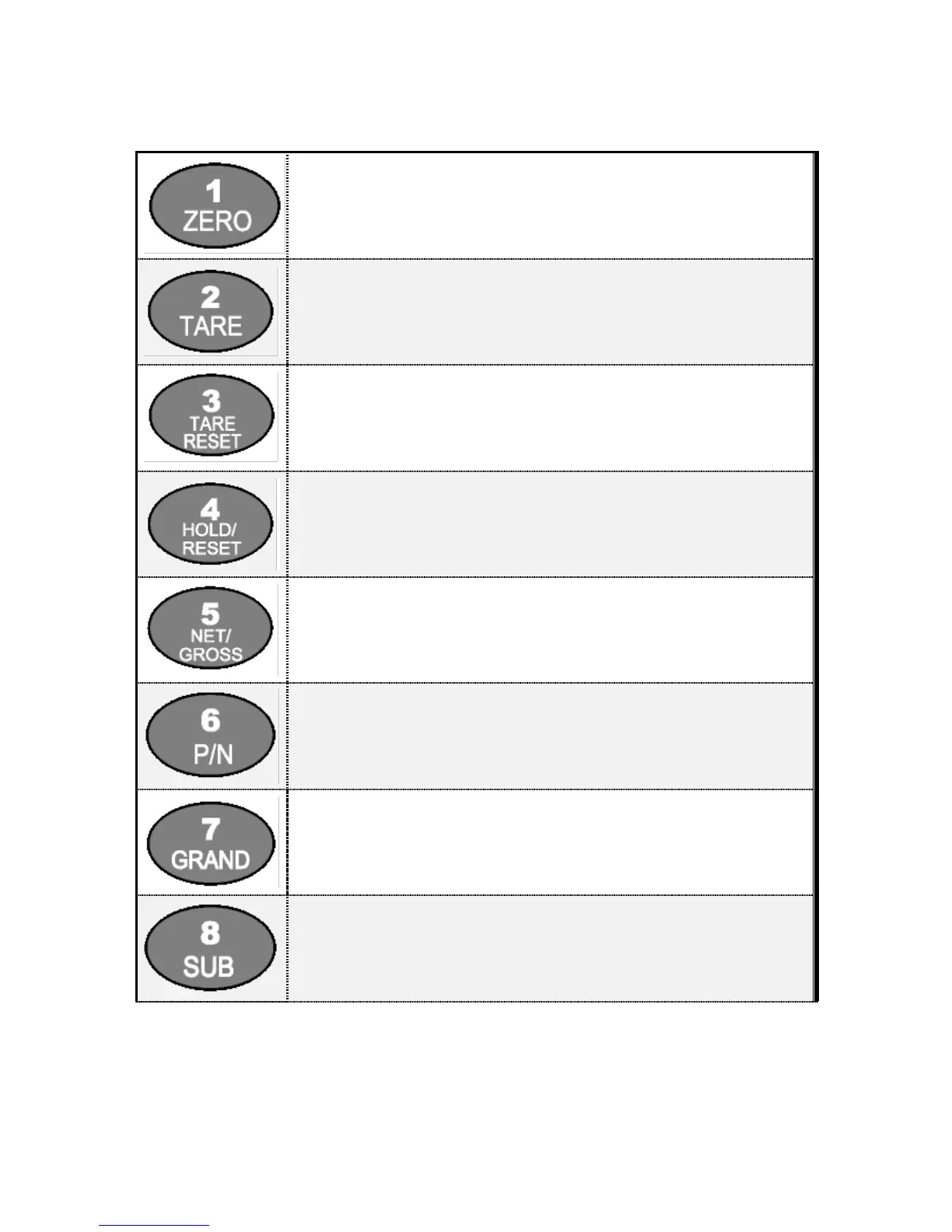
Make Weight value as Zero.
Under F08, you can set the Zero key operation range, as 2%, or 5%, or 10%, or 20% of
Max. Capacity.
※ Under “Tare” key input, Zero key will not be activate within operation range.
Make Weight value as Zero, including Tare Weight.
Under F09, you can set the Tare key operation range, as 10%, 20%, 50%, or 100% of
Max. Capacity.
※ Whenever pressing “Tare” key, you can set the Tare continuously.
TARE RESET
1. Remove the Set TARE function.
- If you press this key, TARE set value will be removed and display gross weight.
Hold the Weight display when indicator detects “Peak Hold”, or “Sample Hold”.
※ You can select “Hold” function on F10.
First input : HOLD is set Second input : HOLD Reset
Under “TARE” setting, you can select weight display mode.
First input, Gross Weight will be displayed, second input, Net weight will be displayed.
※ This key will be activated only under “TARE” set.
You can set each weighing process as a certain P/N.
And you can call certain P/N with pressing this key.
P/N save : Select P/N and Enter key input.
P/N call : P/N + Number key + Enter
Print out All Part Nos’ weighing data will be printed.
(Grand Total Data Print Out)
Current Part No.’s weighing data will be printed.
(Sub Total Data Print Out)


 To Next Page