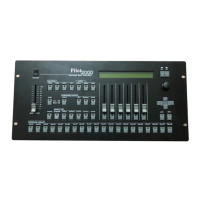
PILOT 2000 USER GUIDE
To insert a new fixture configuration into the Pilot’s library:
1. Press the Menu button.
2. Scroll with the up/down arrows until “Internal Library” appears on the display.
3. Press the right-hand Scroll button to enter the menu
4. Scroll with the up/down arrows until “Create New Unit” appears on the display.
5. Press the right-hand Scroll button to enter the menu. 13 sub-menus are available to
create a New Unit.
To insert the new fixture name:
1. Scroll with the up/down arrows until “Unit Name” appears on the display.
2. Press the right-hand Scroll button to enter the menu.
3. The display will show “-NNNNNNNNNNNN-“
4. By using the up/down arrows replace the “N” with the required letters to write the
fixture’s name.
5. Use the left/right arrows to shift to next/previous letter
6. Refer to above item 4 and 5 to write the fixtur’s name
7. Press the right-hand Scroll button to escape the menu.
To insert the Total DMX Channel:
1. Scroll with the up/down arrows until “Total DMX Channel” appears on the display.
2. Press the right-hand Scroll button to enter the menu.
3. The display will show “Total channels occupied on DMX…..
[01] “
4. By using the up/down, assign the required DMX channels for the fixture to be set.
5. Press the right-hand Scroll button to escape the menu.
To assign the parameters’ name to the faders :
1. Scroll with the up/down arrows until “LCD Effect Label” appears on the display.
2. Press the right-hand Scroll button to enter the menu.
3. The menu consists of 2 sub-menus: “LCD Pages” and “Effect String”.
3a) LCD Pages: allows to set the amount of required LCD screen to view the fixture’s
parameters on display. Each screen can contains 6 parameters, so in case of a fixture
having 18 channels, the required LCD screen are 3 (no.channels divided by 6).
In addition, Pan/Tilt/Remote reset/Remote lamp on/off, must not be considered as they
can be set into other menu.
Press the right-hand Scroll button to enter the “Effect String” menu.
20
SGM A/S · Ver. 2.03


 To Next Page