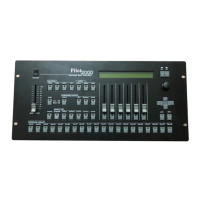
PILOT 2000 USER GUIDE
Manual use of the Unit....................................................................................................13
To assign a shape to a unit:....................................................................................13
Programming..................................................................................................................14
To program a Preset:...............................................................................................14
To program a Psycho:.............................................................................................14
To edit a Chase:......................................................................................................14
To edit a Program:...................................................................................................15
To set the Active Effects of a Unit:..........................................................................15
To set the Length of a Program or Chase:..............................................................16
To change step’s time of a Program or Chase:.......................................................16
Times of a Memory Obj :.........................................................................................16
Times of a Chase or Program:................................................................................16
Times of a Psycho or Preset:..................................................................................17
Levels of a Memory Obj :.........................................................................................17
To allocate a Memory Obj to a memory :.................................................................17
To set or modify the Working Area..........................................................................17
To test a new Working Area....................................................................................18
Internal Library................................................................................................................19
Edit a New Unit........................................................................................................19
To insert a new fixture configuration into the Pilot’s library:.....................................20
To insert the new fixture name:...............................................................................20
To insert the Total DMX Channel:...........................................................................20
To assign the parameters’ name to the faders :......................................................20
Press the right-hand Scroll button to enter the “Effect String” menu..............................20
To assign the DMX channels to the parameters:.....................................................21
To set the “Stand by values” to each parameters:...................................................21
To set the parameter’s type:....................................................................................21
To set the Pan and Tilt channels:............................................................................21
To set the Hard/Soft Cross:.....................................................................................22
To set the Reset/Lamp value:..................................................................................22
To set the Dip-switch configuration:.........................................................................22
To set the Beam find value:.....................................................................................22
To set the Control Type for each parameter:...........................................................22
Synchronization of the Desk with RS232........................................................................24
CHANNEL ON.........................................................................................................24
CHANNEL OFF.......................................................................................................24
REGISTER CHANGE..............................................................................................24
ALL CHANNEL OFF................................................................................................24
PAGE CHANGE......................................................................................................24
DEVICE SELECT....................................................................................................24
Connection of the RS -232 CABLE for Pilot 2000:..................................................25
SMPTE...........................................................................................................................25
SGM A/S · Ver. 2.03
3


 To Next Page