SX-68JF200
18
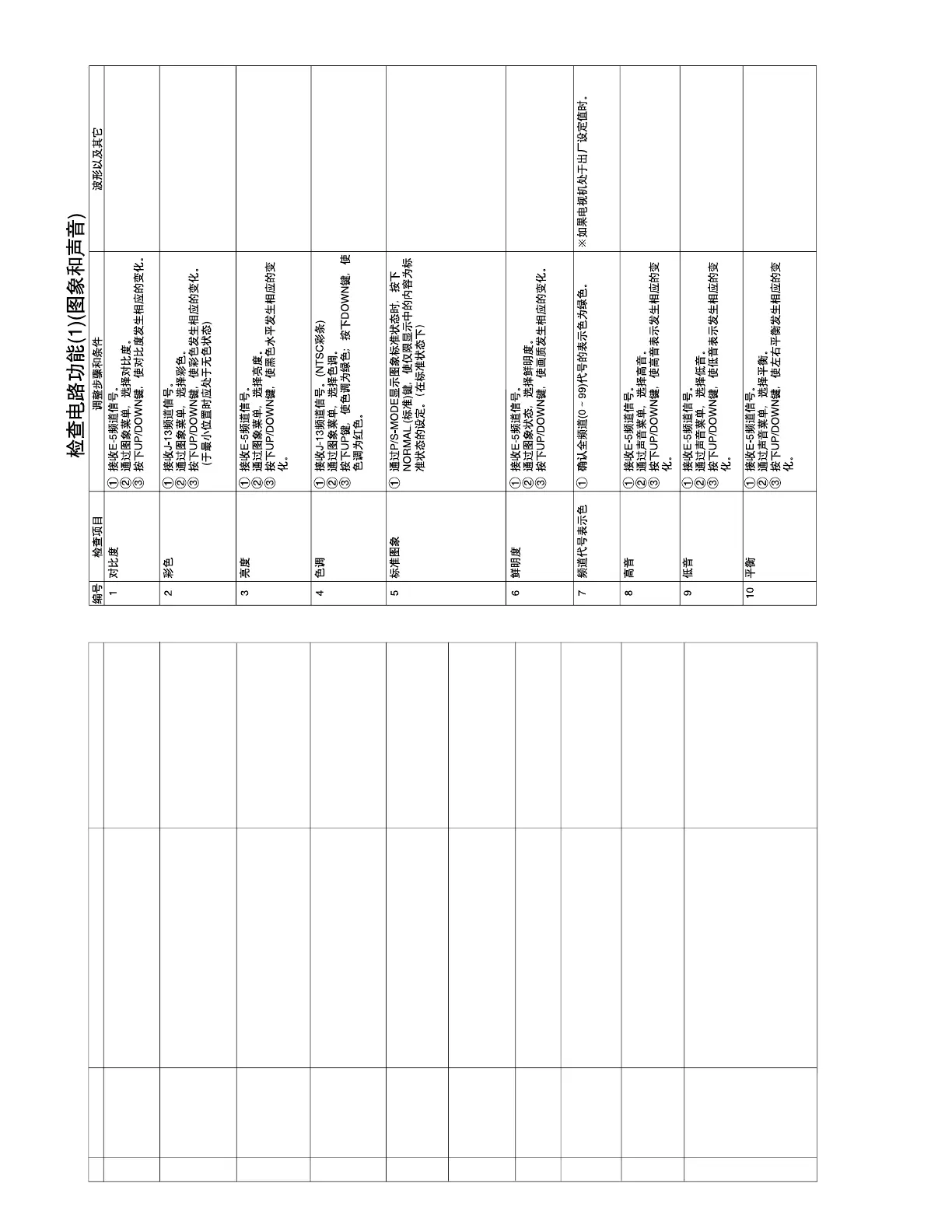
FUNCTION OPERATION CHECK (1) (VIDEO AND AUDIO)
NO. Check item Adjusting procedure and conditions Waveform and others
CONTRAST
COLOUR
1 If NORMAL key is pressed when the mode is
displayed in P/S-mode, the displayed content
alone must be set to be normal.
1 Receive J-13CH. (NTSC colour bar)
2 In P-mode, select TINT.
3 With UP/DOWN, the tint must be varied toward
green for UP, and toward red for DOWN.
1 Receive E-5CH.
2 In P-mode, select BRIGHT.
3 The black level must be varied with UP/
DOWN.
1
2
BRIGHTNESS
3
1 Receive J-13CH.
2 In P-mode, select COLOUR.
3 The colouring must be varied with UP/
DOWN.
(Any colour must not remain in MIN.)
1 Receive E-5CH.
2 In P-mode, select CONTRAST.
3 The contrast must be varied with UP/DOWN.
4
TINT
NORMAL
5
1 Receive E-5CH.
2 In P-mode, select SHARPNESS.
3 The screen quality must be varied with UP/
DOWN.
1 All CH (0 thru 99) sign must be displayed in
green.
1 Receive E-5CH.
2 In S-mode, select TREBLE.
3 The high band must be varied with UP/DOWN.
9
1 Receive E-5CH.
2 In S-mode, select BASS.
3 The low band must be varied with UP/DOWN.
1 Receive E-5CH.
2 In S-mode, select BALANCE.
3 Verify that the left/right balance must be varied
with UP/DOWN.
6
SHARPNESS
7
CH sign display
colour
8
TREBLE
BASS
10 BALANCE



 To Next Page