EN-11EN-11
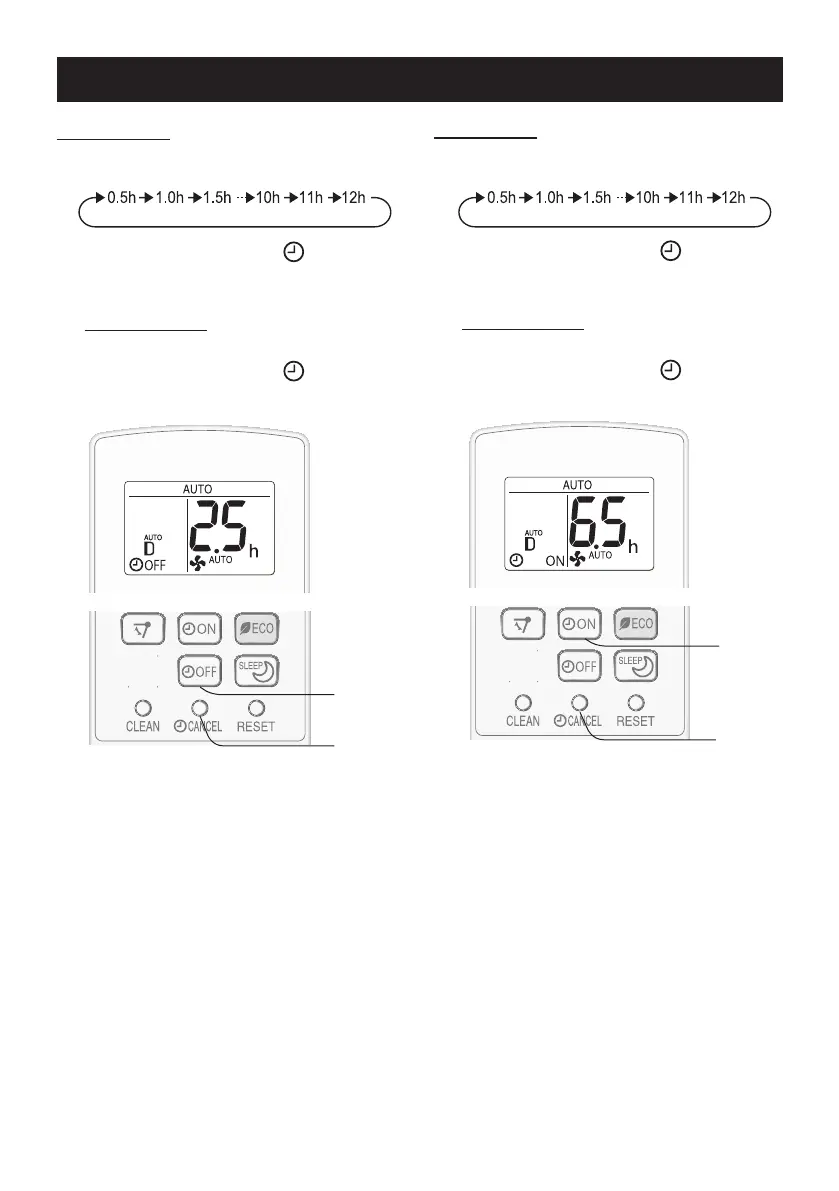
TIMER ON
1
Press the TIMER ON button and set
the time as desired.
•TheorangeTIMERlamp( )willlightup.
•Thetimersettingwillcountdowntoshow
the remaining time.
TO CANCEL
PresstheCANCELbutton.
•TheorangeTIMERlamp( )willturnoff.
TIMER OFF
1
Press the TIMER OFF button and set
the time as desired.
•TheorangeTIMERlamp( )willlightup.
•Thetimersettingwillcountdowntoshow
the remaining time.
TO CANCEL
PresstheCANCELbutton.
•TheorangeTIMERlamp( )willturnoff.
NOTE:
•Timerdurationcanbesetfromaminimumhalfanhourtoamaximumof12hours.Upto9.5hours,
you can set in half-hour increments, and from 10 to 12 hours, in 1-hour increments.
•TheTIMEROFFandTIMERONcannotbesettogether.
•Whenthetemperatureissetduringtimersetting,thetemperaturewillshowinthedisplayfor5
seconds and then return to the timer display.
•IfapowerfailureoccurswhiletheTIMERisset,theTIMERsettingwillbecancelledandwillnotbe
retrievedevenafterthepowerisrestored.
TIMER ON
•Theunitwillturnonpriortothesettimetoallowtheroomtoreachthedesiredtemperaturebythe
programmedtime.(Awakingfunction)
TIMER OPERATION
CANCEL
1
1
CANCEL




 To Next Page