EN-6
ENGLISH
EN-6
OPERATION CONDITION
1
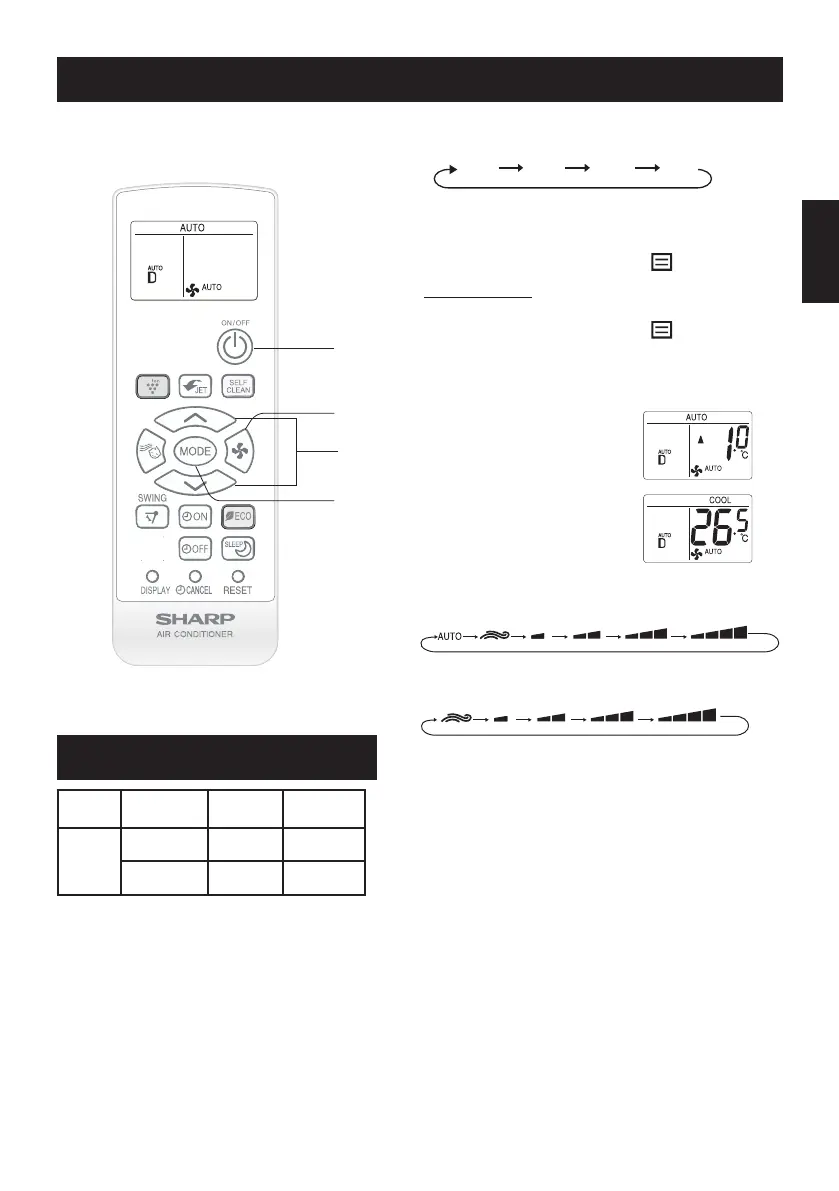
Press the MODE button to select the op-
eration mode.
2
Press the ON/OFF button to start opera-
tion.
•
ThegreenOPERATIONlamp
( )
willlightup.
TO TURN OFF
PresstheON/OFFbuttonagain.
•
ThegreenOPERATIONlamp
( )
willturnoff.
3
Press the THERMOSTAT button to set the
desired temperature, you can set temper-
ature in 0.5
°
C increments.
(AUTO/DRYmode)
Thetemperaturecanbe
changed up to ±2.0°C from
the automatic setting.
(COOLmode)
Thetemperaturesetting
range: 14.0-30.0°C.
4
Press the FAN button to set the desired
fan speed.
InFANmode,fanspeedcannotbesettoAUTO.
BASIC OPERATION
NOTE:
AUTO MODE
IntheAUTOmode,thetemperaturesettingand
mode are automatically selected according to the
roomtemperaturewhentheunitisturnedon.
DRY MODE
ThefanspeedispresettoAUTOandcannotbechanged.
WHEN POWER FAILURE OCCURS
Thisairconditionerhasamemoryfunctiontostore
settingwhenapowerfailureoccurs.
Afterpowerrecovery,theunitwillautomaticallyre-
startinthesamesettingswhichwereactivebefore
thepowerfailure,exceptforTIMER,POWERFUL
JET/SUPERJET,BESTSLEEP,BABYMODE,ECO
MODE,SELFCLEANsettings.
Mode
Indoor
Temp.
Outdoor
Temp.
Cooling
Upper limit 32°C 43°C
Lowerlimit 21°C 21°C
•Thebuild-insafetydevicemayprevent
theunitfromoperatingwhenusedoutof
this range.
•Condensationmayformontheairoutlet
if the unit operates continuously in the
COOLorDRYmodewhenhumidityis
over 80%.
AUTOBREEZEQUIETSOFTLOW HIGH
BREEZEQUIETSOFTLOW HIGH
FANAUTOCOOLDRY
1
4
3
2




 To Next Page