12
CH
VOL
LANGUAGE DIS.MODE
DISPLAY
BRIGHTSLEEP
MENU
POWER
MPX
-/--
TV
VIDEO
MUTE
POWER
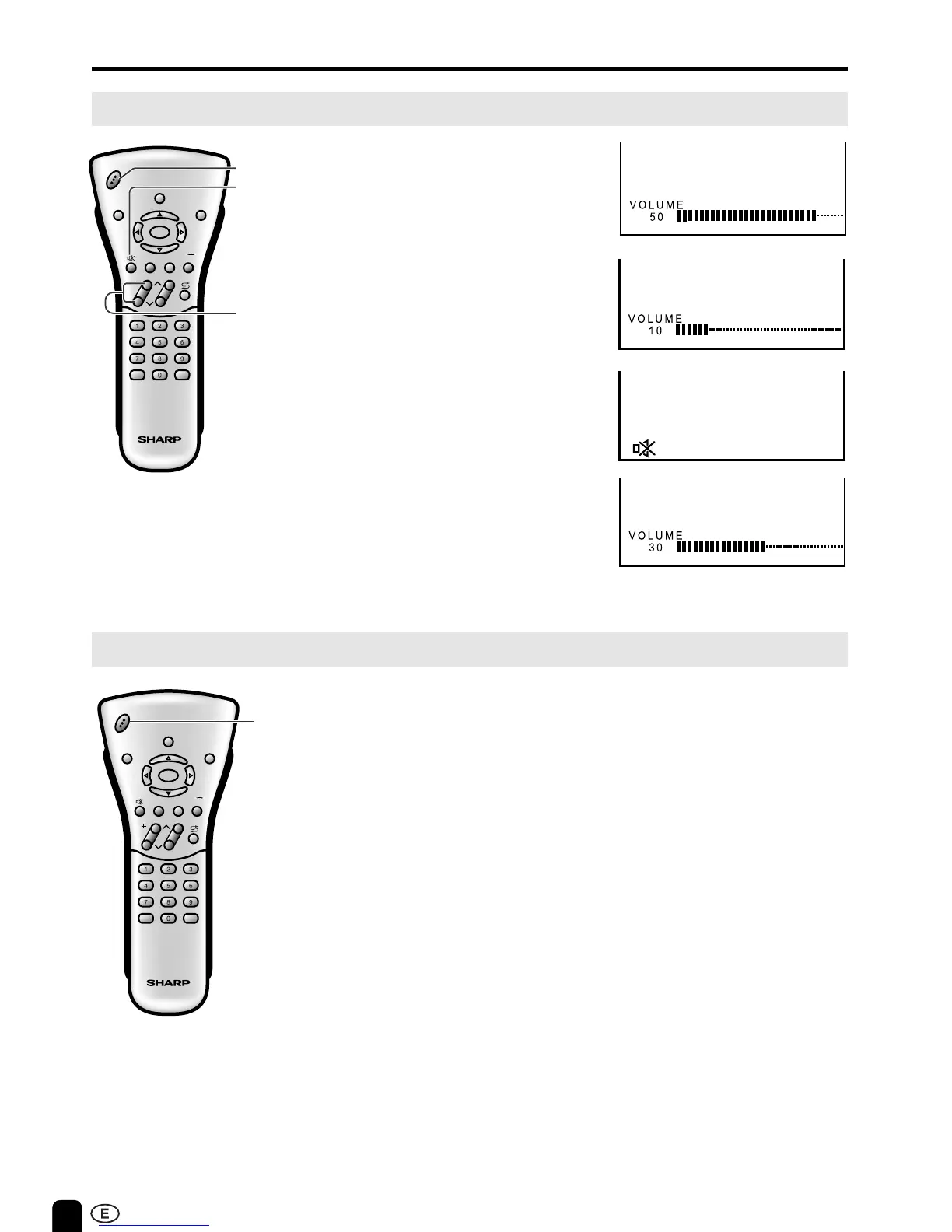
VOL(+)/(–)
Sound Volume
ON/OFF Standby
To mute sound
BASIC OPERATION (Continued)
1 Press VOL (+) to increase sound
volume. The segment of indicator
increases.
2 Press VOL (–) to decrease sound
volume. The segment of indicator
decreases.
1 Press MUTE to temporarily turn off
the sound.
Screen displays the MUTE mark.
2 Press MUTE or VOL (+)/(–) to turn
the sound back to the previous level.
MUTE is automatically cleared when
the following buttons are pressed:
POWER, VOL (+)/(–), MUTE.
To turn off the LCD TV
Press POWER on the remote control.
The Power/Standby indicator will turn
red. (Standby position)
To turn the LCD TV back on
Press POWER again.
The Power/Standby indicator will turn
green.
CH
VOL
LANGUAGE DIS.MODE
DISPLAY
BRIGHTSLEEP
MENU
POWER
MPX
-/--
TV
VIDEO
POWER













 To Next Page