77
Connecting a PC
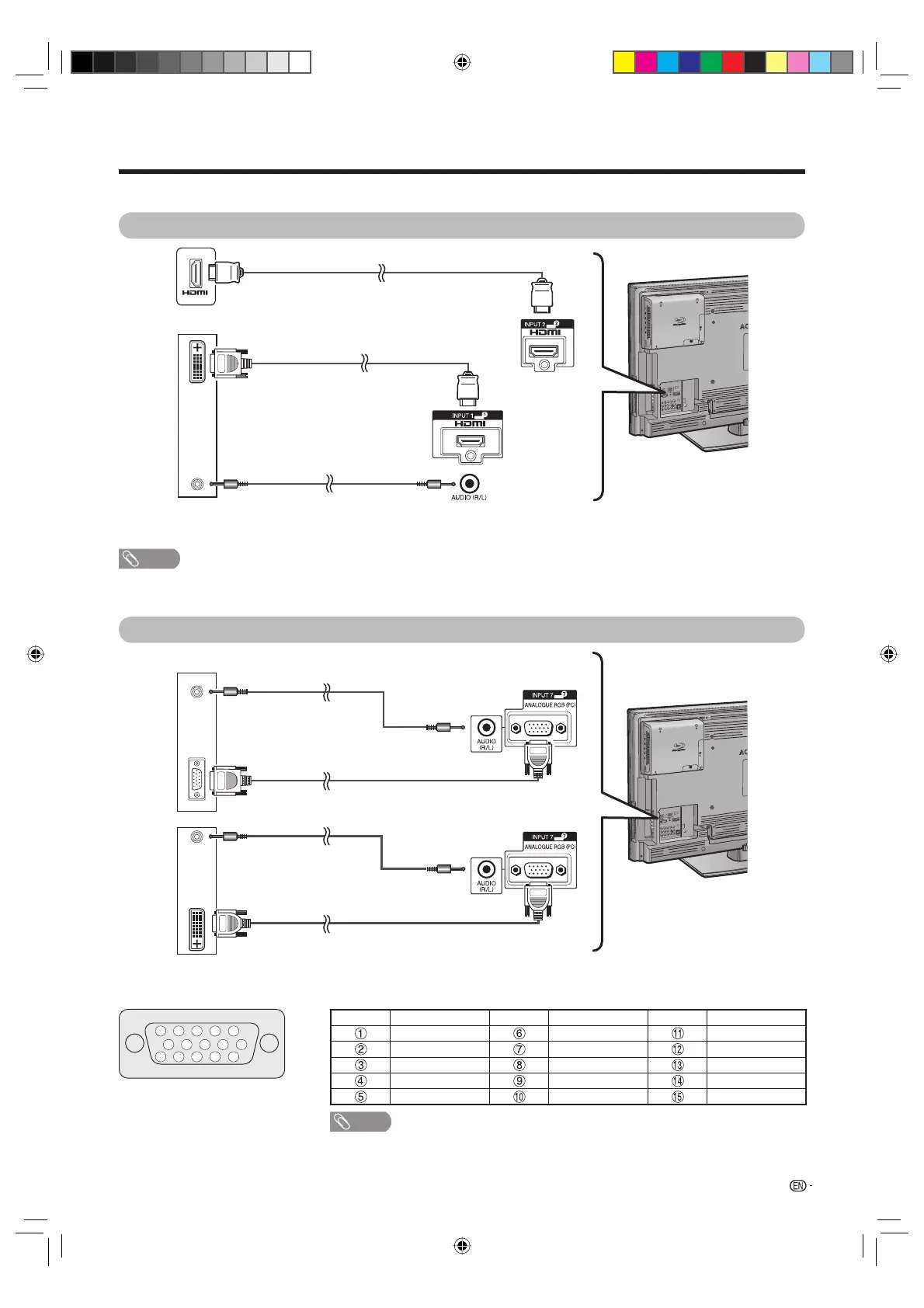
Use the PC terminals to connect a PC.
HDMI Connection
* When using the INPUT 1 terminal, you must select the proper item in the “PC audio select” menu depending on the type of
HDMI cable connected. (See page 78.)
NOTE
• The PC INPUT terminals are DDC1/2B-compatible.
• Refer to page 81 for a list of PC signals compatible with the TV.
Analogue Connection
* When using the INPUT 7 terminal, you must select “INPUT7(RGB)” in the “PC audio select” menu. (See page 78.)
Signal names for 15-pin mini D-sub connector
5 4 3 2 1
15 14 13 12 11
10
9 8 7 6
Pin No. Signal name Pin No. Signal name Pin No. Signal name
R GND (Ground) Not connected
G GND (Ground) SDA
B GND (Ground) HD
Not connected +5V VD
CSYNC GND (Ground) SCL
NOTE
• Macintosh adaptor may be required for use for some Macintosh computers.
• Pin No.
5
is not used for inputting the signal.
DVI/HDMI conversion cable
(commercially available)
Ǿ
3.5 mm stereo minijack cable
(commercially available)
PC
HDMI cable (commercially available)
INPUT 2 or INPUT 3
INPUT 1*
Ǿ
3.5 mm stereo minijack cable
(commercially available)
RGB cable (commercially available)
Ǿ
3.5 mm stereo minijack cable
(commercially available)
RGB/DVI conversion cable
(commercially available)
PC
PC
PC
INPUT 7*
INPUT 7*
LC-40LB700X_en_h.indd 77LC-40LB700X_en_h.indd 77 8/7/2009 12:38:18 PM8/7/2009 12:38:18 PM





 To Next Page