58
Basic operation
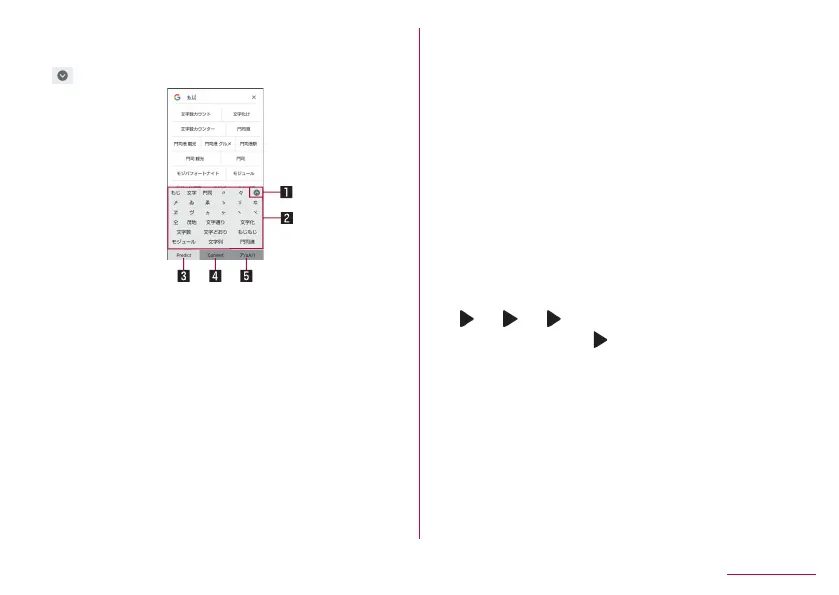
2 Conversion candidates field
z
Touch one of conversion candidates to enter.
2
[ ]
1 Reduce
z
Reduce the conversion candidates field.
2 Conversion candidates field
z
Touch one of conversion candidates to enter.
z
If you set an Internet conversion engine, [Net conv] is
displayed. Touch it to display conversion candidates
searched by the conversion engine on the Internet.
3 Predictive
z
Predictive candidates are displayed.
4 Conversion
z
Conversion candidates are displayed.
5 Katakana and alphanumeric
z
Display katakana of the entered characters or conversion
candidates of alphabets, symbols, etc. assigned to a
touched key.
3
In the conversion candidates field, select “文字”
Wildcard prediction
Conversion candidates are predicted according to the number of
the entered characters and appear.
z
Enable [Japanese wildcard prediction] and [Wildcard prediction]
in advance (
☞
P. 56 “Prediction/Conversion”).
z
This function is available in the Hiragana/Kanji input mode and
the Half Alphabet input mode.
Example: When entering “アナウンス”
1
In the character entry screen, enter “あな”
2
[ ]▶[ ]▶[ ]
z
Each time you touch [ ], [○] is entered and the predictive
candidates appear according to the number of characters.
3
In the conversion candidates field, select “アナ
ウンス”















 To Next Page