AR-M355N/M455N SIMULATION 9 - 69
Operation/Procedure
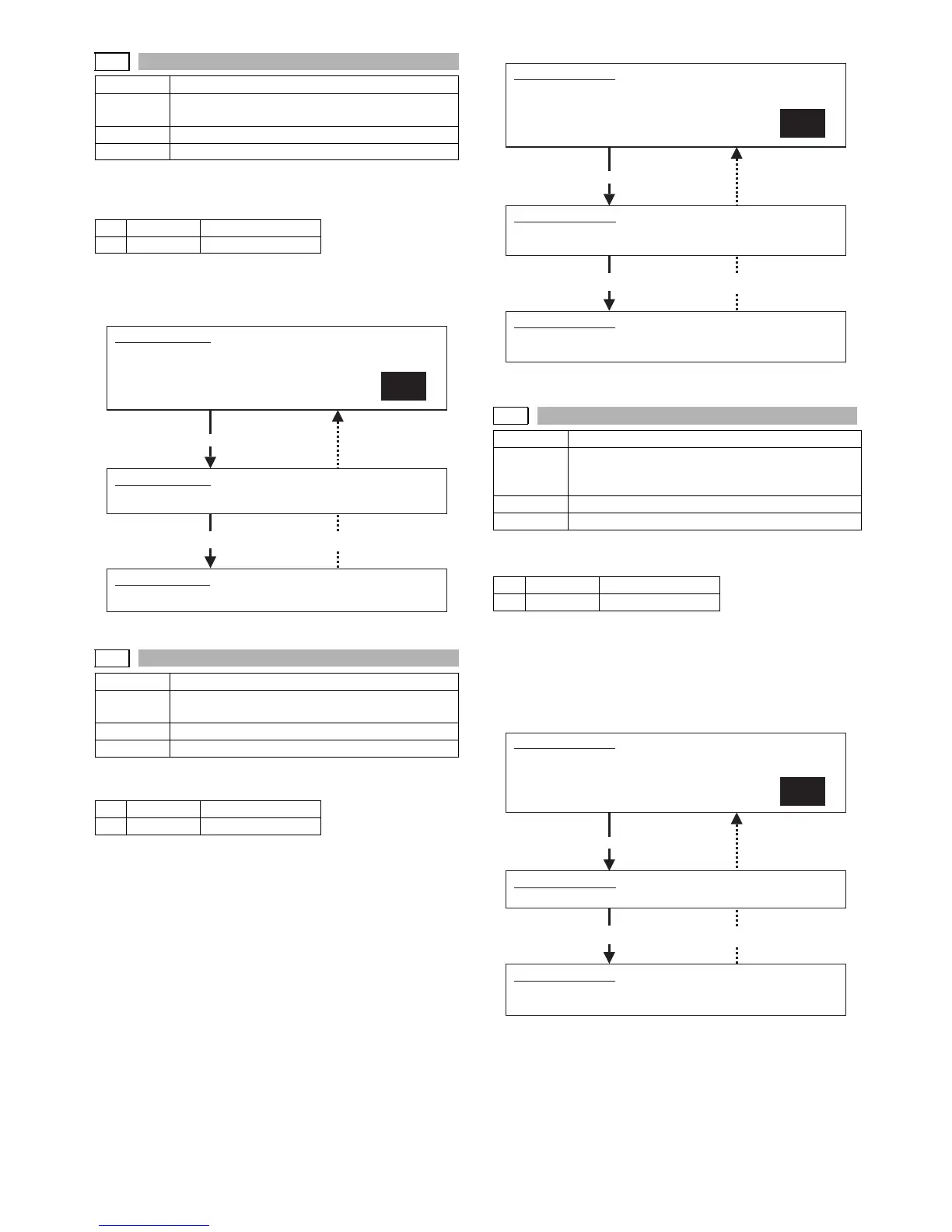
1) Select YES/NO of hard disk (the system area excluded) for-
mat.
2) Press [START] key.
During formatting, "EXECUTING" is displayed. When formatting is
completed normally, "OK" is displayed. If not, "NG" is displayed.
Operation/Procedure
1) Select YES/NO of deleting the job complete list.
2) Press [START] key.
During formatting, "EXECUTING" is displayed. When formatting is
completed normally, "OK" is displayed. If not, "NG" is displayed.
NOTE: When executed, this function also deletes the complete
queues of E-MAIL, FAX and IFAX, reservation data associ-
ated with the image send function, bulletin board data, and
confidential data.
Operation/Procedure
1) Select YES/NO of deleting the document filing data.
2) Press [START] key.
During formatting, "EXECUTING" is displayed. When formatting is
completed normally, "OK" is displayed. If not, "NG" is displayed.
NOTE: When executed, this function internally executes the same
function as SIM66-10;deleting reservation data, bulletin
board data, and confidential data.
62-8
Purpose Data clear
Function
(Purpose)
Used to format the hard disk (the system area
excluded).
Section MFP controller (HDD)
Item Clear
1 YES Execution
2 NO Cancel
Completion Press [CUSTOM SETTINGS] key.
62-10
Purpose Data clear
Function
(Purpose)
Used to delete a job complete list (also to delete
job log data)
Section MFP controller (HDD)
Item Clear
1 YES Execution
2 NO Cancel
SIMULATION 62-8
HDD FORMAT (EXCEPT SYSTEM AREA).
ARE YOU SURE?
1.YES
2.NO
1
SIMULATION 62-8
HDD FORMAT (EXCEPT SYSTEM AREA). EXECUTING···.
Press [START] key.
SIMULATION 62-8
HDD FORMAT (EXCEPT SYSTEM AREA).. OK. (or NG)
Completion Press [CUSTOM SETTINGS] key.
62-11
Purpose Data clear
Function
(Purpose)
Used to delete document filing data. (The
management area (standard folder, user folder) is
cleared.)
Section MFP controller (HDD)
Item Clear
1 YES Execution
2 NO Cancel
Completion Press [CUSTOM SETTINGS] key.
SIMULATION 62-10
JOB COMPLETE DATA CLEAR. (WITH JOB LOG DATA)
ARE YOU SURE?
1.YES
2.NO
1
SIMULATION 62-10
JOB COMPLETE DATA CLEAR. (WITH JOB LOG DATA)
EXECUTING···.
Press [START] key.
SIMULATION 62-10
JOB COMPLETE DATA CLEAR. (WITH JOB LOG DATA)
OK. (or NG)
SIMULATION 62-11
DOCUMENT FILING DATA CLEAR.
ARE YOU SURE?
1. YES
2. NO
1
SIMULATION 62-11
DOCUMENT FILING DATA CLEAR. EXECUTING···.
Press [START] key.
SIMULATION 62-11
DOCUMENT FILING DATA CLEAR.
OK. (or NG)



 To Next Page