17
FV-DB2E
05/4/21 FVDB2E_UK.fm
TINSEA048SJZZ
Advanced Features
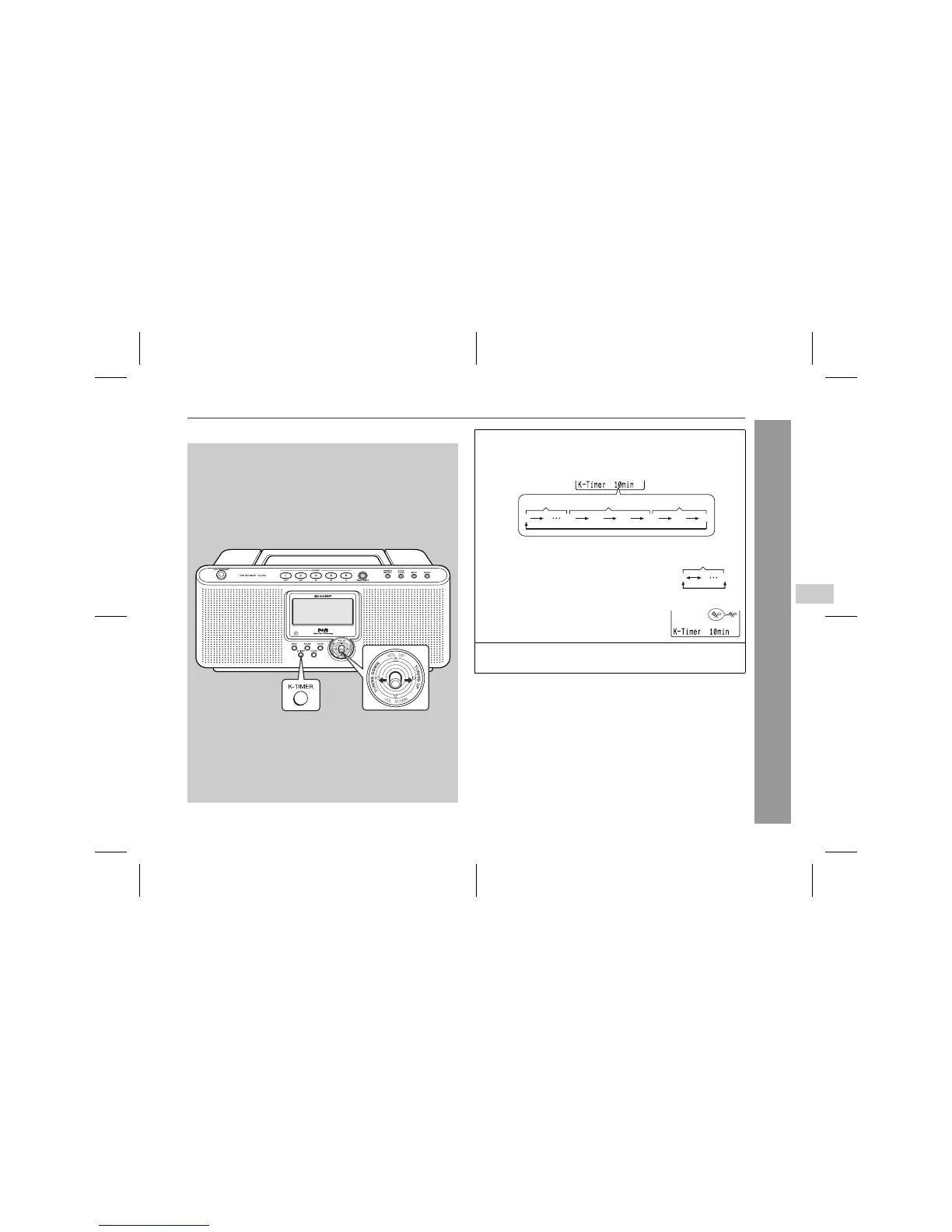
Kitchen timer operation
The alarm sounds after the specified time elapses.
Stopping the alarm:
Press the K-TIMER button.
To cancel the kitchen timer setting:
In the kitchen timer stand-by mode, hold down the K-TIMER button
for 2 seconds or more.
Note:
If the unit is unplugged or a power failure occurs in the kitchen timer
stand-by mode, kitchen timer setting is cancelled.
1 Press the K-TIMER button repeatedly to select the desired
time.
! You can change time between 1 and 60 minutes.
! To change time by 1 minute between 1
and 60 minutes, move the operation le-
ver toward TUNING UP or TUNING
DOWN.
! When 5 seconds pass after setting the
time, the kitchen timer indicator will ap-
pear and countdown starts.
2 When countdown finishes, the alarm tone sounds.
The alarm stops after approx. 10 seconds.
0 1 15 20 25 30 45 60
By 1 minute By 5 minutes By 15 minutes
0160
By 1 minute
5



 To Next Page