18
FV-DB2E
05/4/21 FVDB2E_UK.fm
TINSEA048SJZZ
Advanced Features
Alarm operation
Before setting alarm:
At the set time, the alarm sounds or the radio turns on.
This unit has 2 types of alarm functions: "1-time alarm" and "daily
alarm".
1-time alarm:
1-time alarm works for one time only at a preset time.
Use when...
You want to listen to a radio programme on the day.
(After operation, the alarm setting is cancelled.)
Daily alarm:
Daily alarm works at the same preset time every day.
Use when...
You want to use the alarm as a wake up call, or listen to the radio at
the same time every day.
1 When setting the alarm, connect the AC adaptor to the unit.
If batteries are the only power source, you cannot set the
alarm (see page 6).
2 If the clock is not set, the alarm setting is not available ("No
time date" appears). Receive a DAB station to set date and
time (see pages 9, 10).
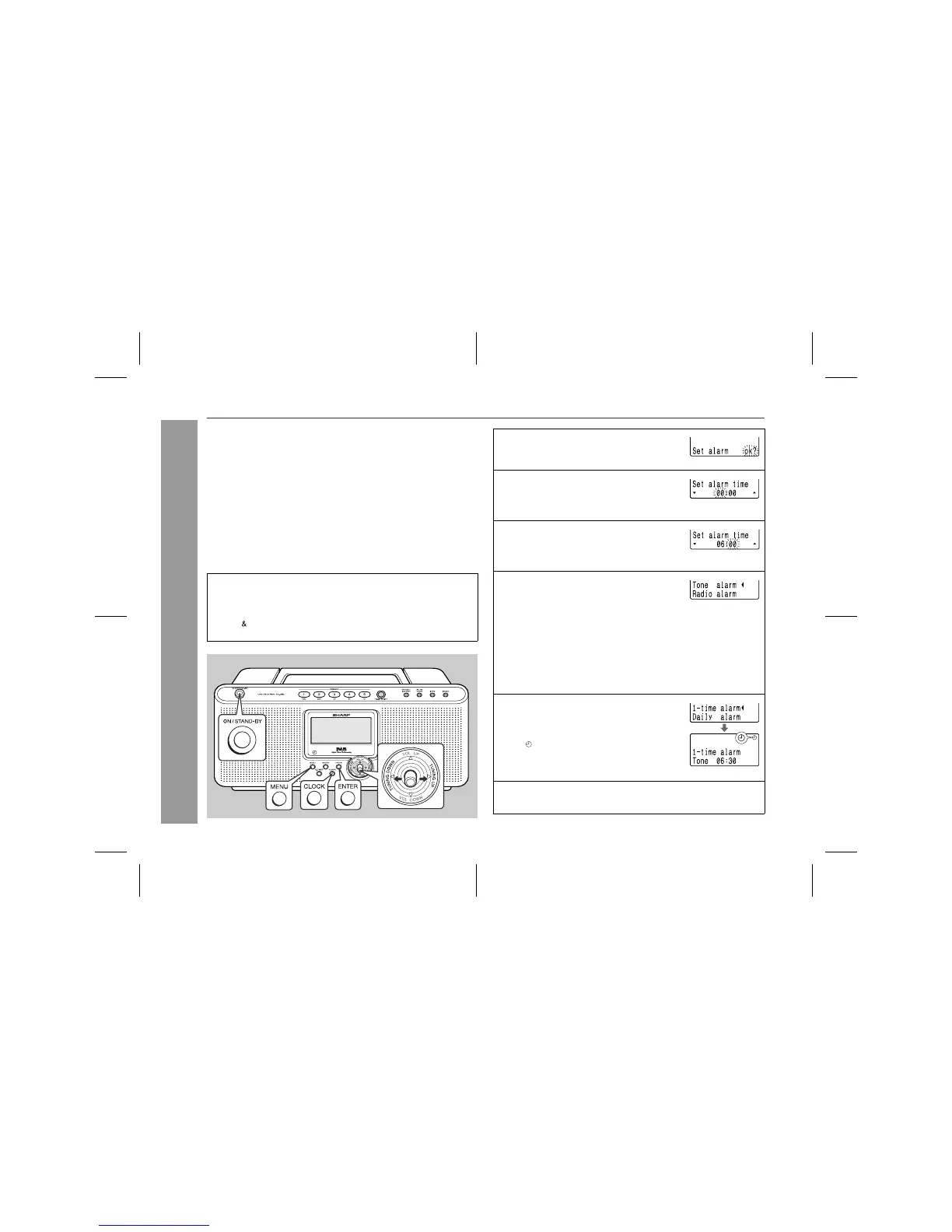
1 Press the CLOCK button repeatedly to
select "Set alarm ok?", then press the
ENTER button.
2 Within 30 seconds, move the operation
lever toward TUNING UP or TUNING
DOWN to specify the hour to start, then
press the ENTER button.
3 Within 30 seconds, move the operation
lever toward TUNING UP or TUNING
DOWN to specify the minutes to start,
then press the ENTER button.
4 Within 30 seconds, move the operation
lever toward TUNING UP or TUNING
DOWN to select the desired alarm type,
then press the ENTER button.
Tone
alarm:
The alarm sounds at the set time, and stops after 5
minutes. The volume gradually increases from 0 and
reaches 40 after 1 minute.
Radio
alarm:
The radio turns on at the set time, and turns off after
1 hour. The volume gradually increases from 0 and
reaches the level set in step 6 after 1 minute.
5 Within 30 seconds, move the operation
lever toward TUNING UP or TUNING
DOWN to select "1-time alarm" or "Daily
alarm", then press the ENTER button.
! " " appears in the display of the unit.
! The power of the unit will be still put on
(not shut off automatically).
6 To use a radio programme as an alarm, tune in to a station
and adjust the volume.



 To Next Page