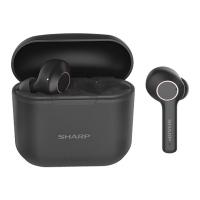
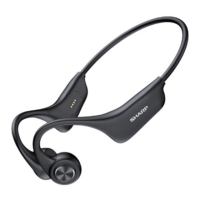
The SHARP HP-TW10 are True Wireless Stereo Earphones designed for hands-free convenience in making calls and listening to music. They are suitable for office use, traveling, and driving.
Function Description:
The HP-TW10 earphones are integrated Bluetooth earbuds that offer various functionalities, including music listening and phone answering. They utilize True Wireless Stereo technology, allowing the left and right earbuds to connect wirelessly to each other and to a compatible Bluetooth device. The earphones provide a stereo sound effect for an enhanced music experience. They are small and light, designed for comfortable and stable wearing. The product offers two usage modes and multiple application scenarios. A built-in 420mAh charging case facilitates charging. The earbuds feature automatic power on and pairing upon removal from the case, ensuring ease of use. Strong magnetic contacts ensure stable placement and easy put-in and take-out from the charging case.
Important Technical Specifications:
- Model: HP-TW10
- Rated input voltage: DC 5 V, 210 mA (USB type C)
- Output power (RMS): Total 6 mW (3 mW + 3 mW)
- Frequency response: 20 Hz - 20 kHz
- Music playback time: Approximately 6 hours
- Battery charging time: Approximately 2 hours (earbuds), 3.5 hours (case)
- Weight (case): 38.9 g (0.09 lbs)
- Weight (earbud): 5.0 g (0.01 lbs) x 2
- Dimensions (case):
- Width: 62.6 mm (2 - 15/32")
- Height: 54.4 mm (2 - 13/32")
- Depth: 27.2 mm (1 - 1/16")
- Dimensions (earbud):
- Width: 19.7 mm (25/32")
- Height: 42.7 mm (1 - 11/16")
- Depth: 25.0 mm (63/64")
- Bluetooth Version: V 5.0 (HSP / HFP / A2DP / AVRCP)
- Maximum power transmitted: < 20 dbm
- Frequency bands: 2.402 GHz - 2.480 GHz
- Waterproof rating: IPX4
Usage Features:
- Power On/Off:
- To power on, take the earbuds out of the charging case. They will automatically power on and auto-reconnect to the last paired Bluetooth device. If not turning on, touch and hold both L and R MFB pads for about 2 seconds.
- To power off, place the earbuds back into the charging case, which will automatically turn them off and disconnect the Bluetooth connection. Alternatively, touch and hold the L or R MFB pad for more than 5 seconds. The earbuds will also automatically power off if there is no Bluetooth connection for more than 5 minutes.
- Bluetooth Pairing:
- When taken out for the first time, the earbuds will enter pairing mode. Search for "HP-TW10 SHARP" on your Bluetooth device.
- If there is no paired record, the earbuds will automatically enter pairing mode after power on.
- During power off, touch and hold L or R MFB pads for about 4 seconds to enter pairing mode.
- Music Mode Controls:
- Volume Up: Touch R MFB pad once.
- Volume Down: Touch L MFB pad once.
- Next Song: Touch and hold R MFB pad for about 2 seconds.
- Previous Song: Touch and hold L MFB pad for about 2 seconds.
- Play/Pause: Touch L or R MFB pad twice.
- Voice Control: Touch L or R MFB pad 3 times.
- Phone Call Mode Controls:
- Answer a Call: Touch L or R MFB pad twice.
- End a Call: Touch L or R MFB pad twice.
- Reject an Incoming Call: Touch and hold L or R MFB pad for about 2 seconds.
- Switch Call (Earbuds to Phone/Vice Versa): While answering a call, touch and hold L or R MFB pad for about 2 seconds.
- Auto Pairing: The earbuds feature auto-pairing functionality, connecting automatically to the last paired device when taken out of the charging case.
- Wireless Charging Case: The charging case supports wireless charging, offering convenience for recharging.
Maintenance Features:
- Battery Charging:
- Earbuds: Place earbuds into the charging case. A red LED on the earbuds indicates charging; the LED turns off when fully charged.
- Charging Case (USB Cable): Insert the provided USB cable into the USB Type C port on the charging case and plug the adapter into an AC socket. The charging case LED will blink during charging, and all 4 LEDs will light up when fully charged.
- Charging Case (Wireless): Place the charging case (front side up) on the surface of a wireless charger. LED indicators will light up when charging starts.
- Battery Level Indicators (Charging Case):
- 0-25%: 1st white LED blinking.
- 25-50%: 1st LED lights up, 2nd LED blinking.
- 50-75%: 1st and 2nd LED light up, 3rd LED blinking.
- 75-99%: 1st, 2nd and 3rd LED light up, 4th LED blinking.
- 100%: All four LEDs light up permanently.
- Battery Care:
- To extend battery service life, charge the charging case at least once a month.
- Always use the provided charging case to charge the earbuds.
- Use the recommended adapter (DC5V+/-0.25V, 0.5A output current) for charging.
- Avoid exposing the battery to extreme temperatures (never above 40°C/104°F or below 5°C/41°F).
- Charge the battery only between 5°C (41°F) and 40°C (104°F).
- Do not attempt to remove the embedded rechargeable battery from the earbud or charging case, as this may cause damage.
- Troubleshooting:
- Earbuds cannot be powered on: Put earbuds into the charging case. If the case is also out of power, charge it first. If the MFB button was not pressed long enough, press and hold it again.
- Earbuds cannot be charged: Take out and clean the metal contacts on the earbuds and charging case pins, then put them back to ensure proper connection.
- No interlink between L and R earbuds (or earbud program error): Perform a factory reset.
- Earbuds cannot be searched or pairing fails: Enable pairing mode by touching and holding L or R MFB pads for about 4 seconds during power off. If the smartphone's Bluetooth application is in error, turn off and restart the smartphone to pair again.
- Cleaning: Do not use chemical/oil to clean the charging terminal point.
- General Precautions:
- Avoid high volume levels to prevent hearing damage.
- Do not cover the product with items while charging.
- Keep the unit away from strong magnetic fields, excessive dust, humidity, and electrical noise-generating equipment.
- Do not expose the unit to temperatures higher than 40°C (104°F) or extremely low temperatures.
- Do not remove the outer cover; refer to a local SHARP service facility for internal service.
- No naked flame sources should be placed on the apparatus.
- Dispose of batteries according to environmental guidelines.
- Use the unit only within 0°C - 40°C (32°F - 104°F).
- This product contains magnetic material; consult a physician if it might affect an implantable medical device.
- Do not make unauthorized alterations.
- Do not expose to dripping or splashing liquids.
- Use only with an agency-approved power supply that meets local regulatory requirements.

 Need help?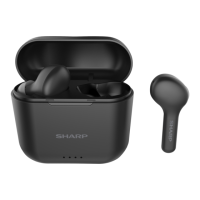

 To Next Page
 General