EN-24
HOW TO CHANGE VARIOUS SETTINGS
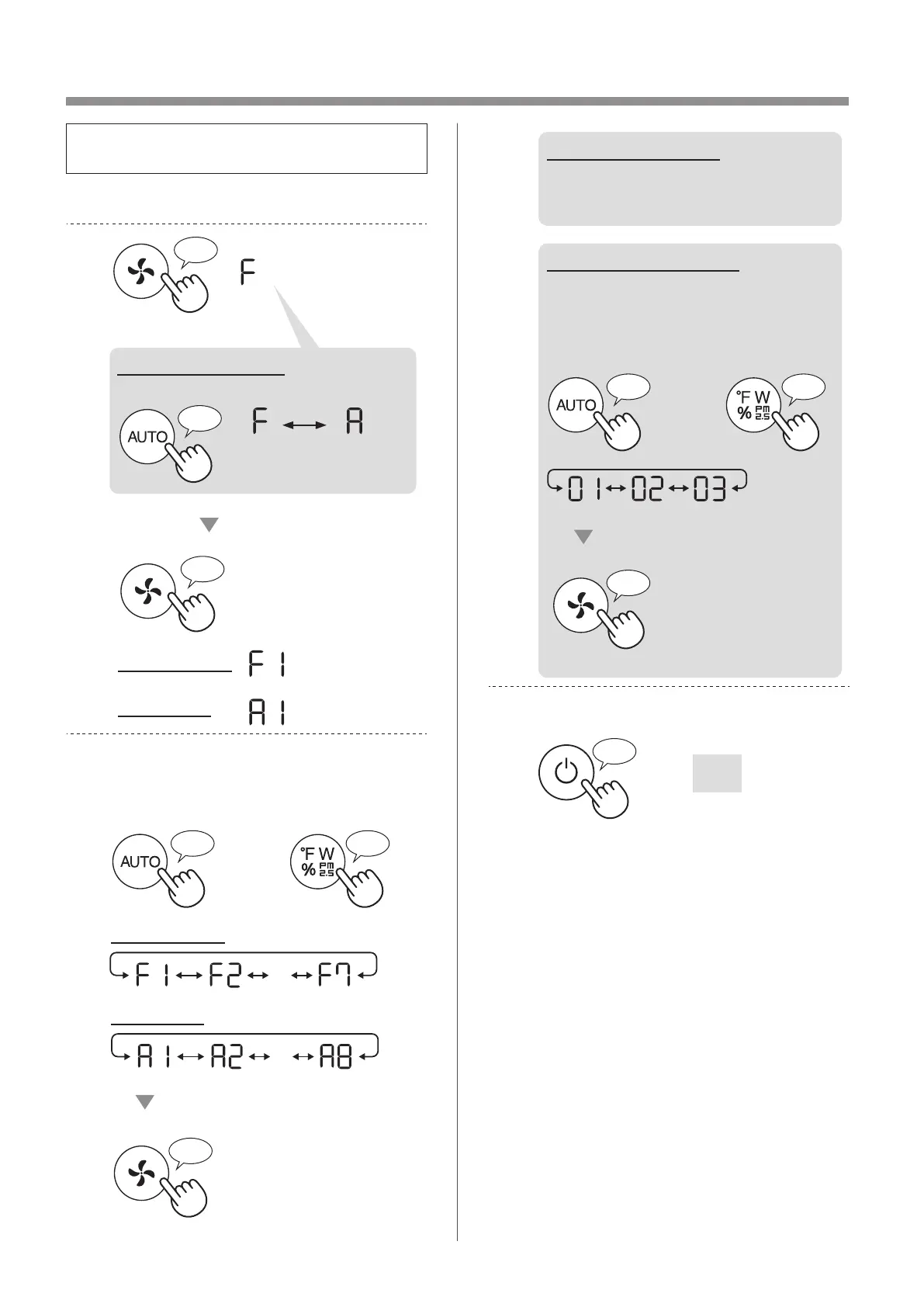
• You can change the product and Wi-Fi
functions on page 25 - 28.
1.
Turn the product OFF.
2.
Press for 3 sec.
Set
Wi-Fi setting
Product setting
When Wi-Fi setting
Change “F” to “A”.
Product
setting
Wi-Fi
setting
3.
Select “Function number (F1-F7 or
A1-A8)” on page 25 - 28.
or
Go Forward
Go Back
・・・
Set
Wi-Fi setting
Product setting
・・・
4.
When Wi-Fi setting
Refer to page 26 - 28 for the
detail of each functions.
When Product setting
Select “Setting number
(01 - 03)” on page 25.
Set
or
Go Forward
Go Back
5.
Finish the setting.
Goes off
KCP110UW_70UW_110CW_70CW_2nd.indb 24KCP110UW_70UW_110CW_70CW_2nd.indb 24 2022/03/23 11:17:192022/03/23 11:17:19


 To Next Page