EN-26
Function Setting
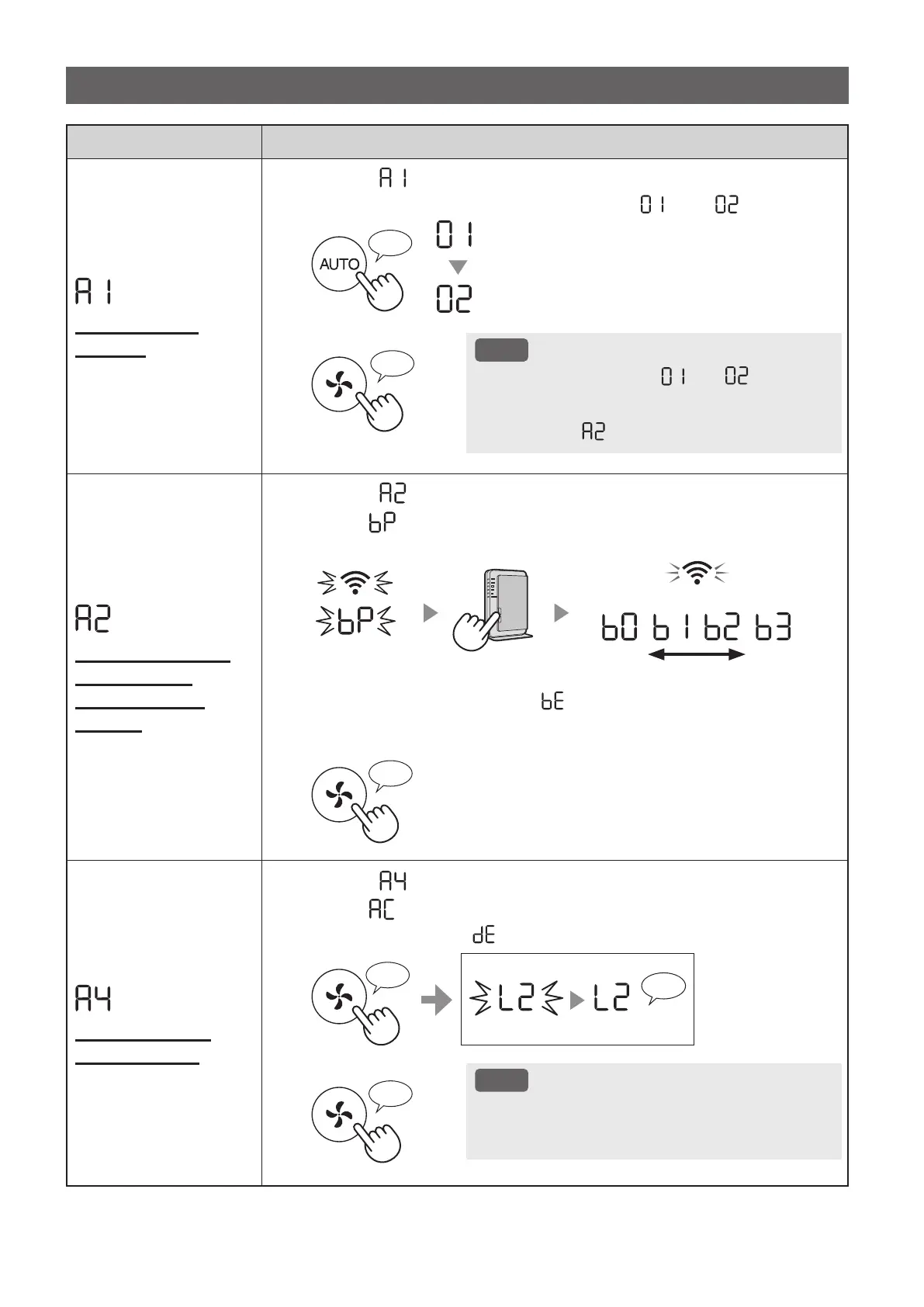
Wi-Fi adapter
ON/OFF
1.
Select “ ” by following Steps 1 - 3 on page 24.
2.
Press "AUTO" Button to select Setting " " or " ".
Wi-Fi OFF
Wi-Fi ON
♪
3.
Complete
NOTE
• When Setting number (“ ” or “ ”) is
changed, the square rotates on the display
until the setting is completed. When setting is
completed, “
” is displayed.
♪
~
Wi-Fi connection
with a router
(with the WPS
Button)
1.
Select “ ” by following Steps 1 - 3 on page 24.
2.
After “ ” is displayed, press the WPS (Wi-Fi Protected Setup)
Button of the router.
weak strong
Light up
Blink
Once connected, receiver level will be displayed.
A connection error is occuring if “ ” is displayed. Please confirm the router
and try again.
3.
Complete
♪
Initialization of
Wi-Fi function
1.
Select “ ” by following Steps 1 - 3 on page 24.
2.
After “ ” is displayed press “Fan Speed” Button.
An error is occurring if “ ” is displayed. Please try again.
Complete
Blink
Initializing
3.
Complete
NOTE
• Please delete the device registration from the App
when initializing the air purifier which is already
connected to the Wi-Fi.
♪
Wi-Fi FUNCTIONS (A1-A8)
KCP110UW_70UW_110CW_70CW_2nd.indb 26KCP110UW_70UW_110CW_70CW_2nd.indb 26 2022/03/23 11:17:382022/03/23 11:17:38


 To Next Page