LC-22DC30M
5 – 3
5. Signal adjustment
5.1. Signal check
Confirmation of signal from generator (setting to spec level)
5.1.1 Adjustment Mode
5.1.2 Component 15K 50Hz signal adjustment (COMP-SD)
5.1.3 Component 33K 60Hz signal adjustment (COMP-HD)
5.1.4 PC (ANALOG RGB) signal adjustment (PC-RGB)
• PAL Composite signal : 0.7Vp-p ± 0.02Vp-p (Pedestal to white level)
• 15K Component signal (50Hz) : Y level:
Pb, Pr level:
0.7Vp-p ± 0.02Vp-p (Pedestal to white level)
0.7Vp-p ± 0.02Vp-p
• 33K Component signal : Y level:
Pb, Pr level:
0.7Vp-p ± 0.02Vp-p (Pedestal to white level)
0.7Vp-p ± 0.02Vp-Com
Adjustment item Adjustment conditions Adjustment procedure
1 Adjustment mode 1) Press the test key at the test remote control.
Adjustment item Adjustment conditions Adjustment procedure
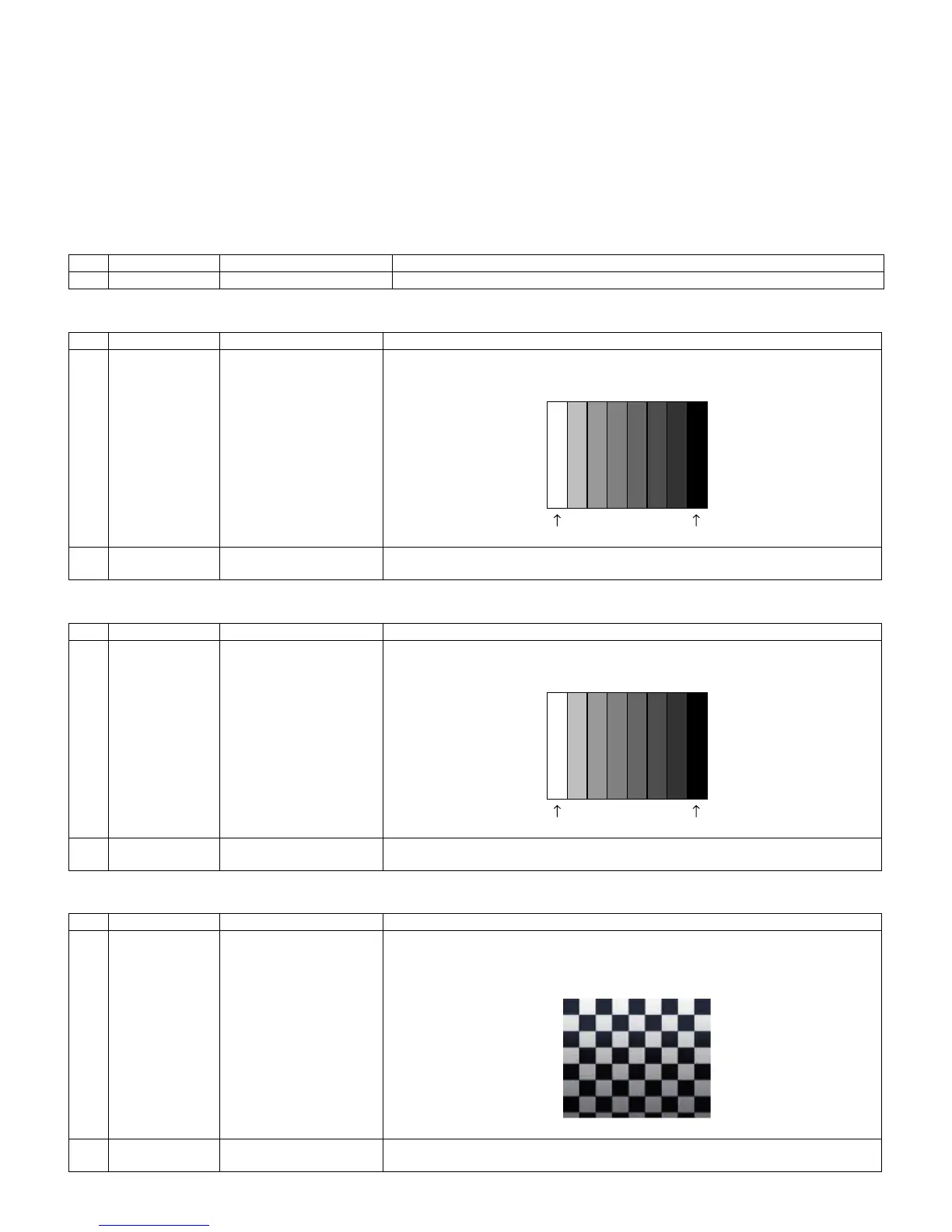
1 Adjustment [Signal]
COMP 15K 50Hz (576i)
100% Full-field Colour Bar
[Terminal]
INPUT 3 COMPONENT
Feed the COMPONENT 15K 50Hz (576i) 100% Full-field Colour Bar signal (100% colour
saturation) to INPUT 3 COMPONENT terminal.
2 Auto adjustment
performance
Process Mode page 4
(COMP SD)
1) At the related page, move cursor to [COMP SD ADJ], press ENTER.
2) [OK] appears when finished.
Adjustment item Adjustment conditions Adjustment procedure
1 Adjustment [Signal]
COMP 33K 60Hz (1080i)
100% Full-field Colour Bar
[Terminal]
INPUT 3 COMPONENT
Feed the COMPONENT 33K 60Hz (1080i) 100% Full-field Colour Bar signal (100%
colour saturation) to INPUT 3 COMPONENT terminal.
2 Auto adjustment
performance
Process Mode page 5
(COMP HD)
1) At the related page, move cursor to [COMP HD ADJ], press ENTER.
2) [OK] appears when finished.
Adjustment item Adjustment conditions Adjustment procedure
1 Adjustment [Signal]
XGA 60Hz
100% Checkered Pattern
[Terminal]
PC INPUT
Feed the XGA 60Hz 100% Checkered pattern signal (100% colour saturation) to PC
INPUT.
*Please make sure SYNC is OFF.
2 Auto adjustment
performance
Process Mode page 6
(PC-RGB)
1) At the related page, move cursor to [RGB ADJ], press ENTER.
2) [OK] appears when finished.
100% white Black
100% white Black







 To Next Page